



August 22, 2024
Xhorse MQB Adapter Set allows us to read VW MQB dashboard without soldering, but to use it with VVDI PROG, we need XDPGSOGL Cable.
Here comes a review of VVDI PROG working with MQB adapter:
Read VW Polo MQB Using Xhorse Adapters and VVDI Prog #xhorse adapters read failed fixing
Connect VVDI PROG to VW cluster using MQB adapter and XDPGSOGL cable.

Try to read dashboard but fail and software gives "Try Frequency Fail" error.

Here connect another cable from VVDI PROG to Pin FMLDO in MQB adapter, supply 3.3v power to it.


Read again and no problem.

Load dashboard data into VVDI2 and get immo data for key programming.

Done!
http://blog.xhorsevvdi.com/read-vw-polo-mqb-using-xhorse-adapters-and-vvdi-prog-success/
Posted by: xhorsevvdi at
07:23 AM
| No Comments
| Add Comment
Post contains 123 words, total size 3 kb.
Question:
VVDI PROG don’t have pinout for bga.
Is there a pinout for programming this MB91F469 bga for me to try?
Here are the Pinouts:
144pins

208pins

Path:
2-MCU>>FUJITSU-MB91XF>>MB91F469G
Done!
http://blog.xhorsevvdi.com/vvdi-prog-program-mb91f469-bga-pinout/
Posted by: xhorsevvdi at
07:23 AM
| No Comments
| Add Comment
Post contains 37 words, total size 1 kb.
One customer gave feedback that Mini Key Tool update failed.


Follow steps below to update VVDI MINI:
1)Turn off vvdi mini
2)Hold on reset button on the back and turn on vvdi mini
3)Update firmware again


Done! Hope this helps!
http://blog.xhorsevvdi.com/solved-xhorse-mini-key-tool-update-failed/
Posted by: xhorsevvdi at
07:22 AM
| No Comments
| Add Comment
Post contains 48 words, total size 2 kb.
One customer gave feedback that VVDI PROG will read VW SIMOS9.4 but Multi Prog failed.


Here is the Solution:
1)Do not connect Multi-Prog to any modules.
2)Select VW SIMOS9.4 (AM29F400BB)
3)Select Test channel>>Test channel 31
4)Test the voltage of yellow cable and check if it is 3.3V

5)Select DB44 self-check

Done! Hope this helps!
http://blog.xhorsevvdi.com/solved-vvdi-prog-read-simos9-4-ok-but-multi-prog-fail/
Posted by: xhorsevvdi at
07:22 AM
| No Comments
| Add Comment
Post contains 65 words, total size 2 kb.
One customer gave feedback that BMW IMMO Programming License is not added into his Key Tool Plus. He tried to update tablet but still no license on activation list.

Here is the Answer:
The added license is BMW Motorcycle OBD Key Learn License, which only work when these basic BMW functions are activated

Done! Hope this helps!
http://blog.xhorsevvdi.com/solved-key-tool-plus-fail-to-add-bmw-immo-programming-license/
Posted by: xhorsevvdi at
07:21 AM
| No Comments
| Add Comment
Post contains 69 words, total size 1 kb.
Xhorse VVDI MLB Tool for VW Audi Key Adapter work with VVDI2, VVDI Key Tool Plus, and if you use with VVDI MLB Key, no points need. But if you use with original MLB key, it will cost points.
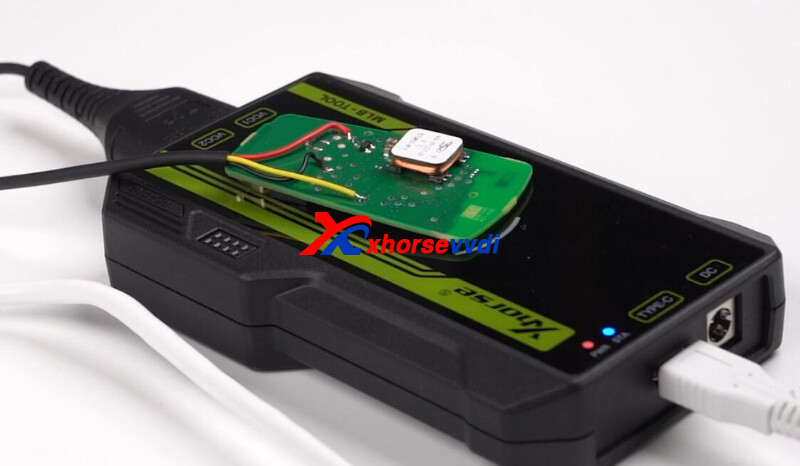
1. Does VVDI MLB Tool need token?
- Read the original MLB key data (without VVDI MLB Key) , will cost 200 points
- Read the original key (but have VVDI MLB Key), identify the VVDI MLB key first, and then you can avoid costing points. (One VVDI MLB key can only be identified once)
- Read data from the VVDI MLB key, no need points.
Xhorse not have MLB token to sell, and vvdi MLB key will release soon, now you can use the points which get from VVDI remote keys.
- Wire key, each key 25 points.
- Wireless remote,super remote key, each key 40 points.
- Smart Key, each key 60 points.

Posted by: xhorsevvdi at
07:21 AM
| No Comments
| Add Comment
Post contains 226 words, total size 3 kb.
Confirmed: Xhorse Dolphin XP005 adds the function to modify key blade size.
You have keys larger and just wish that your machine could mill down one to the size you need.
Path: Click 'Cut by Bitting'. Top right button 'Modify key'.
Here comes a review from Jason:
Tested out a KLR key. These aren't made available yet and the only source for me has been ebay. It just milled down a DAT17 to KLR specs! It's ready to be cut now! This might only be for high security keys, but it's something!
Did this with an original Xhorse Dolphin.

And you could even mill down flip keys to something you need!
Stay tuned!
http://blog.xhorsevvdi.com/xhorse-dolphin-xp005-add-modify-key-blade-size/
Posted by: xhorsevvdi at
07:20 AM
| No Comments
| Add Comment
Post contains 122 words, total size 1 kb.
Confirmed: VVDI MULTI PROG firmware V1.2.7 fixed 9S12 reading issue using solderless adapter to decode CAS4+ (5M48H)!

Simply connect Multi Prog to Xhorse CAS4 Solder-free Adapter.

Make every contact pin connected well.

Firmware updated to V1.2.7.

Read data no problem!

Test by Auto Lock Sector
Stay tuned!
http://blog.xhorsevvdi.com/multi-prog-firmware-v1-2-7-fixed-9s12-reading-issue/
Posted by: xhorsevvdi at
07:19 AM
| No Comments
| Add Comment
Post contains 56 words, total size 2 kb.
Question:
Wondering why the new XXSSBR0EN XM38 Subaru keys aren't working...
(Tool is fully updated)
Tried to generate hyq14ahc and hyq14ahk but get an error. Had to leave customer with a Toyota style fob.


Here is the Answer:
Remote controls hyq14ahc/ hyq14ahk requires XM38 Toyota Remote.
XXSSBR0EN Subaru XM38 supports controls marked with "XM38-SmartKey".

Hope this helps!
http://blog.xhorsevvdi.com/solved-xm38-subaru-key-generate-hyq14ahc-hyq14ahk-fail/
Posted by: xhorsevvdi at
07:19 AM
| No Comments
| Add Comment
Post contains 66 words, total size 2 kb.
All our Xhorse Dolphin XP-005 on xhorsevvdi.com updated with M5 clamp now, M5 clamp fully replace M1, M2 clamp.
And we received feedback that
does not want to do cnc decoding of the key in the position of the clamps B
I've tried different ways to put the key in, but it still doesn't work
error code 2


The wrong clamping, you put into the lower one
Please put into the upper groove like the photo
http://blog.xhorsevvdi.com/how-to-solve-dolphin-xp-005-with-m5-clamp-cut-hu100-key-error-code-2/
Posted by: xhorsevvdi at
07:19 AM
| No Comments
| Add Comment
Post contains 94 words, total size 2 kb.
With MQB RH850-VH850 Cable, users do not have to Cut Wires/ Lift Pins for reading VW dashboard data.
Here we are going to show you how to use this cable.

Dashboard/ Cluster:
R7F701402
Tools:
Steps:
Turn on Multi Prog.
Select
DASHBORAD>>VW>>MQB>>MQB48-LOCK(R7F701402)-READ

Check out pinout.

Remove components and solder cables by pinout.

Read dashboard data.

Turn on VVDI2.
Enter MQB48(VDO/JCI) with locked NEC35XX menu.
Select "Decode immodata" and load dashboard data to decode immo data.

Then just complete "Make Dealer Key" and "Add Key", and we will have new keys.

Done! That's how to use Xhorse MQB RH850 Cable.
http://blog.xhorsevvdi.com/how-multi-prog-read-r7f701402-cluster-with-rh850-cable/
Posted by: xhorsevvdi at
07:18 AM
| No Comments
| Add Comment
Post contains 115 words, total size 3 kb.
Xhorse XSTO01EN TOY.T for Toyota XM38 Smart Key with Key Shell Support 4D 8A 4A, and Xhorse XSCH01EN XM38 Universal Smart Key for Chrysler Type 4 Buttons Newly Add 8A 4D, how to choose them?
Is there any difference between these two keys?


First one is XM38-Toyota, the second pic is XM38-Smart Key. You can check in database every option remote type.
Some only XM38-Toyota, like the following pic one, only XM38 Toyota is OK.

If you use XM38 smart key, then will get error

Some XM38-Toyota, XM38-Smartkey both OK.

And XM38 Toyota no points. But XM38 Smart Key with 40 points.
http://blog.xhorsevvdi.com/what-is-the-difference-of-xhorse-xm38-toyota-and-xm38-smart-key/
Posted by: xhorsevvdi at
07:16 AM
| No Comments
| Add Comment
Post contains 115 words, total size 2 kb.
Here comes a review of Xhorse Multi Prog:
Xhorse Multi-PROG BMW CAS4+ FORCE Unlock function if simple Unlock doesn't work.

Try simple unlock.
Select "CAS4-5M48H-R/W/UNLCOK"

It fails to unlock CAS4.

Try Force Unlock function.
Select "CAS4-5M48H-FORCE-UNLOCK".

Unlock successfully.

Switch back to simple unlock option.
Read ID.

Read CAS4.

Done!
http://blog.xhorsevvdi.com/multi-prog-bmw-cas4-force-unlock-function-success/
Posted by: xhorsevvdi at
07:15 AM
| No Comments
| Add Comment
Post contains 58 words, total size 2 kb.
VVDI MINI OBD V2 is released! It works with Key Tool Max or it could be a standalone tool that users control on Xhorse app.

So, what's new of MINI OBD V2?
1.CANFD models added
2.OBD cable light added

Stay tuned!
http://blog.xhorsevvdi.com/vvdi-mini-obd-v2-vs-mini-obd/
Posted by: xhorsevvdi at
07:15 AM
| No Comments
| Add Comment
Post contains 49 words, total size 1 kb.
Question:
VVDI MLB Tool, Calculated and it said remote locked and can’t unlock.
Original remote, I can’t unlock oem used? I have tons of them

VVDI MLB only calculate data for unlocked remote.
For different oem remotes, here are all VVDI MLB could do:
1.Unlocked uninitialized with id
Generate key directly to learn key
2.Unlocked and uninitialized without id
Allowed to change the id once.
3.Unlocked and initialized
Restore key to unlocked and uninitialized state by calculating anti-theft data No id
4.Locked and initialized
Original key cannot be unlocked.
Done! Hope this helps!
http://blog.xhorsevvdi.com/vvdi-mlb-tool-extract-oem-remote-data-tips/
Posted by: xhorsevvdi at
07:14 AM
| No Comments
| Add Comment
Post contains 102 words, total size 2 kb.
Question:
Error 56 57 popped up on Dolphin XP005's screen once I got it. I don't even use it and the bracket is there, then the error just showed up. How to fix this?


Answer:
XP005 Machine will conduct self-test when you turn it on for the first time.
The axis inside won't move due to the bracket that has not been removed.
The errors will display if self-test fails.
http://blog.xhorsevvdi.com/how-to-fix-xhorse-dolphin-xp005-error-56-57/
Posted by: xhorsevvdi at
07:14 AM
| No Comments
| Add Comment
Post contains 80 words, total size 1 kb.
July 22, 2024
Xhorse condor mini plus 2 automatic key cutting machine we received feedback that:
We have a Condor Mini Plus 2 and we have a Great Wall Haval M6 2024 key we need to cut. 2 track key.
As per pictures attached.


Issue is it states use the M5 B clamp. This will not hold the key as the grooves either side will not clamp in the B clamp.
I think either the M5 A or M2 would hold it however do not know how to tell the machine to change the clamp so I can read and cut the key?
Is there a way to do this?
Xhorse Engineer Reply:
Enter 166 option, then do like the option displays.
http://blog.xhorsevvdi.com/xhorse-condor-mini-plus-2-cut-great-wall-haval-m6-2024-2-track-key-tips/
Posted by: xhorsevvdi at
07:36 AM
| No Comments
| Add Comment
Post contains 135 words, total size 2 kb.
Question:
Using VVDI Key Tool Lite for unlocking a Toyota smart key. I tried to unbind the key today, the application showed that the key was unlinked, but it was not linked to the car. Maybe I’m performing the procedure incorrectly?
Here are some tips for unlock Toyota smart remote:
1.The application unlocks remote successfully only when the Red Light in Remote Blinks
2.RF430 remote is not supported
3.Unlocking may fail, please check the red light

Done! Hope this helps!
http://blog.xhorsevvdi.com/vvdi-key-tool-lite-unlock-toyota-smart-remote-tips/
Posted by: xhorsevvdi at
07:35 AM
| No Comments
| Add Comment
Post contains 90 words, total size 1 kb.
One customer gave feedback that the computer won't identify VVDI MLB Tool. Also tried it on Key Tool Plus but the same result.


Here is the Solution:
To connect VVDI MLB to PC, OTG data adapter is not required.

Further feedback:
Direct connect VVDI MLB to PC or Key Tool Plus, not connection on software.


Solution:
Just use this white USB cable

If you still do not know how to connect VVDI MLB, please check user manual below:
https://www.xhorsevvdi.com/upload/pro/24063017198014759460.pdf
Done!
http://blog.xhorsevvdi.com/solved-vvdi-mlb-tool-wont-connect-to-pc-key-tool-plus/
Posted by: xhorsevvdi at
07:35 AM
| No Comments
| Add Comment
Post contains 92 words, total size 3 kb.
Quick Question:
VVDI Multi Prog, I’m working on a bmw cas4
I just want to write new data on it but I don’t see the write option just read
Any idea?

Here is the Answer:
Wrong option at backup, select the option for Read/ Write/ Unlock.

Done! Hope this helps!
http://blog.xhorsevvdi.com/will-vvdi-multi-prog-write-bmw-cas4/
Posted by: xhorsevvdi at
07:34 AM
| No Comments
| Add Comment
Post contains 58 words, total size 1 kb.
30 queries taking 0.0659 seconds, 131 records returned.
Powered by Minx 1.1.6c-pink.

