



February 12, 2025
Xhorse XDMLB0 MLB Tool for VW Audi Key Adapter work with VVDI2, VVDI Key Tool Plus is released adapter for MLB, and in future will have MQB48 Adapter work with MLB Tool


Xhorse XSMA41EN VVDI-MLB Smart Remote Key for A.D A4 Model Specific PCB 3 Buttons. Work with VVDI MLB Tool, no need points. And when use vvdi key tool plus, mlb tool with mlb key, but got the error

Solution:
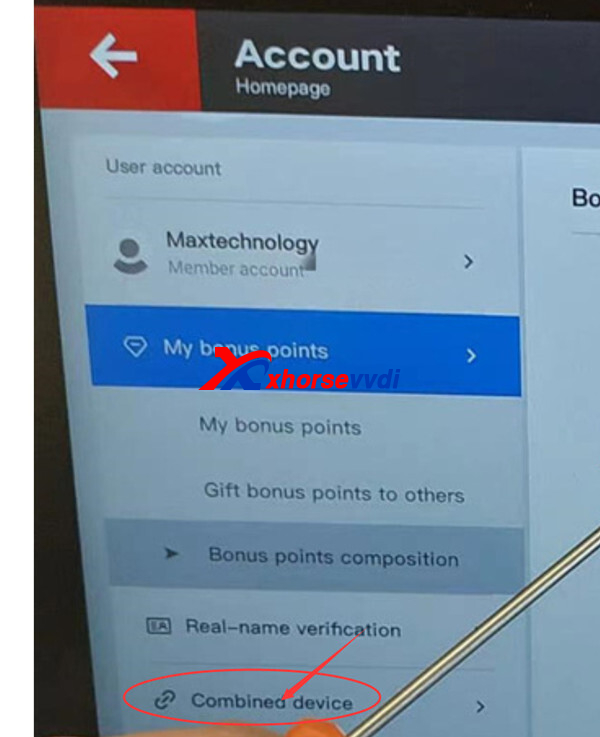
Please use the xhorse app to bind the device to the current login account before calculating.
Then check in account>>combined device
http://blog.xhorsevvdi.com/how-to-solve-key-tool-plus-and-mlb-key-failed-to-parse-server-file-error/
Posted by: xhorsevvdi at
06:13 AM
| No Comments
| Add Comment
Post contains 108 words, total size 2 kb.
Question:
VVDIBIMTOOL, I can’t read and reset mileage on CAS 3, I did connect with GODIAG CAS3 Test Platform and 100kbps


Here is the Answer:
To repair KM for BMW CAS3/ CAS3+, users need other tools like VVDI PROG or Multi Prog.
Steps:
1) Record the KM information displayed in instrument, take instrument away from car avoid synchronize KM with CAS automatically
2) Set CAS KM to 0 (you can do this via OBD or EEPROM dump, select correct CAS version)
3) Read instrument EEPROM dump by programmer then save EEPROM dump you read, usually it use M35080 chip
4) Select File Change KM ->M35080 (Instrument) and load EEPROM dump saved in step 3
Attention: this type instrument have 2 algorithm for KM, Algorithm 1 and Algorithm 2, you need try different algorithm to check the Old KM in file value, which one is nearby the KM (write in step 1), which is the right type. Change new KM with the right type
5) Input new KM
6) Press button "Change KM" and save new EEPROM dump
7) Write new EEPROM dump to M35080 chip
 Put your instrument in car
9) Finished

Done! Hope this helps!
http://blog.xhorsevvdi.com/how-to-repair-km-for-cas3-cas3-by-vvdi-bim-tool/
Posted by: xhorsevvdi at
06:13 AM
| No Comments
| Add Comment
Post contains 209 words, total size 3 kb.
Question:
Don't have direct wires connectors for VVDI MB Tool. I need know which its 12v and ground.

Here is Answer:
White arrow indicates +12V.

Notices:
1.Don't forget the 120 Ohm resistor
2.An MB test platform makes the job easier

Done! Hope this helps!
http://blog.xhorsevvdi.com/vvdi-mb-tool-w204-w207-w212-pinout-notice/
Posted by: xhorsevvdi at
06:12 AM
| No Comments
| Add Comment
Post contains 53 words, total size 1 kb.
Question:
Trying to read BMW cluster 35160wt with Multi Prog but miles are wrong if I read it with r270 miles are correct anyone have this problem I need to correct miles and transfer data to Xhorse 35160DW or can I do this with r270 as I thought I could only use Xhorse tools for Xhorse chip?


Answer:
Need to erase chip before write with multi prog because it erases only 2 first lanes.
Used R270 file modified miles and write back to Xhorse 35160DW Chip with VVDI Multi Prog reset fem.
Done! Hope this helps!
http://blog.xhorsevvdi.com/solved-multi-prog-read-wrong-miles-from-bmw-cluster-35160wt/
Posted by: xhorsevvdi at
06:11 AM
| No Comments
| Add Comment
Post contains 107 words, total size 2 kb.
December 30, 2024
Question:
What does this mean? Trying to make a flip key for a 21 Kia forte using Key Tool Max Pro Programmer.

Here is the Answer:
Use XM6601 remote (XK Wired Remote)
*key version should be v5.9.0 or later (Check via: Special Functions>>VVDI remote function>> Detect remote)

Done! Hope this helps!
http://blog.xhorsevvdi.com/how-to-solve-key-tool-max-pro-cant-find-sn002-error/
Posted by: xhorsevvdi at
09:10 AM
| No Comments
| Add Comment
Post contains 63 words, total size 1 kb.
Here is an review of Xhorse MQB48 Solderless Adapter,
Problem:
VW Golf mk7 dash 5G0920860A pin point of GND is NOT OK with Xhorse XDNP80 Adapter, misaligned about 2mm
The ground pin was a bit off and couldn’t touch the exact point.
Solution:
Manually solder and connect to GND with adapter, read no problem. D6 pin on adapter not necessary for read. Don't forget 12v.


Done! Simple and nice!
http://blog.xhorsevvdi.com/fixed-xhorse-mqb48-adapter-pin-not-correct-on-golf-cluster-5g0920860a/
Posted by: xhorsevvdi at
09:10 AM
| No Comments
| Add Comment
Post contains 81 words, total size 2 kb.
Question:
I have Key Tool Max Pro, XN and XE Remotes and pcb board XEPG00EN for OEM Peugeot remote shell. Car is Peugeot 208 2015.
The pcb board doesn't work (remote control, lock unlock), the chip works fine.
I did the same programming with all of them and the others work.
I learned the remote board (10 seconds lock) and nothing.


Here is the Answer:
Use XN Wireless Remotes with NXP Chips, XEPG00EN Super Remote doesn't support this remote control

Done! Hope this helps!
http://blog.xhorsevvdi.com/xepg00en-remote-unlock-lock-wont-work-on-peugeot-208-2015/
Posted by: xhorsevvdi at
09:09 AM
| No Comments
| Add Comment
Post contains 95 words, total size 2 kb.
VVDI MULTI PROG released V47 database, adding Mercedes VITO 638 IMMOBOX and more.

Free Download MULTI PROG Software
*Download software and update database online
V47 Database Update Info (12-24-2024):
* Update the TMS320F28x series JTAG option wiring diagram to fix the unstable read problem.
+ Add M29FXXX option Unprotect block function.
+ Add LACROSSE BCM(2021)(R7F701053) option in [IMMOBILIZER]->[Buick]->[Buick]
+ Add MENDEO BCM(R7F701053) option in [IMMOBILIZER]->[Ford]->[Ford]
+ Add Benz-Vito-638-IMMOBOX option in [IMMOBILIZER]->[BENZ]->[BENZ]
+ Add DONGFENG-VASOL-DV3-LCD-DASHBOARD(2023) option in [DASHBOARD]->[DongFeng]->[DongFeng]
+ Add VW-4th DASHBOARD(D70F3425)-LOCK-READ, VW-4th DASHBOARD(D70F3425)-LOCK-WRITE options in [DASHBOARD]->[VW]->[VW]
+ Add BENZ 204-212 DASHBOARD(D70F3421)-LOCK option in [DASHBOARD]->[BENZ]->[BENZ]
+ Add CNG(2010-2014) option in [ECU]->[Other]->[Other]
+ Add A180-STEERING-COLUMN, BENZ HU55 Audio AMP(D70F401
-LOCK_READ options in [Other]->[BENZ]->[BENZ]
+ Add DODGE-JOURNEY-CONTROLLER(D70F3373) option in [Other]->[Dodge]->[Dodge]
+ Add ROEWE AS22 PEPS Control Unit option in [Other]->[Saic]->[SAICMOTOR]
+ Add BWM X1 SEAT COMPUTER, BMW 3 Series GT Oil pump(2013)(MC9S12XEG12
options in [Other]->[BWM]->[BWM]
+ Add 498 options for GD32F4xx, GD32F1x0, GD32F10x, GD32F20x series in [MCU]->[GigaDevice]


Stay tuned!
http://blog.xhorsevvdi.com/vvdi-multi-prog-v47-add-mercedes-vito-638-immobox/
Posted by: xhorsevvdi at
09:08 AM
| No Comments
| Add Comment
Post contains 168 words, total size 3 kb.
Question:
Tried 5 VVDI BE Keys, none of them would work on my 2008 R251class. Also drove with the key in the ignition several times. It is not in synchronization.

The original key works, the start and central locking are remote controlled. The data is read from the ignition lock using VVDI MB Programmer.
Remote control. New copied key works fine, the remote control sometimes works, sometimes not and only from a distance of 1-2 m. Other keys have also been tested and all 5 have the same error.
Here is the Solution:
Update VVDI BE Key Pro firmware.
Path: Other Function>> Set key remote frequency/ Update MB smart key.

Done! Hope this helps!
http://blog.xhorsevvdi.com/vvdi-be-key-pro-wont-work-on-2008-w251-r-class-solution/
Posted by: xhorsevvdi at
09:08 AM
| No Comments
| Add Comment
Post contains 126 words, total size 2 kb.
Question:
2014 Audi A7 all keys lost push to start
Got the sync data verified, Xhorse VVDI2 learned the key, but says SAFE on dash and car goes into gear but won’t move car. Key works great though
P170100 transmission control unit locked
That’s the code that comes up

Here is the Answer:
Sync data is not synchronized to work with the gearbox.
Simply contact the sync data file seller or use ODIS with geko login for fix.
Complete! Hope this helps!
http://blog.xhorsevvdi.com/vvdi2-audi-a7-2014-akl-success-but-p170100-dtc-solution/
Posted by: xhorsevvdi at
09:07 AM
| No Comments
| Add Comment
Post contains 93 words, total size 1 kb.
To avoid solder cables on MLB key PCB, Xhorse has launched its new MLB Tool Solder-Free Adapter.
Here we will show you how to use these adapters.
*Users still need to desolder capacitors to ensure data is extracted

Step-by-step Guidance:
Connect VVDI MLB Tool to Key Tool Plus.

Turn on Key Tool Plus, select
IMMO Programming>>Audi>>Select by Type>>MLB Immobilizer system

Check out diagrams.

Remove capacitors and connect key pcb to adapter.


Fasten adapter using clips.


Put key and adapter on VVDI MLB.

Then just go on cracking data from key.
Done! Hope this helps!
http://blog.xhorsevvdi.com/how-to-use-xhorse-mlb-tool-solder-free-adapter/
Posted by: xhorsevvdi at
09:07 AM
| No Comments
| Add Comment
Post contains 103 words, total size 4 kb.
VVDI Key Tool Max Pro is update version of Key Tool Max, with OBD IMMO Programming function. Newly add the function to Read Voltage and Leakage Current. Support BMW CAS3+and lower modules. Support Toyota Models Programming and TPMS generation and 
Would this perform "all keys lost" on 2017 ford explorer?
Key Tool Max Pro has the option:

http://blog.xhorsevvdi.com/can-vvdi-key-tool-max-pro-support-2017-ford-explorer-akl/
Posted by: xhorsevvdi at
09:06 AM
| No Comments
| Add Comment
Post contains 69 words, total size 1 kb.
XhorseVVDI.com sells ID48 token for ID48 cloning. And usually after customer placed order of ID48 token, will receive our inform that:
"Your device id48 function not activated yet, we can not add token. Please use your vvdi mini/max/max pro to generate 10 new vvdi remotes, then 2 hours later, id48 function will be actvated. After id48 function activate OK, please tell us, we will add token online."
It is OK to purchase ID48 function to activate, but price is 240USD. 10 new vvdi remotes will be cheaper.
And here is the guide how to generate 10 new VVDI Remotes:
Please note:
- 1. You must use Xhorse brand vvdi remotes.
- 2. 10 new vvdi remotes. As only first time generation will have points. Can not use one same key generate 10 times. VVDI remotes no limits, but please use 10 keys.
- 3. If you already generate 10 remotes, wait 2 hours, the function will automatically get.
- 4. XZ series remotes keys no points. Please use other vvdi remote keys except the XZ series.
1. Check which remote key you have now. If do not assure, you can check:
Buy Xhorse VVDI Remotes to Get Bonus Points!
https://www.xhorsevvdi.com/info/buy-xhorse-vvdi-remotes-to-get-bonus-points.html
2. Take XKB501EN remote as an example:
XKB501EN is wire remote key
Choose the key type in database, if you have VVDI MINI, then xhorse app>>VVDI MINI<<Vehicle remote.
If max pro, just choose in max pro main page>>vehicle remote

Then choose the type you want to generate, after you choose, it display which remote key you can use
Like the follwoing pic shows:XK-Wire, XN-Wireless, XE-Wireless. Then XKB501EN wire remote key is OK.

Connect the XKB501EN remote key with vvdi mini or max pro via remote programming cable. Press Generate.


And after generate 10 vvdi remotes, and 2 hours later, it will display activated.
http://blog.xhorsevvdi.com/how-to-generate-10-new-vvdi-remote-to-activate-id48-function-of-vvdi-min-max-pro/
Posted by: xhorsevvdi at
09:06 AM
| No Comments
| Add Comment
Post contains 343 words, total size 4 kb.
As we all know, vvdi mb bga tool has one year unlimited bga token. No times limit each day, valid one year.
And it is good news that VVDI Key Tool plus can add too from now on .
|
Token usage |
Number of tokens required |
|---|---|
|
Spare key |
1 token if you already has a working key |
|
All Key Lost |
2 tokens |
How to check Key Tool Plus paid token?
You can check in Xhorse account>>combine device:


Or you can:
Check in IMMO Programming/Benz. If add OK, it will display number for paid calculation.
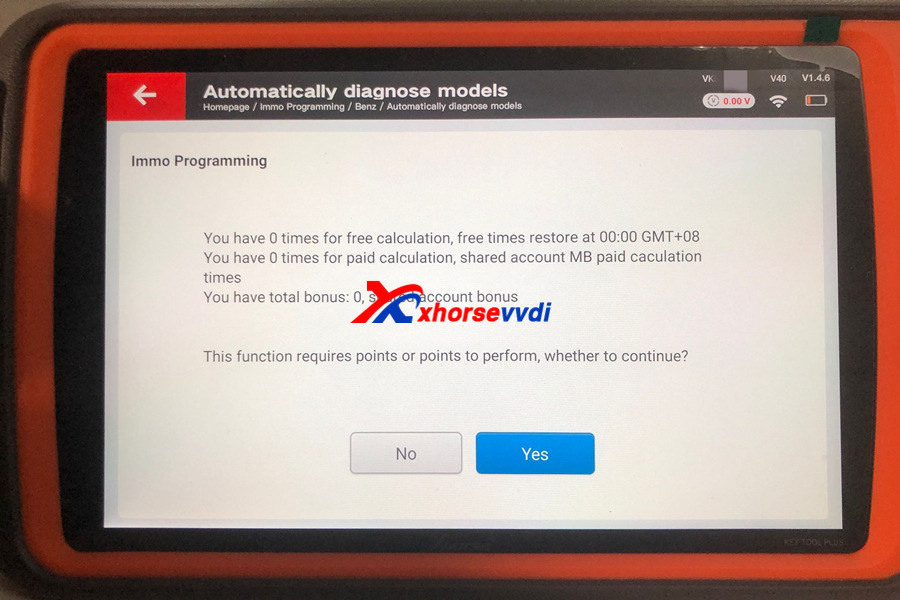
Or if you have xhores app, can check on xhorse app too
Xhorse app>>account>>combine device
Please confirm your key tool plus is binded with your xhorse account. Or this way not available.

http://blog.xhorsevvdi.com/can-vvdi-key-tool-plus-add-one-year-unlimited-bga-token/
Posted by: xhorsevvdi at
09:05 AM
| No Comments
| Add Comment
Post contains 141 words, total size 3 kb.
Question:
Where VVDI PROG Programmer is if I want to convert the d flash file into an eee partition in the footwell?
By the bmw footwell Module
Answer:
Use Data Repair Function.
8-Other>>BMW>>FRM-E-SERIES-REPAIR


Done! Hope this helps!
http://blog.xhorsevvdi.com/how-vvdi-prog-covert-frm-dflash-into-eeprom-partition/
Posted by: xhorsevvdi at
09:04 AM
| No Comments
| Add Comment
Post contains 47 words, total size 1 kb.
Question:
Can't update Dolphin XP005L Machine, just keeps showing BIOS mode and won't let me update firmware.


Here is the Solution:
Unplug the green cable from battery, update firmware, and plug in the green cable.

Complete! Hope this helps!
http://blog.xhorsevvdi.com/solved-cant-update-dolphin-xp005l-firmware/
Posted by: xhorsevvdi at
09:03 AM
| No Comments
| Add Comment
Post contains 46 words, total size 1 kb.
Question:
IN MY VVDI MB TOOL, THERE IS ONE OPTION OF READ/WRITE DASHBOARD REALTED WITH INSTRUMENT CLUSTER... WHAT IS THIS FUNCTION FOR?
Here is the Answer:
Read and Write Dashboard Function is for KM Repair.
Path: Other Function>>Read and Write Dashboard

Support List:
C(W204), GLK(X204), CLK(W207), E(W212), SLS(W197), CLS(W21
R-Class(W251), GL(X164), ML(W164)
E-Class(W211), CLS(W219)
S-Class(W221), CL(216)
W166, W172, W246, W231
W205
Notices:
1)W204, W207, W212…and S-Class (W221), CL (216): to block KM synchronization between EZS and dashboard, you need to backup CGW (Gateway) EEPROM and FLASH before write KM.
2)For S-Class(W221), CL (216), block KM synchronization require update Gateway FLASH and EEPROM. You can provide the FLASH and EEPROM that you have. If you don't provide these files. We will use the FLASH and EEPROM from Gateway, only need some time to read it.
3)W166, W172, W246, W231 and W205: these 2 types only support change KM in dashboard. Doesn't support block KM synchronization between EZS and dashboard. You can install extra CAN filter yourself or erase EIS.
More Details, please check out the VVDI MB User Manual.
Complete!
http://blog.xhorsevvdi.com/what-is-read-and-write-dashboard-function-on-vvdi-mb-for/
Posted by: xhorsevvdi at
09:02 AM
| No Comments
| Add Comment
Post contains 190 words, total size 2 kb.
Toyota Land Cruise(Lc300) 2023 year, I succeeded to add the remote by using VVDI XM38 Remote, lock & unlock is working perfectly but proximate is not working, when i want to start the car i should put the remote close to the push to start button, tried to go the smart key customize to change frequency still failed, please if there is any anyone knows how to solve this?

Here is the Solution:
Adjust the Signal Strength using Key Tool Max or Key Tool Plus.
Path: Special Function - Toyota Smart Key Setting
Done! Hope this helps!
http://blog.xhorsevvdi.com/solved-vvdi-xm38-key-prox-only-work-when-close-to-start-button/
Posted by: xhorsevvdi at
09:02 AM
| No Comments
| Add Comment
Post contains 110 words, total size 1 kb.
Question:
I also have other questions for VVDI2 Full Version I just bought I did on the bench engine ecu removed from the vehicle & I did KM change just to test vvdi2 product. It all looked like the km change function worked as it shows successfully. Take a look at the 2 attached photos 1 with original km & 1 with km changed, all looks good ?? But when I read the ecu memory the KM has changed back to it's original figures 406125.The ecu is a Bosch Edc16u1 from a Audi.


Changed km from 406125 to 406100. But then when I read ecu memory it is back to 406125....it should be 406100?
Here is the Answer:
After changing KM, VVDI2 Programmer will generate a new file.
Users need to write that new file back to cluster and the change is complete.

Done! Hope this helps!
http://blog.xhorsevvdi.com/vvdi2-change-km-successfully-but-read-the-same-value-solution/
Posted by: xhorsevvdi at
09:01 AM
| No Comments
| Add Comment
Post contains 158 words, total size 2 kb.
Question:
The M4 Gasket of the Dolphin XP-005L brings these accessories. The big ones I guess are for the tops in the lines. Can anyone tell me what the wires I'm pointing to in the picture are for?

Here is the Answer:
Those wires works with Condor XC009 for changing clamping depth to tighten key blades and ensure normal cutting.

Done! Hope this helps!
http://blog.xhorsevvdi.com/what-is-wires-in-m4-gasket-of-dolphin-xp005l-for/
Posted by: xhorsevvdi at
09:01 AM
| No Comments
| Add Comment
Post contains 75 words, total size 1 kb.
30 queries taking 0.0777 seconds, 131 records returned.
Powered by Minx 1.1.6c-pink.

