



January 15, 2022
Question: VVDI MB gave "ELV simulator not support read ESL data" when progrmaming ELV Emulator.
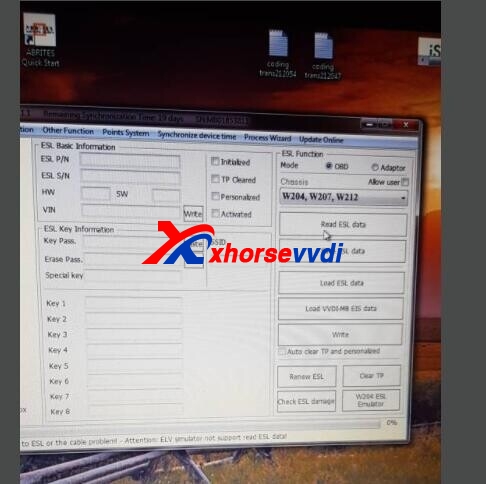
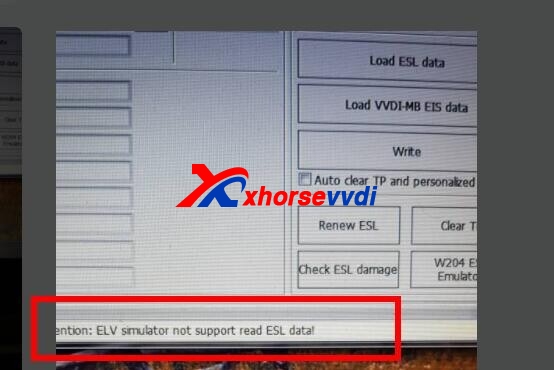
From the above pictures, we can see VVDI MB Tool failed to read ESL data.
Here Xhorsevvdi technician gave the
Solution:
During programming Benz ELV Simulator, there is no step of reading ESL on the process.
Please follow the steps (on bench):
Step 1
(EIS page)Read and save EIS data
Step 2
(EIS page)Calculate Key Pass
Step 3
(ESL page)Load VVDI MB EIS data and paste Key Pass
Step 4
(ESL page)Tick "Auto clear TP and personalized" and click "Write"
Tip:
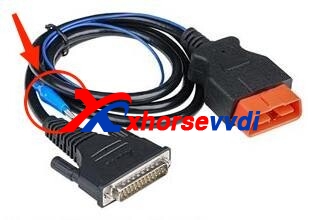
If ELV Simulator is programmed On Car, need to clamp ESL K-line. (There is a plug on ESL, and 4 cables on the plug. Break the rubber insulation of the thinnest cable, and clamp it by the blue clamp of OBD line.)
Source: http://blog.xhorsevvdi.com/how-to-solve-vvdi-mb-elv-simulator-not-support-read-esl-data/
Posted by: xhorsevvdi at
06:23 AM
| No Comments
| Add Comment
Post contains 150 words, total size 3 kb.
35 queries taking 0.0369 seconds, 97 records returned.
Powered by Minx 1.1.6c-pink.

