



May 13, 2025
Xhorse VVDI PROG Programmer and 35160DW Chip Support M35080, M35080-3, M35080-6, M35080V6, M35080VP, D80D0WQ, 160D0WQ,35160WT.
And we received feedback that:
I'm having problems reading an eeprom
It says device no connect it


Engineer reply:
1.VVDI Prog orange light is on, VVDI Prog no problem.
2. The option is only for 35160WT adapter, can not work with 35128 adapter.

3.Use the EEPROM>>Special function>>M35160XX option if you not have 35160wt adapter.

Posted by: xhorsevvdi at
08:48 AM
| No Comments
| Add Comment
Post contains 79 words, total size 2 kb.
Xhorse Cloud Smart Mode B and Mode C 2 in 1, here is some simple instruction about Xhorse Cloud Smart.
1. What is a Remote Diagnostic Device?
Remotediagnosticdevicesfallintotwocategories:
Mode-B
Mode-C
Remotediagnosticdevicesareusuallysplitintotwotypes:remoteservicedevices(Mode-B)andremoterepairdevices(Mode-C).
Traditionally,thesedeviceswerelimitedtoasinglefunction.ButtheXhorseCloudSmartcombinesbothmodes,allowingyoutoseamlesslyswitchbetweenthem.Byintegrating IoTandcloudtechnology,we'vecreatedaplatformthatoffersbothmaintenanceanddiagnosticservicesforautomotivecustomers.
2. What is the Function of Xhorse Cloud Smart?
Function1:RemoteDiagnostics
LargeautorepairshopsuseitinMode-B,whilesmallershopsorkeyprogrammingshopsuseitinMode-C.

Function 2: Local Mode (Supports J2534 Protocol)
Perfect for diagnostics with original manufacturer software.

3. How to Connect the Mode-B and Mode-C?
Mode-C Users :
Post tasks on the XHORSE APP with a unique ID
Connect your device to the vehicle and share the ID
Mode-B Users :
Browse the Demand Square for open tasks
Enter the ID to link with Mode-C and resolve issues remotely
4. How Cloud Smart Works: A Case Study
Let's look at how Xhorse Cloud Smart handles a common problem: BMW FEM coding loss.In this case, we use the BMW FEM module as a simulation unit, yet it can still be connected to the car' s OBD interface for real vehicle diagnostics.

Step 1: Connect Devices
Mode-C: Link KEYTOOL PLUS to the BMW FEM module → Generate ID
Mode-B: Connect Cloud Smart, BIMTOOL PRO and Computer→ Enter ID to sync
Step 2: Calculating Programming Files
In the BIMTOOL PRO software, navigate to "Vehicle programming" and select "40-FEM" to calculate the programming file.
Step 3: Programming
After calculation, click "Programming" to apply the new coding. The process will update the vehicle' s firmware and restore its key learning.
Step 4: Key Learning and DTC Reset
After programming, clear the vehicle's DTCs and perform key learning. This will restore the coding and key data.
Posted by: xhorsevvdi at
08:47 AM
| No Comments
| Add Comment
Post contains 268 words, total size 4 kb.
VVDI Multi Prog V55 Database is available! Audi Steering Gear(SPC5643L) and more are added!
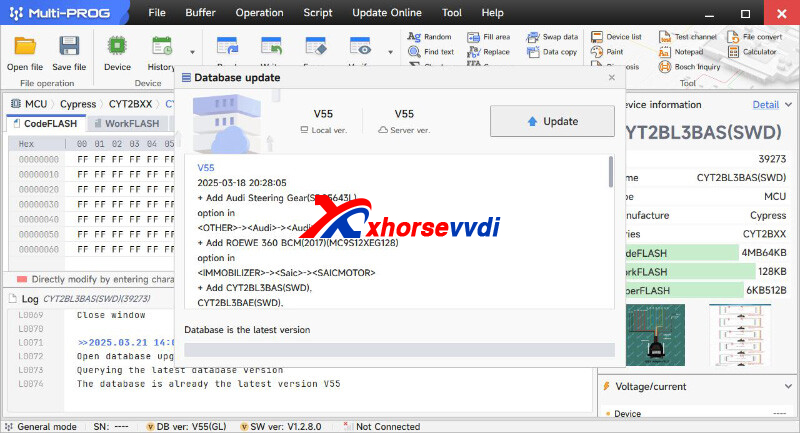
Free Download MULTI PROG Software
*Download software and update database online
V55 Database Update Info (03-18-2025)
+ Add Audi Steering Gear(SPC5643L) option in [OTHER]->[Audi]->[Audi]
+ Add ROEWE 360 BCM(2017)(MC9S12XEG12 option in [IMMOBILIZER]->[Saic]->[SAICMOTOR]
+ Add CYT2BL3BAS(SWD), CYT2BL3BAE(SWD), CYT2BL3CAS(SWD), CYT2BL3CAE(SWD), CYT2BL4BAS(SWD), CYT2BL4BAE(SWD), CYT2BL4CAS(SWD), CYT2BL4CAE(SWD), CYT2BL5BAS(SWD), CYT2BL5BAE(SWD), CYT2BL5CAS(SWD), CYT2BL5CAE(SWD), CYT2BL7BAS(SWD), CYT2BL7BAE(SWD), CYT2BL7CAS(SWD), CYT2BL7CAE(SWD), CYT2BL8BAS(SWD), CYT2BL8BAE(SWD), CYT2BL8CAS(SWD), CYT2BL8CAE(SWD), CYT2B93BAS(SWD), CYT2B93BAE(SWD), CYT2B93CAS(SWD), CYT2B93CAE(SWD), CYT2B94BAS(SWD), CYT2B94BAE(SWD), CYT2B94CAS(SWD), CYT2B94CAE(SWD), CYT2B95BAS(SWD), CYT2B95BAE(SWD), CYT2B95CAS(SWD), CYT2B95CAE(SWD), CYT2B97BAS(SWD), CYT2B97BAE(SWD), CYT2B97CAS(SWD), CYT2B97CAE(SWD), CYT2B98BAS(SWD), CYT2B98BAE(SWD), CYT2B98CAS(SWD), CYT2B98CAE(SWD), CYT2B73BAS(SWD), CYT2B73BAE(SWD), CYT2B73CAS(SWD), CYT2B73CAE(SWD), CYT2B74BAS(SWD), CYT2B74BAE(SWD), CYT2B74CAS(SWD), CYT2B74CAE(SWD), CYT2B75BAS(SWD), CYT2B75BAE(SWD), CYT2B75CAS(SWD), CYT2B75CAE(SWD), CYT2B77BAS(SWD), CYT2B77BAE(SWD), CYT2B77CAS(SWD), CYT2B77CAE(SWD), CYT2B78BAS(SWD), CYT2B78BAE(SWD), CYT2B78CAS(SWD), CYT2B78CAE(SWD), CYT2B63BAS(SWD), CYT2B63BAE(SWD), CYT2B63CAS(SWD), CYT2B63CAE(SWD), CYT2B64BAS(SWD), CYT2B64BAE(SWD), CYT2B64CAS(SWD), CYT2B64CAE(SWD), CYT2B65BAS(SWD), CYT2B65BAE(SWD), CYT2B65CAS(SWD), CYT2B65CAE options in [MCU]->[Cypress]->[CYT2BXX]
+ Add XMC4800-E196x2048, XMC4800-F144x2048, XMC4800-F100x2048, XMC4800-E196x1536, XMC4800-F144x1536, XMC4800-F100x1536, XMC4800-E196x1024, XMC4800-F144x1024, XMC4800-F100x1024, XMC4700-E196x2048, XMC4700-F144x2048, XMC4700-F100x2048, XMC4700-E196x1536, XMC4700-F144x1536, XMC4700-F100x1536, XMC4500-E144x1024, XMC4500-F144x1024, XMC4500-F100x1024, XMC4500-F144x768, XMC4500-F100x768, XMC4502-F100x768, XMC4504-F100x512, XMC4504-F144x512, XMC4400-F100x512, XMC4400-F64x512, XMC4400-F100x256, XMC4400-F64x256, XMC4402-F100x256, XMC4402-F64x256, XMC4300-F100x256, XMC4200-F64x256, XMC4200-Q48x256, XMC4100-F64x128, XMC4100-Q48x128, XMC4104-F64x128, XMC4104-Q48x128, XMC4104-F64x64, XMC4104-Q48x64, XMC4108-F64x64, XMC4108-Q48x64 options in [MCU]->[Infineon]->[XMC4XXX]
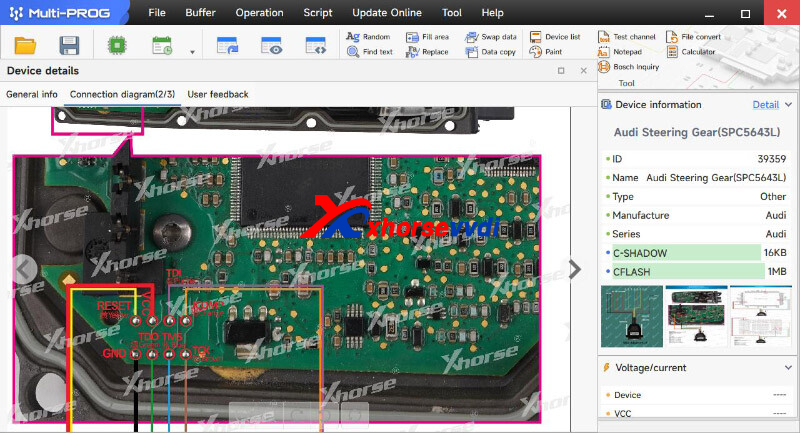


Stay tuned!
http://blog.xhorsevvdi.com/multi-prog-v55-database-update-audi-steering-gear/
Posted by: xhorsevvdi at
08:46 AM
| No Comments
| Add Comment
Post contains 182 words, total size 4 kb.
Here we are going to show you the pinout of Mercedes W211 airbag using VVDI Multi Prog.
MCU:
TEMIC A2118704326 MC68HC912DG128A
Pinout Airbag Mercedes W211:


Posted by: xhorsevvdi at
08:46 AM
| No Comments
| Add Comment
Post contains 33 words, total size 1 kb.
Question:
ToyotaHilux2022CY91F575, I need VVDI Multi Prog to read the flash memory of this chip to change the language of the dashboard.


I have a total of 115 and 116, I tried untying them and connecting them just like in the manual the error still persists

Here is the Answer:
Check out the crystal marked.
If frequency of this crystal is not 4.7MHZ, connect PINX0 to cable CLK.

Done! Hope this helps!
http://blog.xhorsevvdi.com/multi-prog-read-toyota-hilux-2022-cy91f575-chip-connection-fail/
Posted by: xhorsevvdi at
08:45 AM
| No Comments
| Add Comment
Post contains 83 words, total size 2 kb.
One customer gave feedback his VVDI2 Full Version kept requiring new firmware. It showed "Error - This version need higher firmware support" but he already update it to the latest version. Software version is 7.3.7 and firmware version is 7.3.6.


Here is the Answer:
Downgrade Xhorse VVDI2 firmware to 7.3.5 and use old version, and the bug will be fixed soon.

Done! Hope this helps!
http://blog.xhorsevvdi.com/vvdi2-v7-3-7-require-higher-firmware-support-solution/
Posted by: xhorsevvdi at
08:45 AM
| No Comments
| Add Comment
Post contains 73 words, total size 2 kb.
March 18, 2025
Xhorse XDNPRBGL MQB-RH850/V850 Adapter work with KEY TOOL PLUS. No need to cut wire or lift pin to read MQB48/MQB49/5C dashboards. But in Key Tool Plus it has a new xhorse 5A 5C 5D adapter.
Do you have adapter for key tool plus mqb49 5a /5C immo?
I have rh850 , but instruction have difrent adapter , i have blue cabel but picture have Purple line

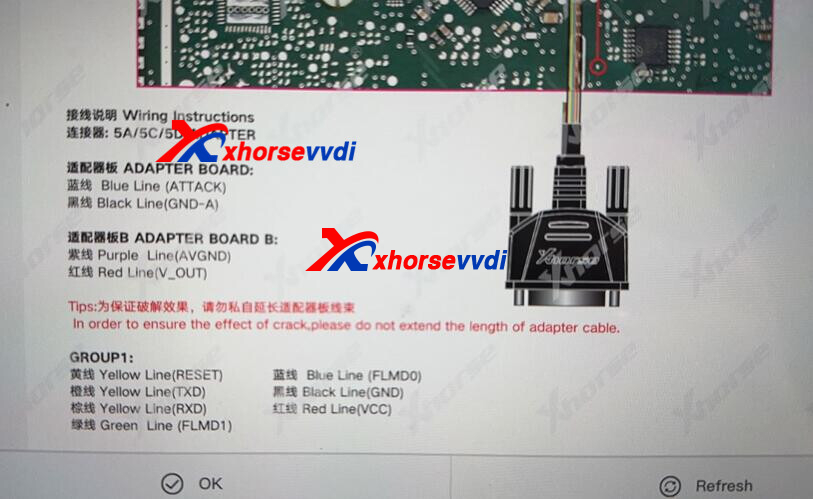
Xhorse reply:
This xhorse 5A 5C 5D adapter is new one, not sales yet, not old RH850 MQB cable for Key Tool Plus.
Once we get, we will inform.
http://blog.xhorsevvdi.com/xhorse-vvdi-key-tool-plus-mqb-5c-r7f701401-connection-diagram/
Posted by: xhorsevvdi at
07:47 AM
| No Comments
| Add Comment
Post contains 106 words, total size 1 kb.
One customer gave feedback that VVDI Mercedes Key sometimes won't fit in the key shells he bought. What key shells are good for the Green VVDI BE Key Pro and the Yellow VVDI BE Key Pro?
Here are using tips:
To select key shell for VVDI BE Key PCB,
Watch out the head part and make sure it won't damage the IR part on PCB.

Done! Hope this helps!
http://blog.xhorsevvdi.com/vvdi-be-key-pro-for-mercedes-using-tips/
Posted by: xhorsevvdi at
07:46 AM
| No Comments
| Add Comment
Post contains 78 words, total size 1 kb.
Xhorse VVDI Key Tool MIDI is new tool from Xhorse, intergrated IMMO and TPMS, and MQB48 Adapter workS with MLB-Tool for KTP/VVDI2. Read immo data (CS code) from mqb working key on the MQB48 platform so can add keys without disassembling the instrument cluster to read on bench.


Posted by: xhorsevvdi at
07:45 AM
| No Comments
| Add Comment
Post contains 99 words, total size 3 kb.
Question:
Xhorse MLB MQB48 Adapter wont extract immo data from key, what is the problem? I did supply power to both VVDI MLB Tool and mqb48 adapter.


Here is the answer:
Try VVDI-MLB Tool_V2.0.4.2.exe.
Install and swap, double-click to run software.
Done! Hope this helps!
http://blog.xhorsevvdi.com/solved-xhorse-mlb-mqb48-adapter-fail-to-read-immo-data/
Posted by: xhorsevvdi at
07:45 AM
| No Comments
| Add Comment
Post contains 56 words, total size 1 kb.
VVDI MQB48 Adapter (work with VVDI MLB Tool) is designed to extract immo data from original keys.
One customer asked where is the MQB48 section on VVDI Key Tool Plus.
He would not like to use a computer.

Here is the Answer:
MQB48 section for the new adapter on Key Tool Plus is not ready yet, and new firmware will come soon to solve this problem.
When new firmware is ready,
Select:
IMMO Programming>>VW>>Select by type>>MQB instrument immo system>>NEC35xx (Continental/VDO)
Stay tuned!
http://blog.xhorsevvdi.com/where-is-vvdi-mlb-tool-mqb48-section-on-key-tool-plus/
Posted by: xhorsevvdi at
07:44 AM
| No Comments
| Add Comment
Post contains 94 words, total size 1 kb.
Question:
All these VVDI BE Key Pro were programmed using VVDI MB Tool in late December and January, and all of the keys are coming back as blanks, they lose their information and stop working. | renew and write again and they start to work again. Are they going to stop again in a month or 2? It's crazy how all 5 keys stopped working within the same time period.
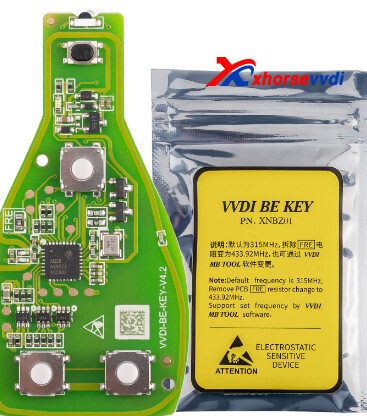
Here is the Answer:
Press insulating tape onto the required area.

Done!
http://blog.xhorsevvdi.com/fixed-vvdi-be-key-pro-stop-working-after-certain-time/
Posted by: xhorsevvdi at
07:44 AM
| No Comments
| Add Comment
Post contains 93 words, total size 1 kb.
VVDI Multi Prog V54 Database is available! Land Rover 12V Lithium Battery and more are added!

Free Download MULTI PROG Software
*Download software and update database online
V54 Database Update Info (03-06-2025)
+ Add BOSCH BCM option in [IMMOBILIZER]->[BOSCH]->[BOSCH]
+ Add CHANGAN BCM option in [IMMOBILIZER]->[CHANGAN]->[CHANGAN]
+ Add Tucson BCM option in [IMMOBILIZER]->[Hyundai]->[Hyundai]
+ Add CS15(2016) option in [DASHBOARD]->[CHANGAN]->[CHANGAN]
+ Add LinControl LEC4AF option in [ECU]->[LinControl]->[LinControl]
+ Add VW Touareg Directional Column Module, Volkswagen Golf 2Q0 ESL options in [Other]->[VW]->[VW]
+ Add Roewe Gateway option in [Other]->[Saic]->[SAICMOTOR]
+ Add Hyundai PEPS option in [Other]->[Hyundai]->[Hyundai]
+ Add Land Rover 12V Lithium Battery_WRITE, Land Rover 12V Lithium Battery Module_CFLASH_READ options in [Lithium battery]->[LandRover]->[LandRover]
+ Add R7FA2A2AD3CFP, R7FA2A2BD3CFM, R7FA2A2BD3CFN, R7FA2A2BD3CFP, R7FA2E1A52DDA, R7FA2E1A52DFJ, R7FA2E1A52DFL, R7FA2E1A52DLM, R7FA2E1A52DNE, R7FA2E1A52DNH, R7FA2E1A53CDA, R7FA2E1A53CFJ, R7FA2E1A53CFL, R7FA2E1A53CLM, R7FA2E1A53CNE, R7FA2E1A53CNH, R7FA2E1A72DBU, R7FA2E1A72DDA, R7FA2E1A72DFJ, R7FA2E1A72DFK, R7FA2E1A72DFL, R7FA2E1A72DFM, R7FA2E1A72DLM, R7FA2E1A72DNB, R7FA2E1A72DNE, R7FA2E1A72DNH, R7FA2E1A73CBU, R7FA2E1A73CDA, R7FA2E1A73CFJ, R7FA2E1A73CFK, R7FA2E1A73CFL, R7FA2E1A73CFM, R7FA2E1A73CLM, R7FA2E1A73CNB, R7FA2E1A73CNE, R7FA2E1A73CNH, R7FA2E1A92DBU, R7FA2E1A92DDA, R7FA2E1A92DFJ, R7FA2E1A92DFK, R7FA2E1A92DFM, R7FA2E1A92DLM, R7FA2E1A92DNB, R7FA2E1A92DNE, R7FA2E1A92DNH, R7FA2E1A93CBU, R7FA2E1A93CDA, R7FA2E1A93CFJ, R7FA2E1A93CFK, R7FA2E1A93CFL, R7FA2E1A93CFM, R7FA2E1A93CLM, R7FA2E1A93CNB, R7FA2E1A93CNE, R7FA2E1A93CNH, R7FA2E2A32DBY, R7FA2E2A32DNJ, R7FA2E2A32DNK, R7FA2E2A33CBY, R7FA2E2A33CNJ, R7FA2E2A33CNK, R7FA2E2A34CBY, R7FA2E2A34CNJ, R7FA2E2A34CNK, R7FA2E2A52DBY, R7FA2E2A52DNJ, R7FA2E2A52DNK, R7FA2E2A53CBY, R7FA2E2A53CNJ, R7FA2E2A53CNK, R7FA2E2A54CBY, R7FA2E2A54CNJ, R7FA2E2A54CNK, R7FA2E2A72DBY, R7FA2E2A72DNJ, R7FA2E2A73CBY, R7FA2E2A73CNJ, R7FA2E2A73CNK, R7FA2E2A74CBY, R7FA2E2A74CNJ, R7FA2E2A74CNK, R7FA2E3052DFJ, R7FA2E3052DFL, R7FA2E3052DNE, R7FA2E3052DNH, R7FA2E3053CFJ, R7FA2E3053CFL, R7FA2E3053CNE, R7FA2E3053CNH, R7FA2E3072DFJ, R7FA2E3072DFL, R7FA2E3072DNE, R7FA2E3072DNH, R7FA2E3073CFJ, R7FA2E3073CFL, R7FA2E3073CNE, R7FA2E3073CNH, R7FA2L1A92DFL, R7FA2L1A92DFM, R7FA2L1A92DFN, R7FA2L1A92DFP, R7FA2L1A92DNE, R7FA2L1A93CFL, R7FA2L1A93CFM, R7FA2L1A93CFN, R7FA2L1A93CFP, R7FA2L1A93CNE, R7FA2L1AB2DFL, R7FA2L1AB2DFM, R7FA2L1AB2DFN, R7FA2L1AB2DFP, R7FA2L1AB2DNE, R7FA2L1AB3CFL, R7FA2L1AB3CFM, R7FA2L1AB3CFN, R7FA2L1AB3CFP, R7FA2L1AB3CNE, R7FA4E2B92CBB, R7FA4E2B92CBC, R7FA4E2B93CBB, R7FA4E2B93CBC, R7FA4E2B93CFM, R7FA4E2B93CNE, R7FA4E2B93CNH, R7FA4M1AB2CLJ, R7FA4M1AB3CFL, R7FA4M1AB3CFM, R7FA4M1AB3CFP, R7FA4M1AB3CNB, R7FA4M1AB3CNE, R7FA4M1AB3CNF, R7FA4M2AB3CFL, R7FA4M2AB3CFM, R7FA4M2AB3CFP, R7FA4M2AB3CNE, R7FA4M2AC3CFL, R7FA4M2AC3CFM, R7FA4M2AC3CFP, R7FA4M2AC3CNE, R7FA4M2AD3CFL, R7FA4M2AD3CFM, R7FA4M2AD3CFP, R7FA4M2AD3CNE, R7FA4M3AD2CBM, R7FA4M3AD2CBQ, R7FA4M3AD3CBM, R7FA4M3AD3CBQ, R7FA4M3AD3CFB, R7FA4T1B93CFJ, R7FA4T1B93CFL, R7FA4T1B93CFM, R7FA4T1B93CNE, R7FA4T1B93CNH, R7FA4T1BB3CFJ, R7FA4T1BB3CFL, R7FA4T1BB3CFM, R7FA4T1BB3CNE, R7FA4T1BB3CNH, R7FA4W1AD2CNG, R7FA6E2B92CBB, R7FA6E2B92CBC, R7FA6E2B93CBB, R7FA6E2B93CBC, R7FA6E2B93CFM, R7FA6E2B93CNE, R7FA6E2B93CNH, R7FA6E2BB2CBB, R7FA6E2BB2CBC, R7FA6E2BB3CBB, R7FA6E2BB3CBC, R7FA6E2BB3CFM, R7FA6E2BB3CNE, R7FA6E2BB3CNH, R7FA8D1AFECBD, R7FA8D1AFECFC, R7FA8D1AHECBD, R7FA8D1AHECFC, R7FA8D1BFECBD, R7FA8D1BFECFC, R7FA8D1BHECBD, R7FA8D1BHECFC, R7FA8E1AFDCFB, R7FA8E1AFDCFP, R7FA8E2AFDCBD, R7FA8M1AFECBD, R7FA8M1AFECFB, R7FA8M1AFECFC, R7FA8M1AFECFP, R7FA8M1AHECBD, R7FA8M1AHECFB, R7FA8M1AHECFC, R7FA8M1AHECFP, R7FA8T1AFECBD, R7FA8T1AFECFB, R7FA8T1AFECFC, R7FA8T1AFECFP, R7FA8T1AHECBD, R7FA8T1AHECFB, R7FA8T1AHECFC, R7FA8T1AHECFP, R7FA2E1A92DFL, R7FA2E2A72DNK, options in [MCU]->[RENESAS]->[RA]


Done!
http://blog.xhorsevvdi.com/multi-prog-v54-database-update-land-rover-12v-lithium-battery/
Posted by: xhorsevvdi at
07:43 AM
| No Comments
| Add Comment
Post contains 332 words, total size 6 kb.
To read EEPROM 95640, VVDI Multi Prog needs to work with VH13/ VH23/ VH29 Adapter.
Buy today, we are going to show you a way where you don't need to desolder chips.
Pinout Airbag Fiat Ducato:


Done! Hope this helps!
Credit: Auto-Diag66
http://blog.xhorsevvdi.com/vvdi-multi-prog-fiat-ducato-m95640-pinout/
Posted by: xhorsevvdi at
07:43 AM
| No Comments
| Add Comment
Post contains 50 words, total size 1 kb.
Here we are going to show you How to Set Screen Lock on VVDI Key Tool Plus.
Steps:
Around the low left part of the screen, scroll up to display taskbar.
Select this icon.

Select 'Settings'.

Scroll down and select 'Security&location'.

Select 'Screen lock'.

Set a pin or swipe screen lock on your Key Tool Plus Pad.

Done!
http://blog.xhorsevvdi.com/how-to-set-screen-lock-on-vvdi-key-tool-plus/
Posted by: xhorsevvdi at
07:42 AM
| No Comments
| Add Comment
Post contains 69 words, total size 2 kb.
VVDI Multi Prog V53 Database is available! Silicon Lab C8051F MCU and more are added!

Free Download MULTI PROG Software
*Download software and update database online
V53 Database Update Info (02-28-2025)
+ Add C8051F300, C8051F301, C8051F302, C8051F303, C8051F304, C8051F305 options in [MCU]->[Silicon Laborat]->[C8051F30x]
+ Add C8051F310, C8051F311, C8051F312, C8051F313, C8051F314, C8051F315, C8051F316-GM, C8051F317-GM options in [MCU]->[Silicon Laborat]->[C8051F31x]
+ Add C8051F320, C8051F321, C8051F326, C8051F327 options in [MCU]->[Silicon Laborat]->[C8051F32x]
+ Add C8051F330, C8051F331, C8051F332, C8051F333, C8051F334, C8051F335, C8051F336, C8051F337, C8051F336, C8051F337 options in [MCU]->[Silicon Laborat]->[C8051F33x]
+ Add C8051F340, C8051F341, C8051F342, C8051F343, C8051F344, C8051F345, C8051F346, C8051F347, C8051F348, C8051F349, C8051F34A, C8051F34B options in [MCU]->[Silicon Laborat]->[C8051F34x]
+ Add C8051F350, C8051F351, C8051F352, C8051F353 options in [MCU]->[Silicon Laborat]->[C8051F35x]
+ Add C8051F360-GQ, C8051F361-GQ, C8051F362-GM, C8051F363-GQ, C8051F364-GQ, C8051F365-GM, C8051F366-GQ, C8051F367-GM, C8051F368-GQ, C8051F369-GM options in [MCU]->[Silicon Laborat]->[C8051F36x]
+ Add C8051F370, C8051F371, C8051F372, C8051F373, C8051F374, C8051F875, C8051F376, C8051F377, C8051F378, C8051F379, C8051F37a, C8051F37b, C8051F37c, C8051F37d, C8051F37e, C8051F37f options in [MCU]->[Silicon Laborat]->[C8051F37x]
+ Add C8051F380, C8051F381, C8051F382, C8051F383, C8051F384, C8051F385, C8051F386, C8051F387, C8051F38C options in [MCU]->[Silicon Laborat]->[C8051F38x]
+ Add C8051F390, C8051F391, C8051F392, C8051F393, C8051F394, C8051F395, C8051F396, C8051F397, C8051F398, C8051F399, C8051F39a, C8051F39b, C8051F39c, C8051F39d, C8051F39e, C8051F39f options in [MCU]->[Silicon Laborat]->[C8051F39x]
+ Add C8051F410, C8051F411, C8051F412, C8051F413, C8051F420, C8051F421, C8051F422, C8051F423 options in [MCU]->[Silicon Laborat]->[C8051F41x]
+ Add C8051F500, C8051F501, C8051F502, C8051F503, C8051F504, C8051F505, C8051F506, C8051F507, C8051F508, C8051F509, C8051F510, C8051F511 options in [MCU]->[Silicon Laborat]->[C8051F50x]
+ Add C8051F520-IM_AM, C8051F521-IM, C8051F523-IM_AM, C8051F524-IM, C8051F526-IM_AM, C8051F527-IM, C8051F530-IM_AM, C8051F531-IM, C8051F533-IM_AM, C8051F534-IM, C8051F536-IM_AM, C8051F537-IM, C8051F530-IT_AT, C8051F531-IT, C8051F533-IT_AT, C8051F534-IT, C8051F536-IT_AT, C8051F537-IT, C8051F520A-IM_AM, C8051F521A-IM, C8051F523A-IM_AM, C8051F524A-IM, C8051F526A-IM_AM, C8051F527A-IM, C8051F530A-IM_IT_AM_AT, C8051F531A-IM_IT, C8051F533A-IM_IT_AM_AT, C8051F534A-IM_IT, C8051F536A-IM_IT_AM_AT, C8051F537A-IM_IT options in [MCU]->[Silicon Laborat]->[C8051F52x]
+ Add C8051F540, C8051F541, C8051F542, C8051F543, C8051F544, C8051F545, C8051F546, C8051F547 options in [MCU]->[Silicon Laborat]->[C8051F54x]
+ Add C8051F550, C8051F551, C8051F552, C8051F553, C8051F554, C8051F555, C8051F556, C8051F557 options in [MCU]->[Silicon Laborat]->[C8051F55x]
+ Add C8051F560, C8051F561, C8051F562, C8051F563, C8051F564, C8051F565, C8051F566, C8051F567, C8051F568, C8051F569 options in [MCU]->[Silicon Laborat]->[C8051F56x]
+ Add C8051F570, C8051F571, C8051F572, C8051F573, C8051F574, C8051F575 options in [MCU]->[Silicon Laborat]->[C8051F57x]
+ Add C8051F580, C8051F581, C8051F582, C8051F583, C8051F584, C8051F585, C8051F586, C8051F587, C8051F588, C8051F589 options in [MCU]->[Silicon Laborat]->[C8051F58x]
+ Add C8051F590, C8051F591 options in [MCU]->[Silicon Laborat]->[C8051F59x]
+ Add C8051F700, C8051F701, C8051F702, C8051F703, C8051F704, C8051F705, C8051F706, C8051F707, C8051F708, C8051F709 options in [MCU]->[Silicon Laborat]->[C8051F70x]
+ Add C8051F710, C8051F711, C8051F712, C8051F713, C8051F714, C8051F715, C8051F716, C8051F717 options in [MCU]->[Silicon Laborat]->[C8051F71x]
+ Add C8051F800, C8051F801, C8051F802, C8051F803, C8051F804, C8051F805, C8051F806, C8051F807, C8051F808, C8051F809 options in [MCU]->[Silicon Laborat]->[C8051F80x]
+ Add C8051F810, C8051F811, C8051F812, C8051F813, C8051F814, C8051F815, C8051F816, C8051F817, C8051F818, C8051F819 options in [MCU]->[Silicon Laborat]->[C8051F81x]
+ Add C8051F820, C8051F821, C8051F822, C8051F823, C8051F824, C8051F825, C8051F826, C8051F827, C8051F828, C8051F829 options in [MCU]->[Silicon Laborat]->[C8051F82x]
+ Add C8051F830, C8051F831, C8051F832, C8051F833, C8051F834, C8051F835 options in [MCU]->[Silicon Laborat]->[C8051F83x]
+ Add C8051F850-GU, C8051F851-GU, C8051F852-GU, C8051F853-GU, C8051F854-GU, C8051F855-GU, C8051F850-GM, C8051F851-GM, C8051F852-GM, C8051F853-GM, C8051F854-GM, C8051F855-GM options in [MCU]->[Silicon Laborat]->[C8051F85x]
+ Add C8051F860-GS, C8051F861-GS, C8051F862-GS, C8051F863-GS, C8051F864-GS, C8051F865-GS options in [MCU]->[Silicon Laborat]->[C8051F86x]
+ Add C8051F901, C8051F902 options in [MCU]->[Silicon Laborat]->[C8051F90x]
+ Add C8051F911, C8051F912 options in [MCU]->[Silicon Laborat]->[C8051F91x]
+ Add C8051F920, C8051F921 options in [MCU]->[Silicon Laborat]->[C8051F92x]
+ Add C8051F930, C8051F931 options in [MCU]->[Silicon Laborat]->[C8051F93x]
+ Add C8051F960, C8051F961, C8051F962, C8051F963, C8051F964, C8051F965, C8051F966, C8051F967, C8051F968, C8051F969 options in [MCU]->[Silicon Laborat]->[C8051F96x]
+ Add C8051F970-GM, C8051F971-GM, C8051F972-GM, C8051F973-GM, C8051F974-GM, C8051F975-GM options in [MCU]->[Silicon Laborat]->[C8051F97x]
+ Add C8051F980, C8051F981, C8051F982, C8051F983, C8051F985, C8051F986, C8051F987, C8051F988, C8051F989 options in [MCU]->[Silicon Laborat]->[C8051F98x]
+ Add C8051F990, C8051F991, C8051F996, C8051F997 options in [MCU]->[Silicon Laborat]->[C8051F99x]
+ Add C8051T600, C8051T601, C8051T602, C8051T603, C8051T604, C8051T605 options in [MCU]->[Silicon Laborat]->[C8051T60x]
+ Add C8051T610-GQ, C8051T611-GM, C8051T612-GQ, C8051T613-GM, C8051T614-GQ, C8051T615-GM, C8051T616-GM, C8051T617-GM options in [MCU]->[Silicon Laborat]->[C8051T61x]
+ Add C8051T630, C8051T631, C8051T632, C8051T633, C8051T634, C8051T635 options in [MCU]->[Silicon Laborat]->[C8051T63x]
+ Add EFM8BB10F8G, EFM8BB10F4G, EFM8BB10F2G options in [MCU]->[Silicon Laborat]->[EFM8BB1]
+ Add EFM8BB22F16G, EFM8BB21F16G options in [MCU]->[Silicon Laborat]->[EFM8BB2]
+ Add EFM8BB31F64G, EFM8BB31F32G, EFM8BB31F16G, EFM8BB31F64I, EFM8BB31F32I, EFM8BB31F16I options in [MCU]->[Silicon Laborat]->[EFM8BB3]
+ Add EFM8LB12F64E, EFM8LB12F32E, EFM8LB11F32E, EFM8LB11F16E, EFM8LB10F16E options in [MCU]->[Silicon Laborat]->[EFM8LB1]
+ Add EFM8SB10F8G, EFM8SB10F4G, EFM8SB10F2G options in [MCU]->[Silicon Laborat]->[EFM8SB1]
+ Add EFM8SB20F64G, EFM8SB20F32G, EFM8SB20F16G options in [MCU]->[Silicon Laborat]->[EFM8SB2]
+ Add EFM8UB10F16G, EFM8UB11F16G, EFM8UB10F8G options in [MCU]->[Silicon Laborat]->[EFM8UB1]
+ Add EFM8UB20F64G, EFM8UB20F32G options in [MCU]->[Silicon Laborat]->[EFM8UB2]
+ Add Si1000, Si1001, Si1002, Si1003, Si1004, Si1005 options in [MCU]->[Silicon Laborat]->[Si100x]
+ Add Si4010 option in [MCU]->[Silicon Laborat]->[Si401x]
+ Add Si8250-IM, Si8250-IQ, Si8251-IM, Si8251-IQ, Si8252-IM, Si8252-IQ options in [MCU]->[Silicon Laborat]->[Si825x]
Stay tuned!
http://blog.xhorsevvdi.com/multi-prog-v53-database-update-silicon-lab-c8051f-mcu/
Posted by: xhorsevvdi at
07:42 AM
| No Comments
| Add Comment
Post contains 649 words, total size 9 kb.
VVDI Key Tool Plus Tablet is able to program keys for BMW CAS3/ CAS4/ BDC system via OBD2 port.
Here is a review:
Successfully added a new smart key (Keyless) and disabled a lost key for the BMW 535d xDrive GT F07 year 2014 to the CAS4+ (EWS5) system with virtual cockpit using Key tool plus via OBD2.

Let's take a look at how this job gets done!
Auto detect immobilizer system via OBD.

Locked version.

Unlock CAS4 system.

Read ISN.

Key info.
Disable one key and add a new smart one via OBD.

Done! That's how to add smart key for BMW CAS4+ via OBD using VVDI Key Tool Plus Pad.
Credit: Patrik Baroch
http://blog.xhorsevvdi.com/vvdi-tablet-add-key-for-bmw-535d-2014-cas4-virtual-cockpit-ok/
Posted by: xhorsevvdi at
07:41 AM
| No Comments
| Add Comment
Post contains 128 words, total size 3 kb.
Question:
Failed to get immo data from the server, server problem? use VVDI MLB Tool and new Xhorse XDMQBAGL MQB48 Adapter.


Here is the Answer:
Select "Collect key data" to extract and upload data again.
Do Not click on 'Query last successful result'.

Done! Hope this helps!
http://blog.xhorsevvdi.com/fixed-vvdi-mlb-tool-and-mqb48-adapter-wont-decode-immo-data/
Posted by: xhorsevvdi at
07:41 AM
| No Comments
| Add Comment
Post contains 59 words, total size 2 kb.
Xhorse app allows users to upload their customized key data. By these key data file, Xhorse Key Cutting Machine may be able to duplicate keys not on the support list, such as KW1 key.

One customer wondered why it keeps telling that he has insufficient bonus points when trying to download this file... If anyone know a bypass to getting it.

Here is the Answer:
Get points by generating remote control using VVDI Keys.
The required points will be given to the uploader for encouraging users to upload their custom cut data.
Done! Hope this helps!
http://blog.xhorsevvdi.com/why-xhorse-app-custom-key-cut-data-costs-points/
Posted by: xhorsevvdi at
07:40 AM
| No Comments
| Add Comment
Post contains 106 words, total size 1 kb.
One customer asked if it is possible to reuse an already programmed XHORSE MLB Key?

Here is the Answer:
Yes, VVDI MLB Key is reusable,
On VVDI MLB Tool software,
Select
Update Online>>Upgrade OEM keys
Then read immo data and make dealer key

Done! Hope this helps!
http://blog.xhorsevvdi.com/possible-to-reuse-programmed-xhorse-mlb-key/
Posted by: xhorsevvdi at
07:40 AM
| No Comments
| Add Comment
Post contains 55 words, total size 1 kb.
30 queries taking 0.0807 seconds, 131 records returned.
Powered by Minx 1.1.6c-pink.

