



July 03, 2024
One customer gave feedback that VVDI MB Tool failed to write mileage in the dashboard.
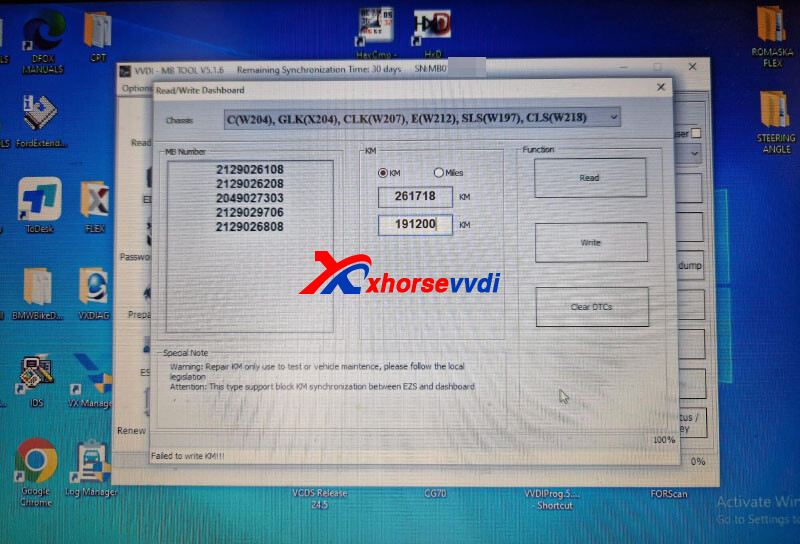
VVDI MB doesn't support mileage repair for this model,
Here are all supported models on odometer correction:
C(W204), GLK(X204), CLK(W207), E(W212), SLS(W197), CLS(W21
R-Class(W251), GL(X164), ML(W164)
E-Class(W211), CLS(W219)
S-Class(W221), CL(216)
W166, W172, W246, W231
W205
Done! Hope this helps!
http://blog.xhorsevvdi.com/vvdi-mb-odometer-correction-support-list/
Posted by: xhorsevvdi at
03:19 AM
| No Comments
| Add Comment
Post contains 61 words, total size 1 kb.
Here is the feedback of Xhorse Multi-Prog share from auto-diag
Xhorse Multi Prog PINOUT DASH FORD FIESTA


Try at your own risk! Thanks.
http://blog.xhorsevvdi.com/xhorse-multi-prog-pinout-dash-ford-fiesta/
Posted by: xhorsevvdi at
03:18 AM
| No Comments
| Add Comment
Post contains 31 words, total size 1 kb.
One customer gave his feedback that PSA EDC16C34 flash file size in VVDI Multi Prog shows 0KB. He wondered if the tool won't read this ecu.

Here Xhorsevvdi tech support answers:
On this ecu, flash file size is not fixed, and it varies so the size shows 0kb
Just read flash file by wiring diagrams on Multi Prog.
Done!
http://blog.xhorsevvdi.com/solved-vvdi-multi-prog-keeps-losing-usb-connection/
Posted by: xhorsevvdi at
03:17 AM
| No Comments
| Add Comment
Post contains 71 words, total size 1 kb.
Quick Question:
My VVDI Multi Prog keeps losing the USB connection even during the update and then regains it again and again. I tried ports and cables on other computers and it's still the same.

Here Xhorsevvdi tech support answers:
Try the ways below,
1)Change to another USB port
2)User another power adapter
3)Make sure power adapter is connected to a 3-pin socket
Then your Multi Prog should connect to PC.
Done! Hope this could help!
http://blog.xhorsevvdi.com/would-vvdi-multi-prog-support-wi-fi-connection/
Posted by: xhorsevvdi at
03:17 AM
| No Comments
| Add Comment
Post contains 85 words, total size 1 kb.
Quick Question :
Would VVDI Multi Prog Support Wi-Fi Connection?
Here is the Answer:
Use wireless Wi-Fi adapter in package.
Then 8-pin chip data would display on the Multi-Prog screen.

*If there is a Wi-Fi password, users could only enter numbers in Multi Prog (letters are not supported)

Done! Hope this could help!
http://blog.xhorsevvdi.com/would-vvdi-multi-prog-support-wi-fi-connection/
Posted by: xhorsevvdi at
03:16 AM
| No Comments
| Add Comment
Post contains 61 words, total size 1 kb.
Quick Question:
XSJP01EN Remote, Key Tool Max Pro won't identify chip or detect frequency. Sent pictures, anything wrong?


Here is the Solution:
Put the chip side down into the sensing coil, so the tool could detect the chip.

Done! Hope this could help!
http://blog.xhorsevvdi.com/fixed-key-tool-max-pro-wont-identify-xsjp01en-remote/
Posted by: xhorsevvdi at
03:16 AM
| No Comments
| Add Comment
Post contains 53 words, total size 2 kb.
V5.3.5 VVDI Prog software is released now, get free download link V5.3.5 VVDI Prog software from XhorseVVDI.com.
1.Free Download V5.3.5 VVDI Prog Software
Password: 123456
2.V5.3.5 VVDI Prog Update Info
* This version DON't need update firmware
* Modify MQB-LOCK(D70F35xx)-READ options in <5-DASHBOARD>-><VOLKSWAGEN>: Optimize the process
* Modify LITHIUM BATTERY MODULE option in <8-OTHER>-><Porsche>: Reading failure
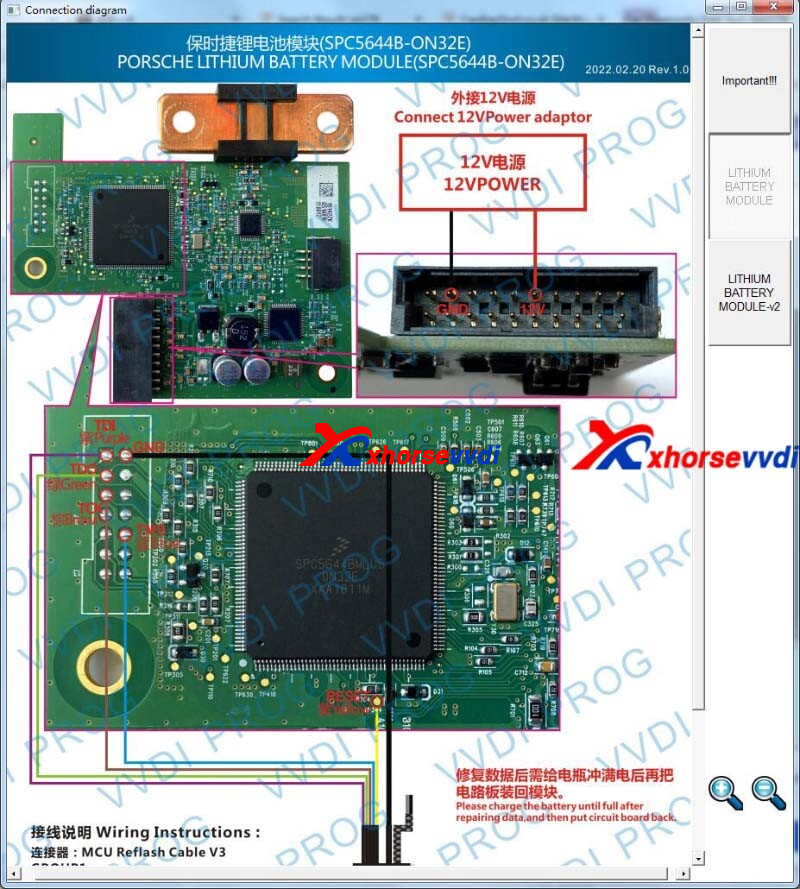
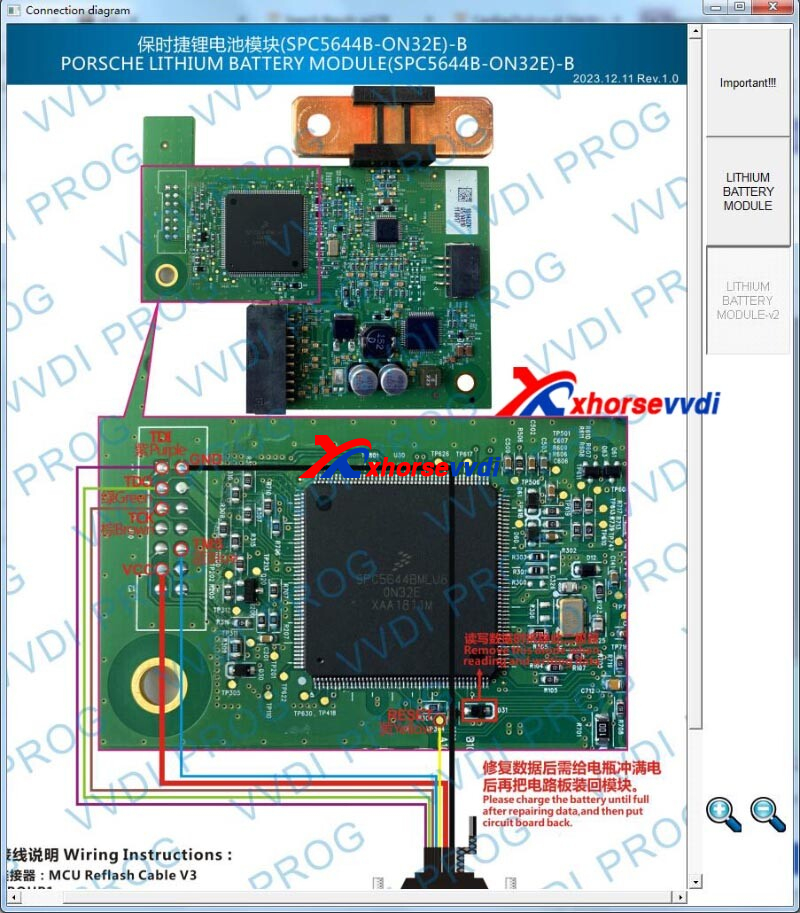
Stay tuned!
http://blog.xhorsevvdi.com/free-download-v5-3-5-vvdi-prog-mqb-reading-optimization/
Posted by: xhorsevvdi at
03:15 AM
| No Comments
| Add Comment
Post contains 70 words, total size 2 kb.
June 18, 2024
One customer asked how to authorize his new VVDI Multi Prog. The software shows "Failed to load VPA! Error Code: ffff55aa This option is not authorized".

Here Xhorsevvdi tech support answers:
Synchronize this new Multi Prog.
Path: Update Online>>Authorization Management>>Synchronize Devices

Done! Hope this could help!
http://blog.xhorsevvdi.com/solved-vvdi-multi-prog-error-code-ffff55aa/
Posted by: xhorsevvdi at
09:55 AM
| No Comments
| Add Comment
Post contains 54 words, total size 1 kb.
One customer gave feedback that his Condor XC-Mini Plus II broke the cutter and was not working. Tried many keys of defiant cars is the same thing.
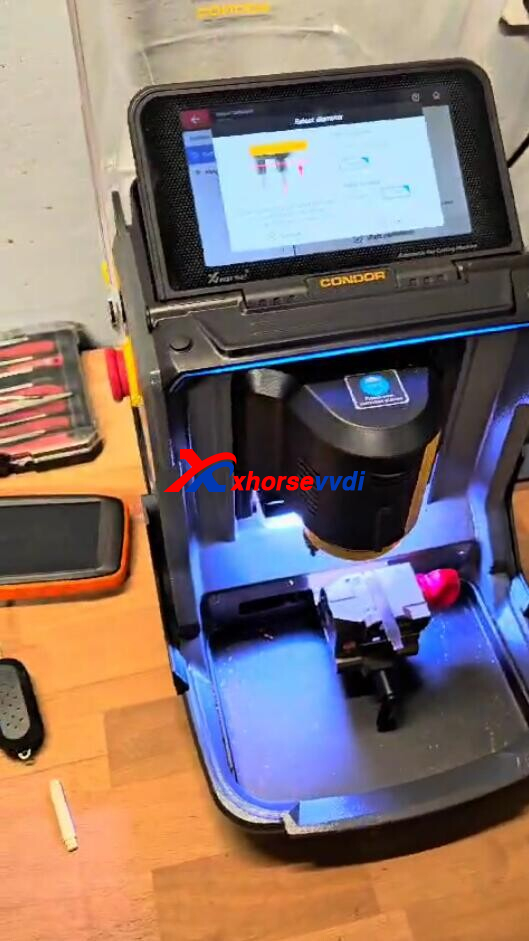
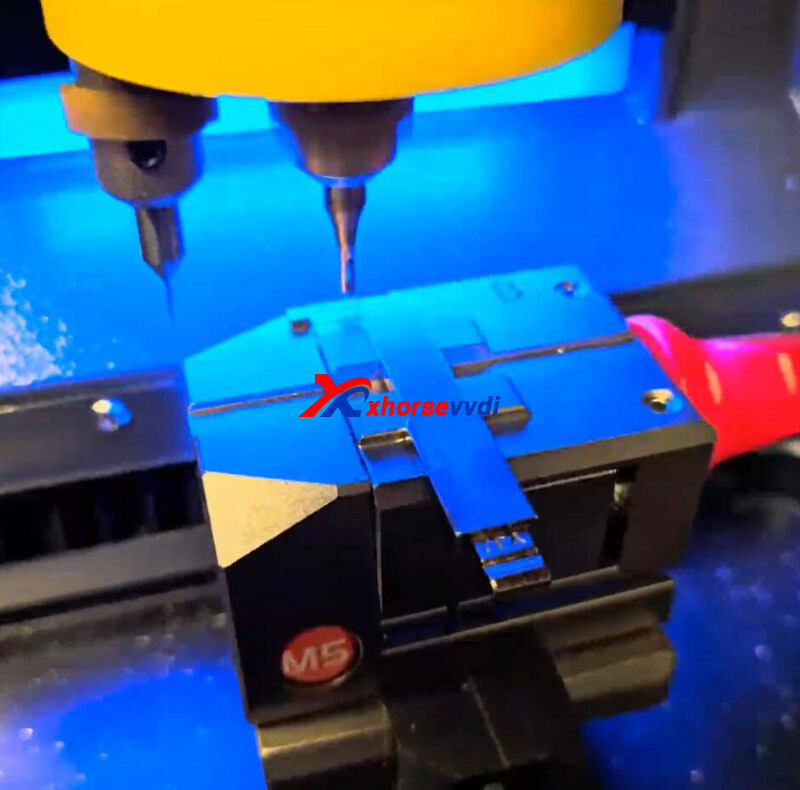
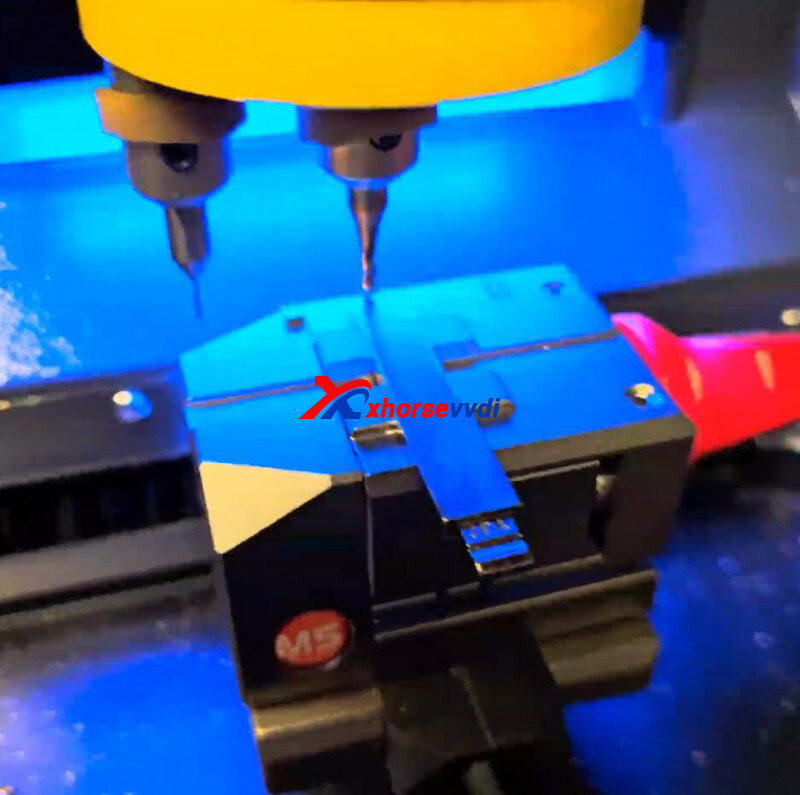
To solve this problem, Main Motor Measurement is required.
(Path: Settings>> Device Test>> Motor measurement>>Main Motor Measurement)
Test shows error 20.
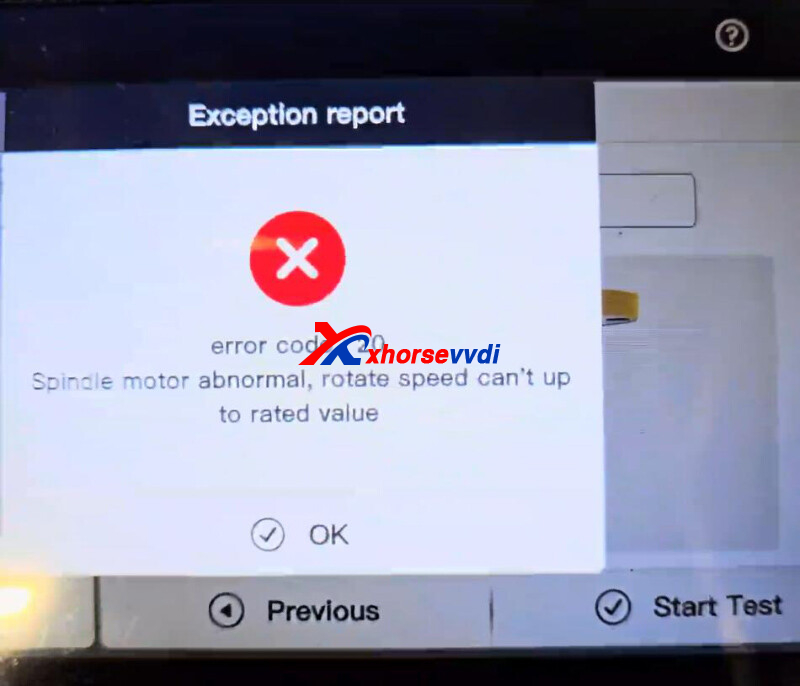
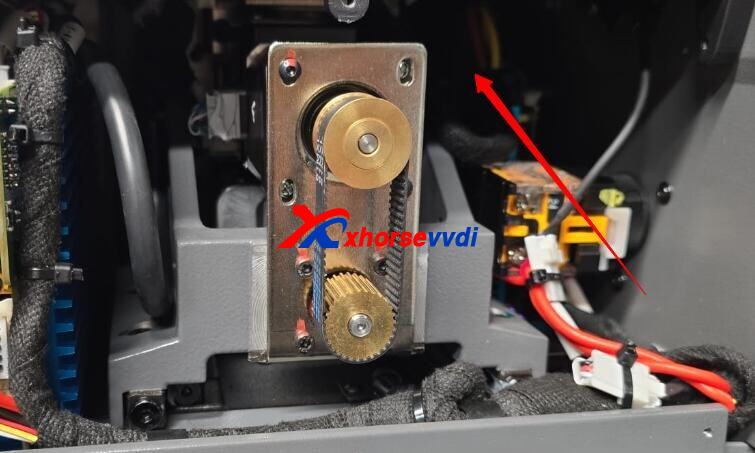
Here users need to check connections on Condor II driver board.
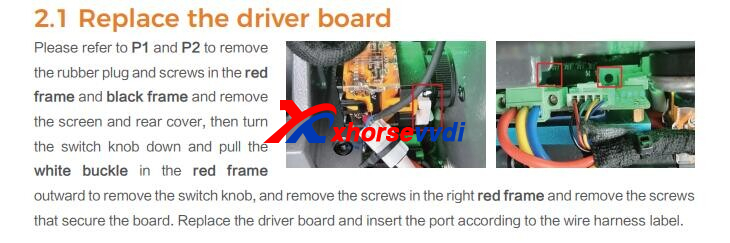
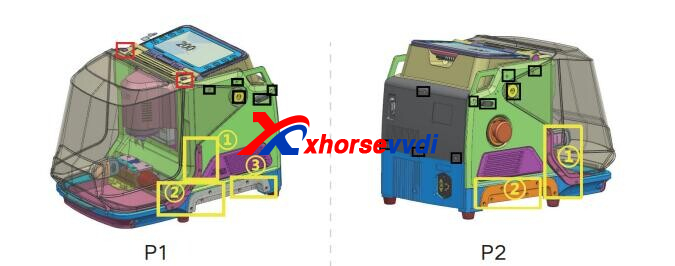
Re-connect cables here.
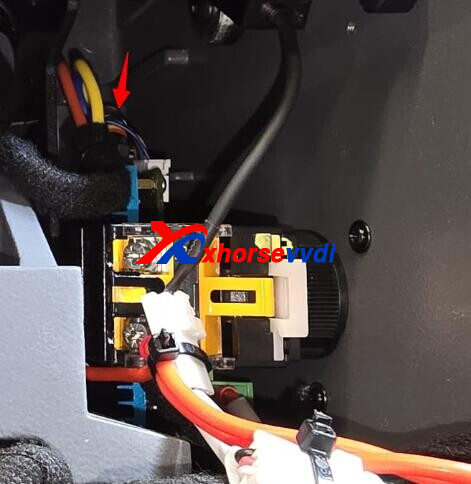
Done! Hope this could help!
http://blog.xhorsevvdi.com/solved-xhorse-condor-xc-mini-plus-ii-cutter-stop-rotating/
Posted by: xhorsevvdi at
09:54 AM
| No Comments
| Add Comment
Post contains 77 words, total size 3 kb.
VVDI MULTI PROG released V28 database, adding XC2XXX JTAG...

Free Download MULTI PROG Software
*Download software and update database online
V28 Database Update Info (2024-06-04)
* Fixed the issue that MPC574xP series chips cannot connect
+ Add XC2060M-104(JTAG), XC2060N-40(JTAG), XC2263N-16(JTAG), XC2263N-24(JTAG), XC2285-56(JTAG), XC2285-72(JTAG), XC2285-96(JTAG), XC2285M-104(JTAG), XC2336B-24(JTAG), XC2361A-56(JTAG), XC2361A-72(JTAG), XC2361B-24(JTAG), XC2361B-40(JTAG), XC2361E-136(JTAG), XC2363A-72(JTAG), XC2364A-104(JTAG), XC2364A-72(JTAG), XC2365A-72(JTAG), XC2785X-104(JTAG), XC2785X-72(JTAG), XC2786X-96(JTAG), XC2787X-136(JTAG), XC2787X-200(JTAG), XC2788X-104(JTAG), XC2788X-136(JTAG), XC2261N-24(JTAG), XC2264N-24(JTAG), XC2265N-24(JTAG), XC2264N-16(JTAG), XC2265N-16(JTAG), XC2263N-40(JTAG), XC2264N-40(JTAG), XC2265N-40(JTAG), XC2268N-40(JTAG), XC2285M-56(JTAG), XC2286-56(JTAG), XC2287-56(JTAG), XC2285M-72(JTAG), XC2286-72(JTAG), XC2287-72(JTAG), XC2286-96(JTAG), XC2287-96(JTAG), XC2286M-104(JTAG), XC2287M-104(JTAG), XC2286M-56(JTAG), XC2287M-56(JTAG), XC2286M-72(JTAG), XC2287M-72(JTAG), XC2363A-56(JTAG), XC2364A-56(JTAG), XC2365A-56(JTAG), XC2365A-104(JTAG), XC2363B-24(JTAG), XC2364B-24(JTAG), XC2365B-24(JTAG), XC2363B-40(JTAG), XC2364B-40(JTAG), XC2365B-40(JTAG), XC2367E-136(JTAG),
options in <MCU>-><Infineon>-><XC2XXX>
Stay tuned!
http://blog.xhorsevvdi.com/vvdi-multi-prog-v28-database-add-xc2xxx-jtag/
Posted by: xhorsevvdi at
09:54 AM
| No Comments
| Add Comment
Post contains 113 words, total size 2 kb.
In this article, we'll show you how to cut a HON66 key using Xhorse Condor XC-002 PRO.
Steps:
Insert original and new key blade into machine by the guiding block and a shim.
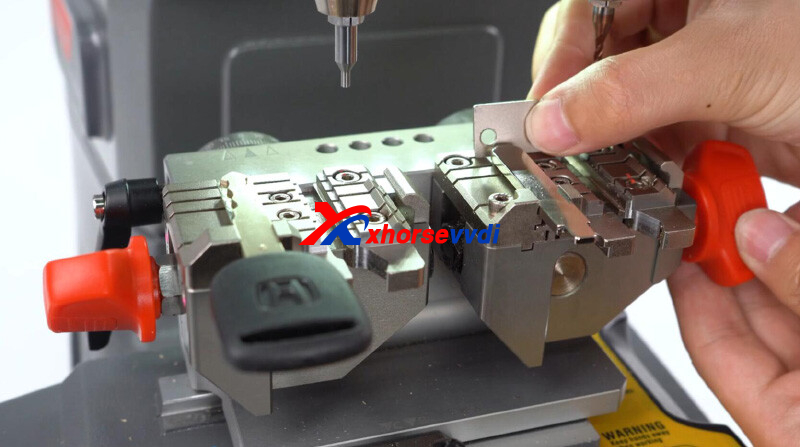
Put down main handle and rotate micro-adjust knob.
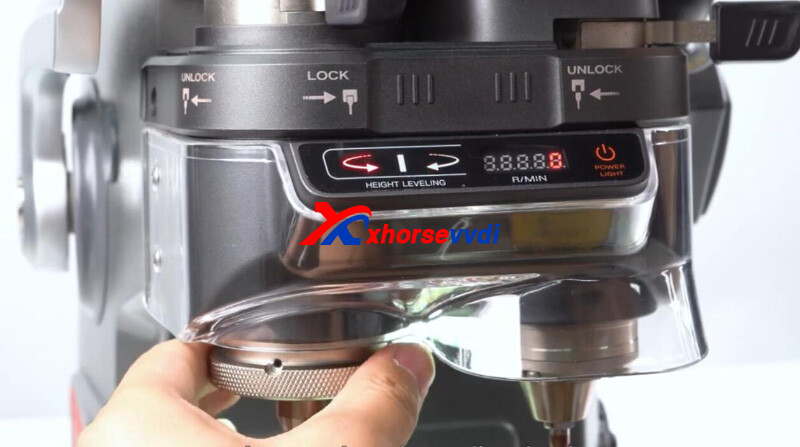
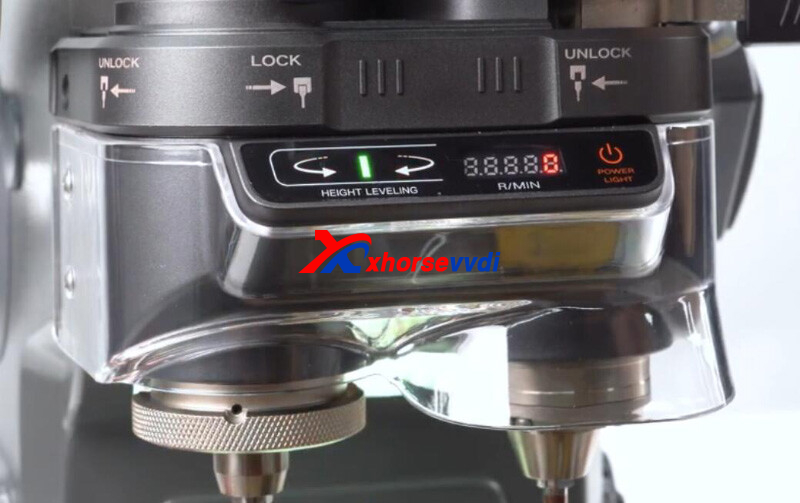
When the green light turns on, height calibration is complete.
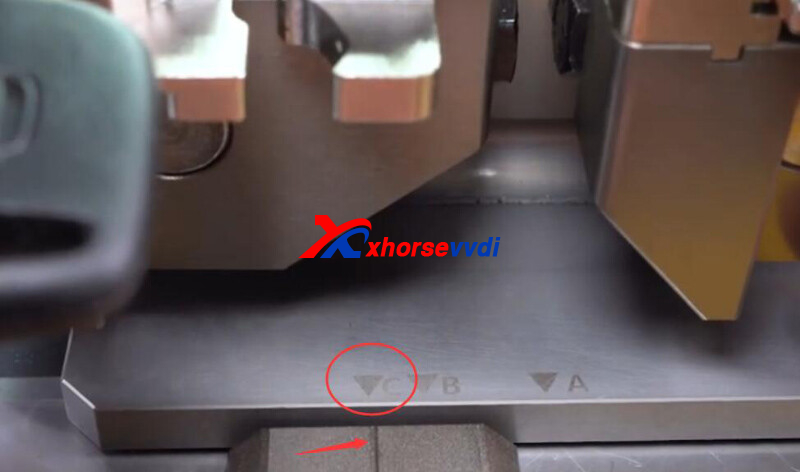
Move clamp A/ B/ C in align with the line.
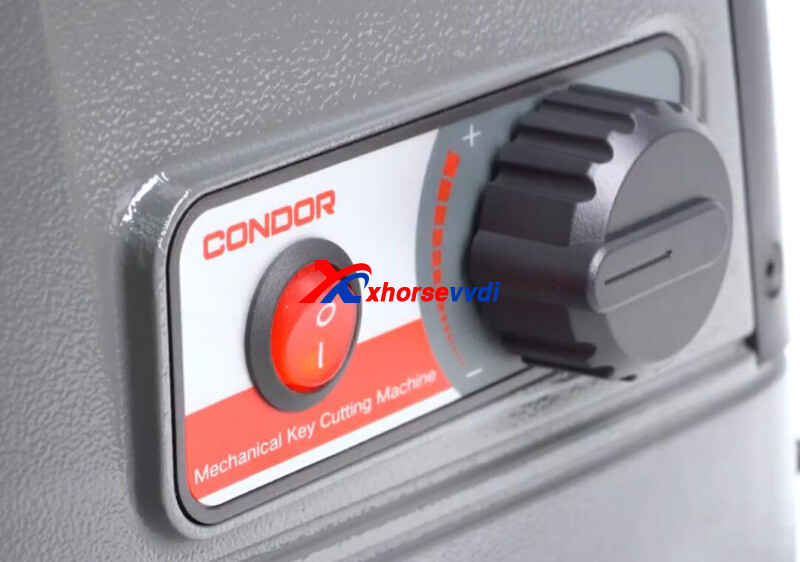
Turn on machine and adjust cutting speed.
Put down main handle and cut key.
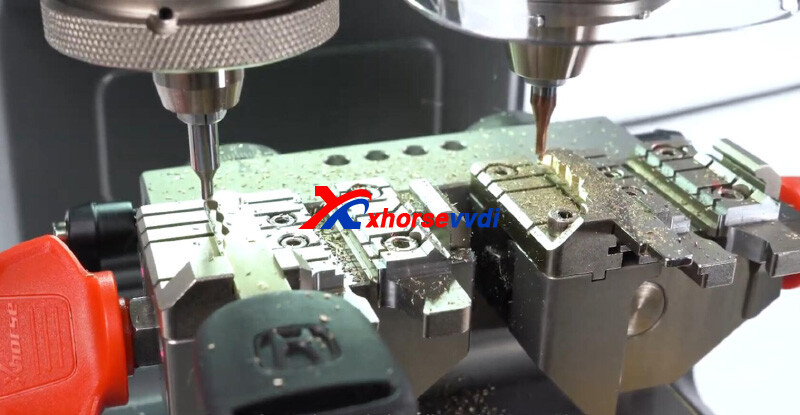
Repeat steps above to cut the other side.
Done!
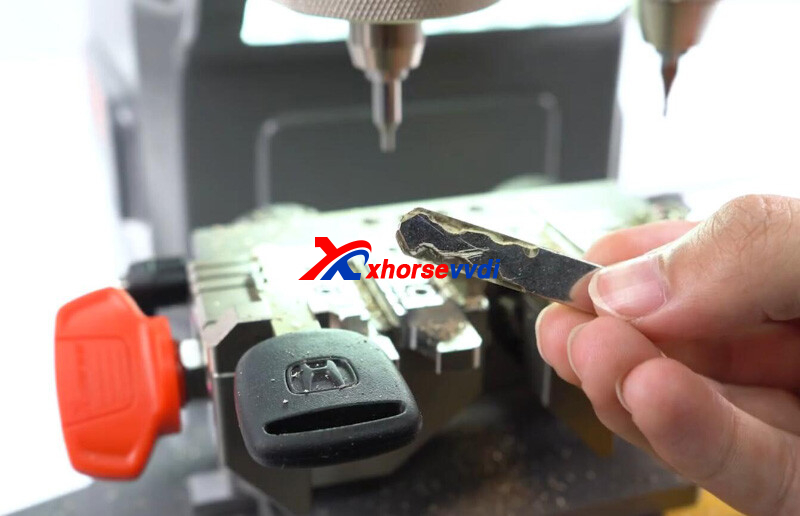
That's how to cut HON66 key using Condor XC-002 PRO.
http://blog.xhorsevvdi.com/how-xhorse-condor-xc-002-pro-cut-hon66-key/
Posted by: xhorsevvdi at
09:53 AM
| No Comments
| Add Comment
Post contains 103 words, total size 2 kb.
Quick Question:
VVDI Multi PROG driver won't work, how to install it again?
Here is the Solution:
Re-install Multi Prog driver
Path: Help>>Install the driver>>USB Serial (CDC)
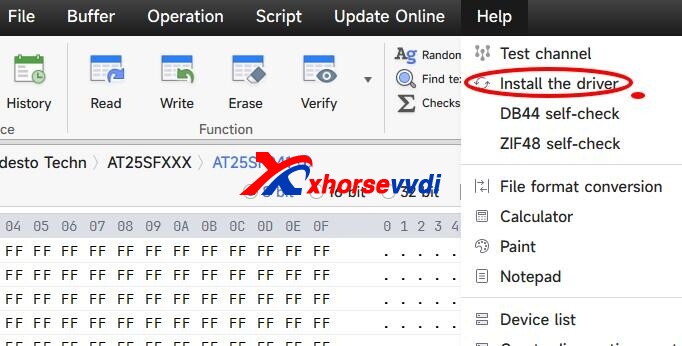
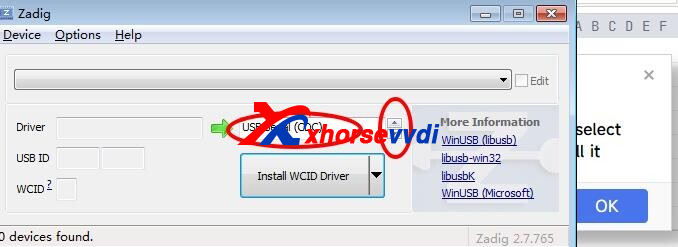
Done! Hope this could help!
http://blog.xhorsevvdi.com/solved-vvdi-multi-prog-driver-wont-work/
Posted by: xhorsevvdi at
09:53 AM
| No Comments
| Add Comment
Post contains 40 words, total size 1 kb.
Quick Question:
To clone delco e87 using VVDI Multi Prog, if I just need to copy data files and write them to ecu and it will be done? What does this prompt mean?
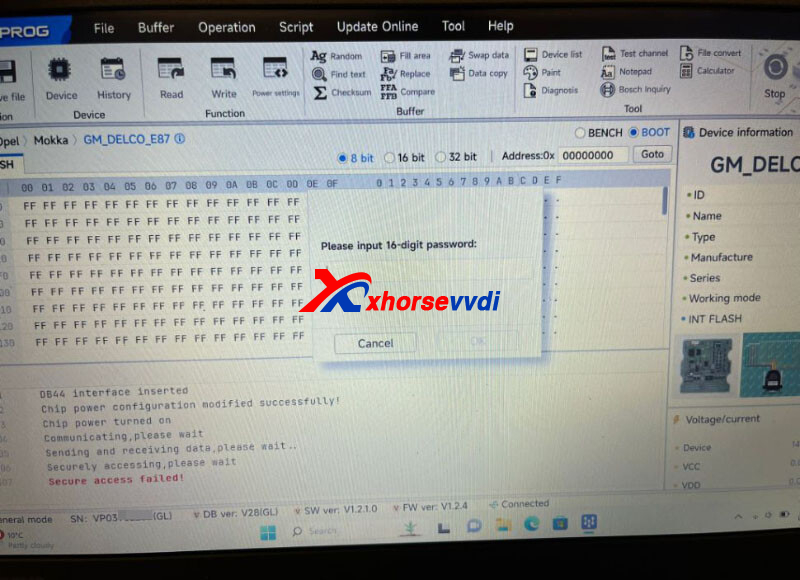
Here is the Answer:
Read password file on Bench mode.
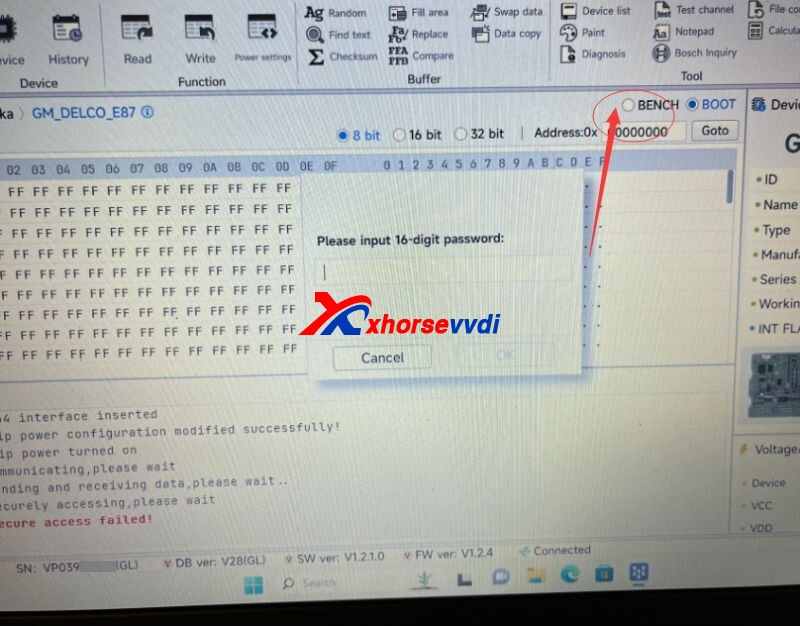
To clone delco e87, simple Read& Write won't work.
First install module to car, and see if car will start.
1)If so, and ECU was read and written before using other ECU programmers, cloning is not possible. See if that programmer could still read and write
2)If not or immobilizer is active, we need to do immo off
Done! Hope this could help!
http://blog.xhorsevvdi.com/vvdi-multi-prog-read-write-gm-delco-e87-tips/
Posted by: xhorsevvdi at
09:52 AM
| No Comments
| Add Comment
Post contains 116 words, total size 1 kb.
VVDI Key Tool Plus is a professional key programmer, especially in high-end vehicles such as VAG, BMW, Mercedes...
Here is a review:
2011 BMW CAS3++ IstaP (encrypted) Key Programming by Xhorse Key Tool Plus Tab via OBD OK.
Check out the process:
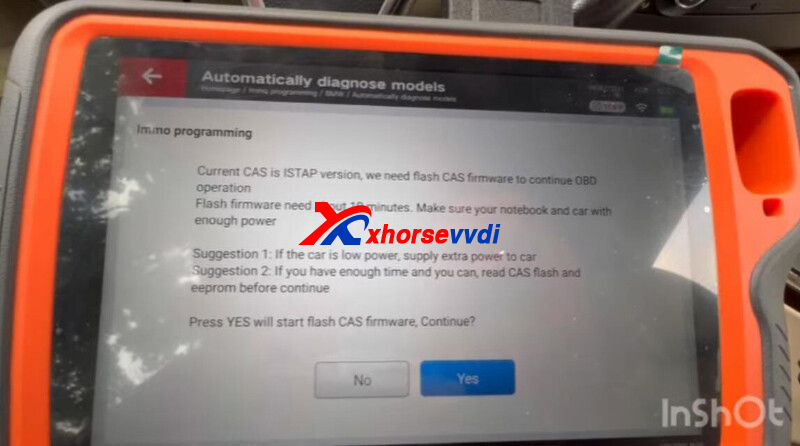
Immo Programming>>BMW>>Automatically diagnose model
CAS3++ system.
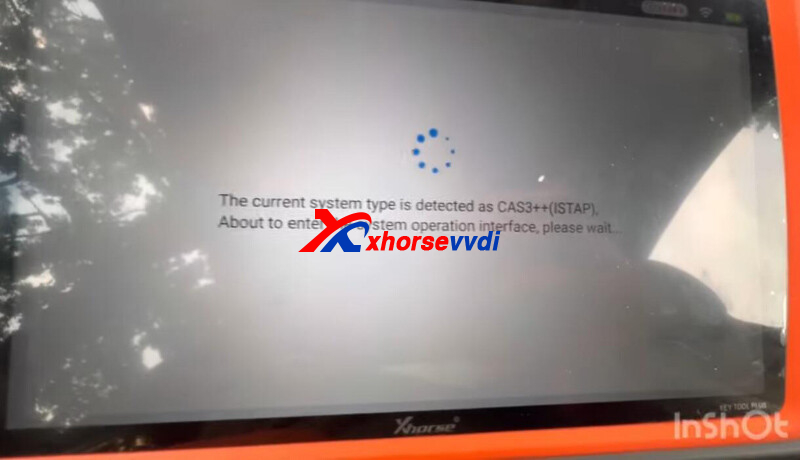
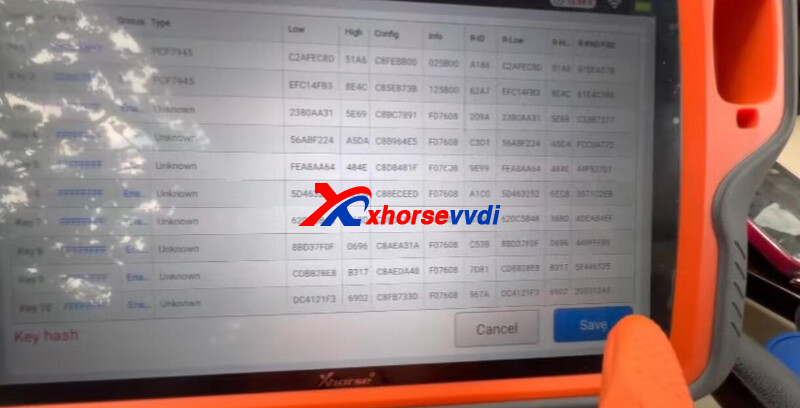
Read key info.
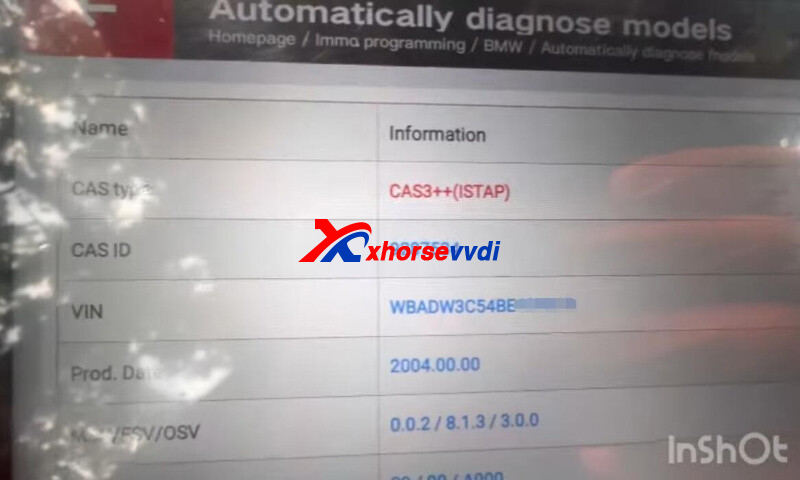
The process to flash CAS firmware will take about 10 minutes.
Back up Flash before operation and make sure enough power supply to car and tablet.
Save key info.
Generate dealer key.
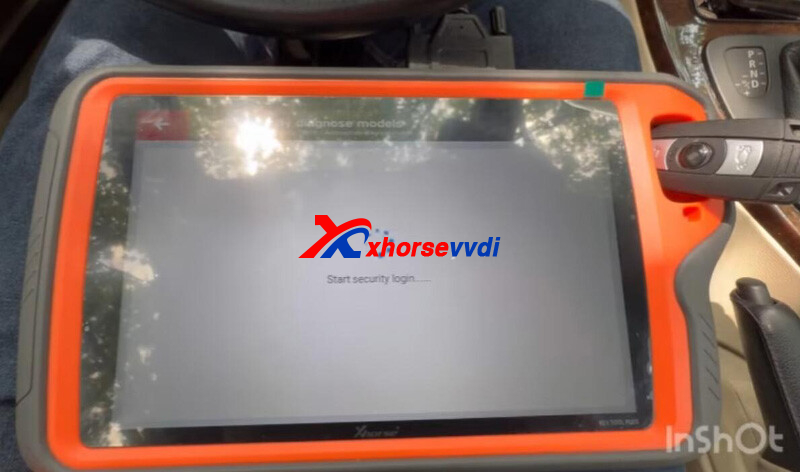
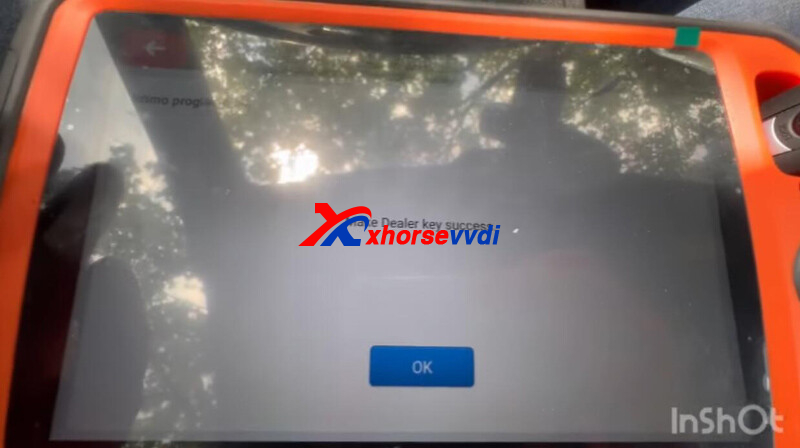
Add key.
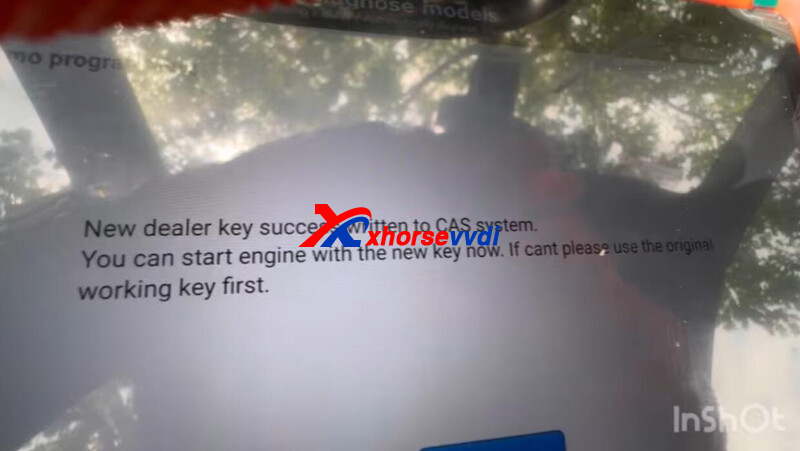
Done! That's how Key Tool Plus add keys for BWM CAS3++ IstaP version via OBD.
Credit to AutoHack.
http://blog.xhorsevvdi.com/key-tool-plus-2011-bmw-cas3-istap-encrypted-add-key-via-obd/
Posted by: xhorsevvdi at
09:52 AM
| No Comments
| Add Comment
Post contains 116 words, total size 3 kb.
VVDI MLB Tool is designed for VAG MLB key programming.
Here is a review:
Repair & save Audi 2021 mlb key data,
with Xhorse MLB-Tool and Key Tool Plus.
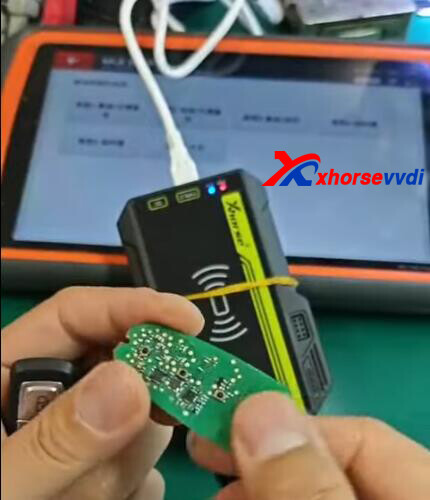
Take a look at how to back up key data,
Solder cables to original key pcb, and two capacitors required to be removed.
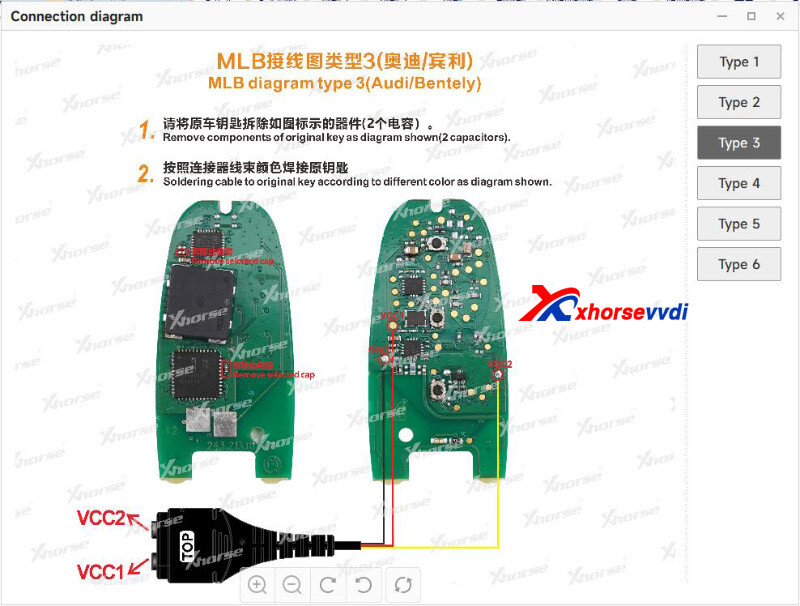
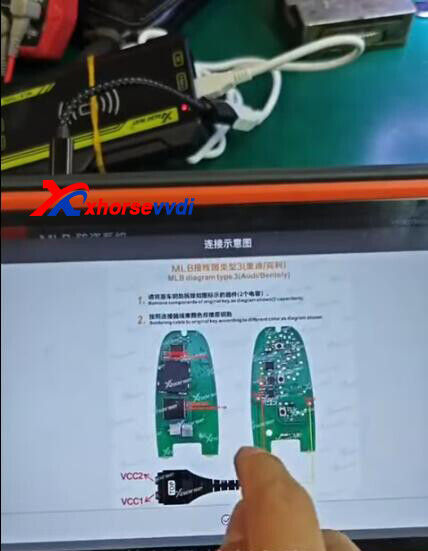
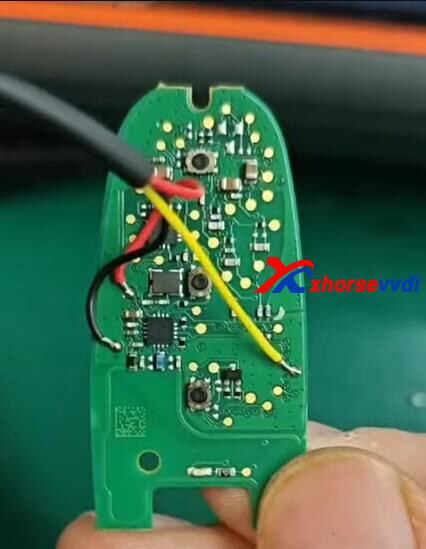
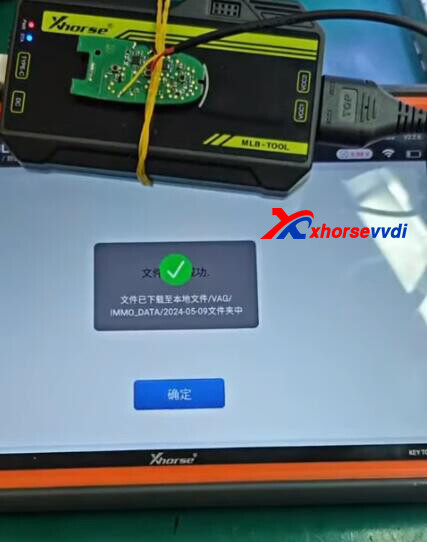
Back up key data so later we could generate dealer key by it.
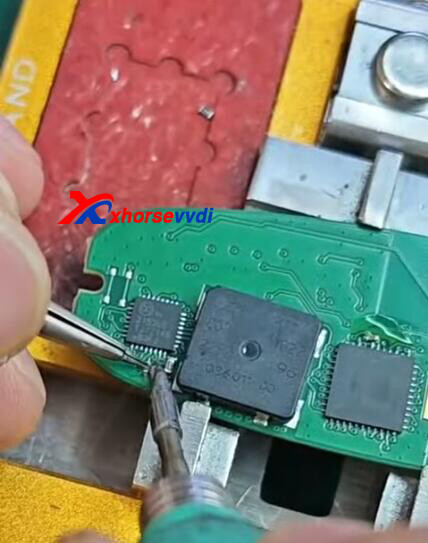
Solder back removed capacitors.
Done! Simple and Nice!
VVDI MLB Tool Pre-Order Now:
https://www.xhorsevvdi.com/wholesale/vvdi-mlb-tool.html
(Deposit 200USD, Refundable, Available within 30 days)
Posted by: xhorsevvdi at
09:51 AM
| No Comments
| Add Comment
Post contains 97 words, total size 3 kb.
Dear Xhorse Users from the US:
Xhorse Key Cutting Machine US Version now is on Sale!
*US Address Only! Local Shipping! No Tax!

US Version Sale: https://www.xhorsevvdi.com/producttags/us-version-sale.html
Hot Sale
1.Condor XC-Mini Plus II $2744
- Support Dimple Key
- Key Engraving
2.Dolphin XP005L $1848
- Adjustable HD Screen
- Full Protection Cover
3.Dolphin XP005 $1499
- Strong key database
- Built-in Battery
4.Dolphin XP007 $579
- Manual Key Cutting
- Support Dimple/ Side/ Track Key
Done!
http://blog.xhorsevvdi.com/xhorse-key-cutting-machine-us-version-on-sale/
Posted by: xhorsevvdi at
09:51 AM
| No Comments
| Add Comment
Post contains 77 words, total size 2 kb.
Quick Question:
VVDI Key Tool Plus, it failed to read vehicle data when all key lost. The error showed "Read data failed - Request out of range ERR: 7FA431", and the car is Toyota Rav 4 2017.
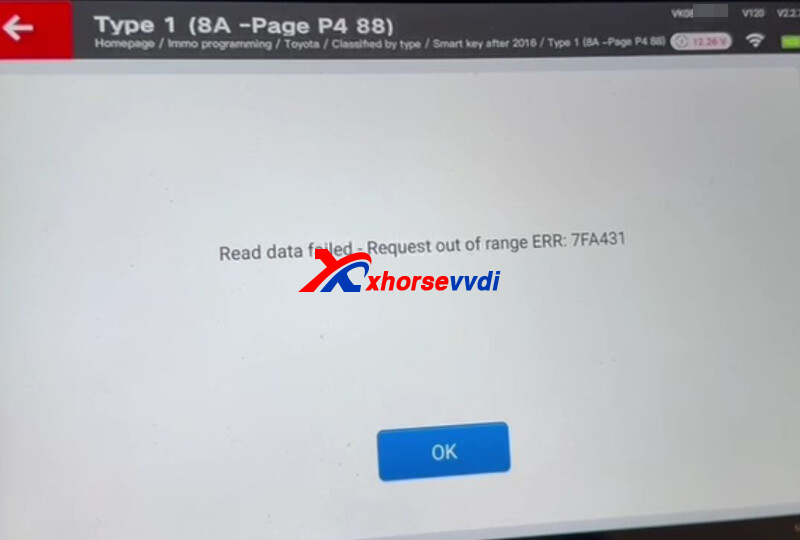
Here is the Solution:
Select
IMMO Programming>>Toyota>>Select by type>>Smart key after 2016>>Type2 (8A-PageP4A8_A9_AA)
1)If the screen shows
Thisremote(RX06JR7QUL)hasbeenusedtobackupothervehicledata,orthefirstbackuptimeismorethan24hours.Pleaseretryafterreplacingtheremote!
->Use another Xhorse XM38 Remote
2)If the screen shows
Wrong password
->Remove 93C86 and read data
Select
IMMO Programming>>Toyota>>Select by type>>Smart key after 2016>>Type1(8A-PageP48
Generate dealer keys via All Key Lost menu.
Done!
http://blog.xhorsevvdi.com/fixed-vvdi-key-tool-plus-toyota-rav4-2017-akl-read-data-failed/
Posted by: xhorsevvdi at
09:50 AM
| No Comments
| Add Comment
Post contains 101 words, total size 2 kb.
One customer gave feedback that his VVDI MULTI PROG failed to write BOSCH EDC17C74. And what does the remaining usage times mean? Is this the problem?
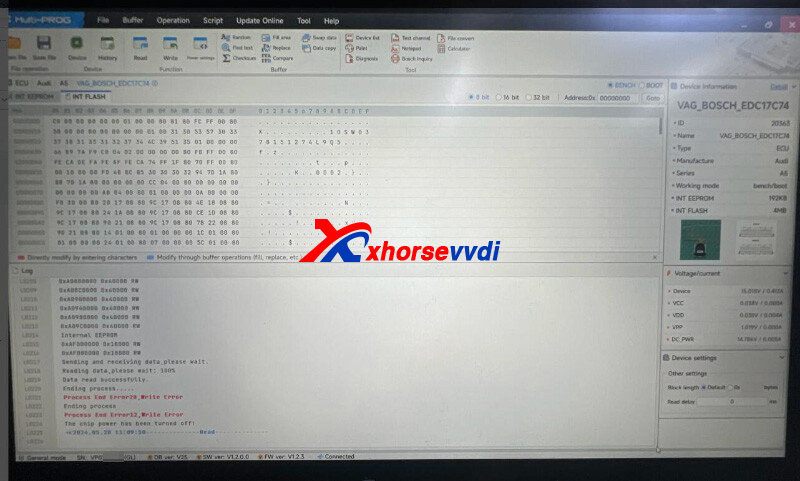
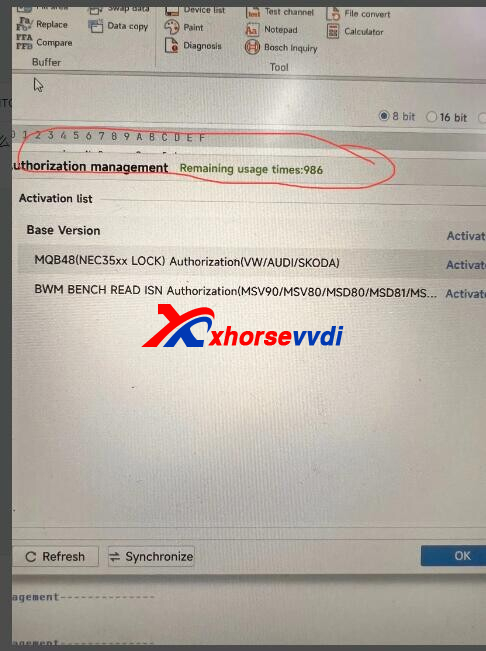
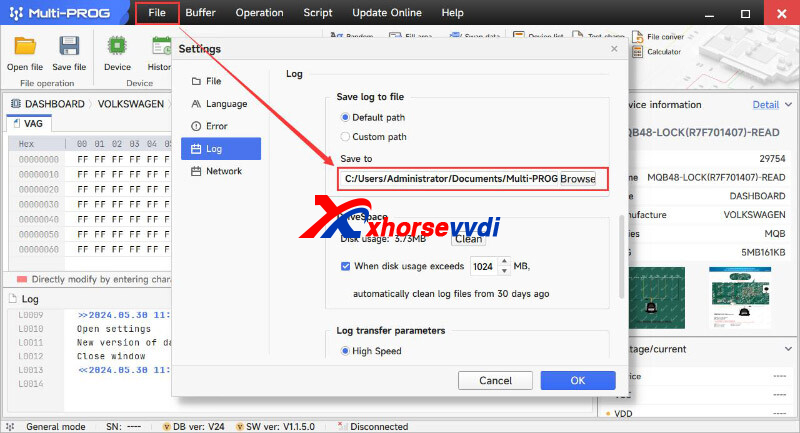
Here is the Answer:
Change file save location to another drive instead of C drive
When usage times run out, MULTI PROG needs synchronization to server.
Done! Hope this could help!
http://blog.xhorsevvdi.com/solved-vvdi-multi-prog-write-bosch-edc17c74-fail/
Posted by: xhorsevvdi at
09:50 AM
| No Comments
| Add Comment
Post contains 66 words, total size 1 kb.
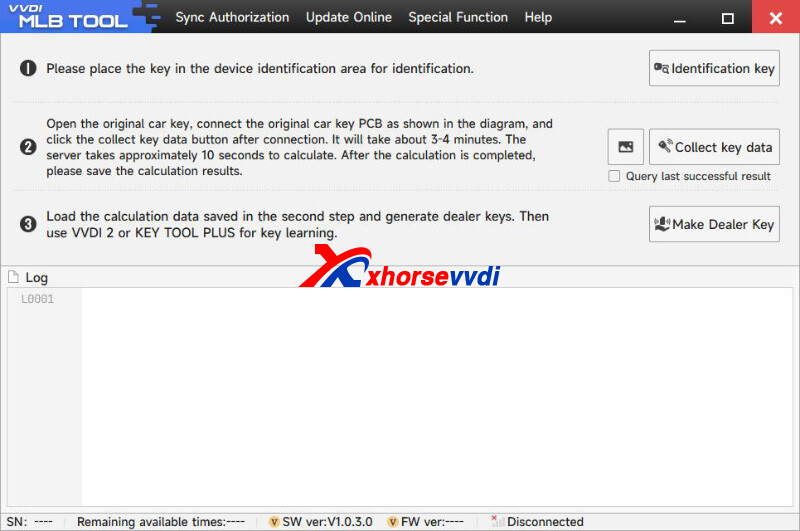
VVDI MLB-Tool is designed for MLB models like VW, Lamborghini, Bentley...
Here is info you may need.
1.VVDI MLB Tool Software Download:
2.Support List:
*Please refer to the prompts of the device software
Audi
A4L 2017-
A5 2017-
A6L 2019-
Q5L 2018-
Q7 2016-
A8 2017-
RS4 2019-
RS5 2019-
RS6 2019-
RS7 2021-
RS Q8 2021-
A4 2016-
A5 2017-
S4 2016-
S5 2017-
A7 2019-
S7 2020-
A8 2018-
A8 ne energy 2021-
S8 2021-
Q7 New Energy 2017-
Porsche
Taycan 2019-
Panamera 2017-
Panamera New Energy 2017-
Cayenne 2018-
Cayenne New Energey 2019-
911 2019-
VW
Touareg 2019-
Lamborghini
Urus 2018-
Bentley
Flying Spur 2020-
Flying Spur Hybrid 2022-
Bentayga 2016-
Bentayga Hybrid 2019-
Continental 2016-
3.MLB Key PINOUTs:
(*Removed capacitors are 100nF)
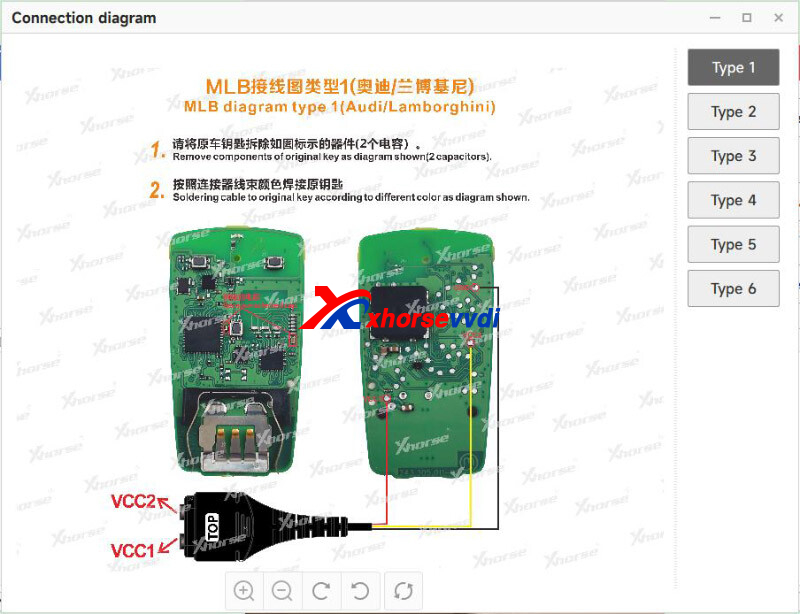
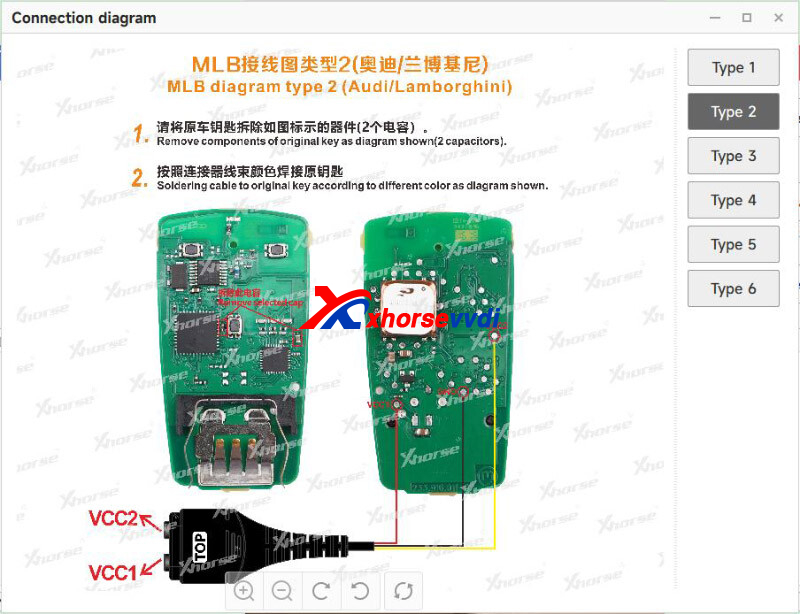
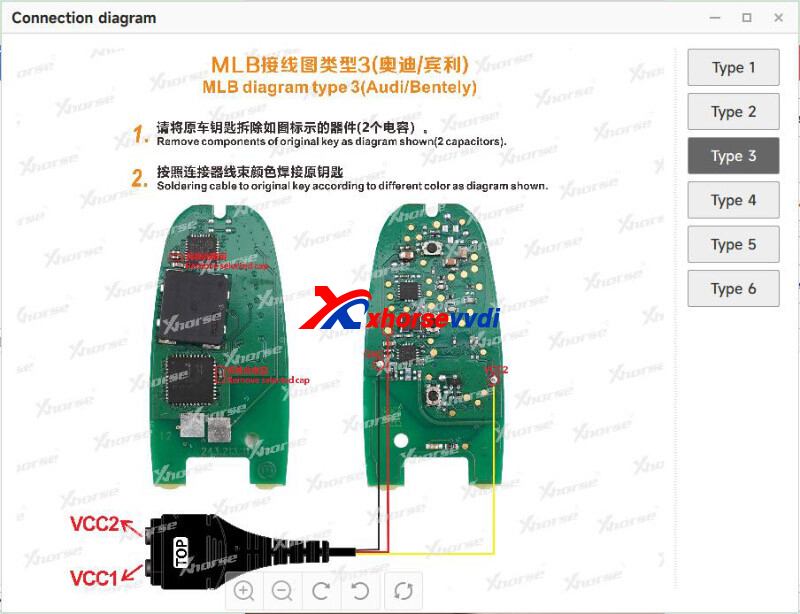
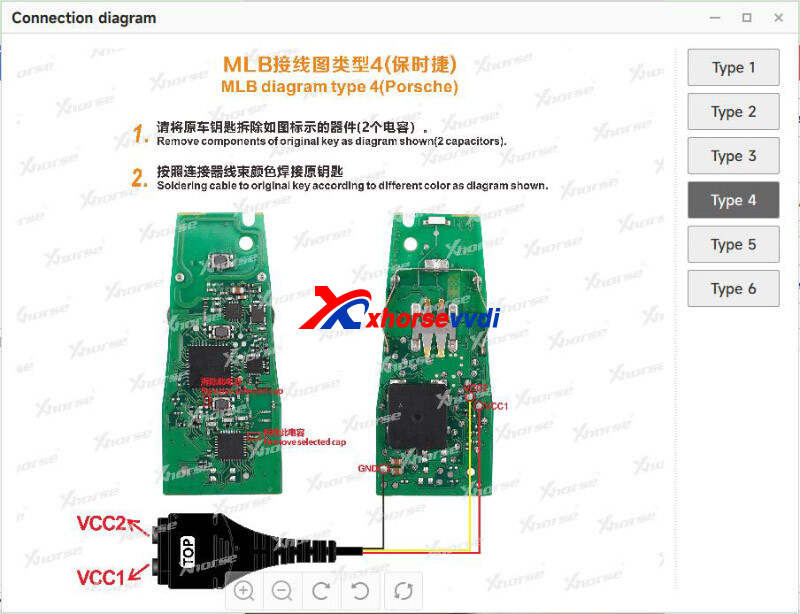
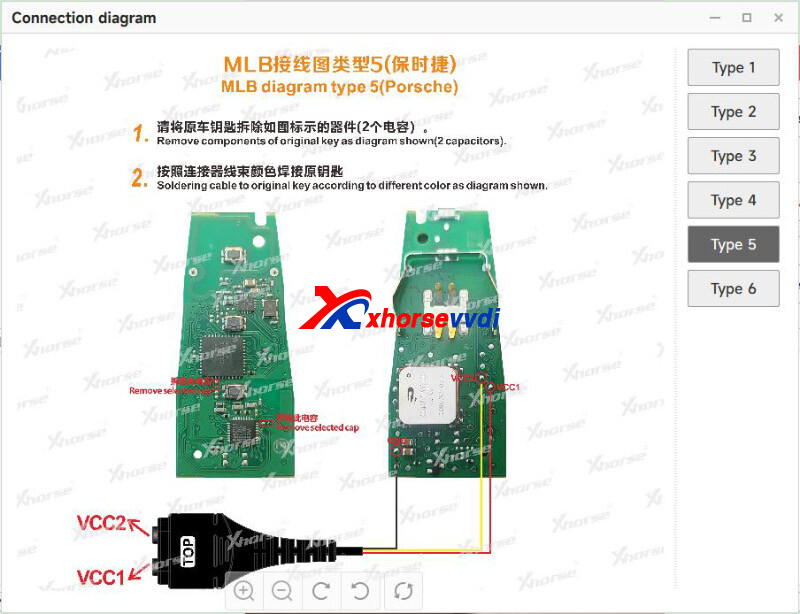
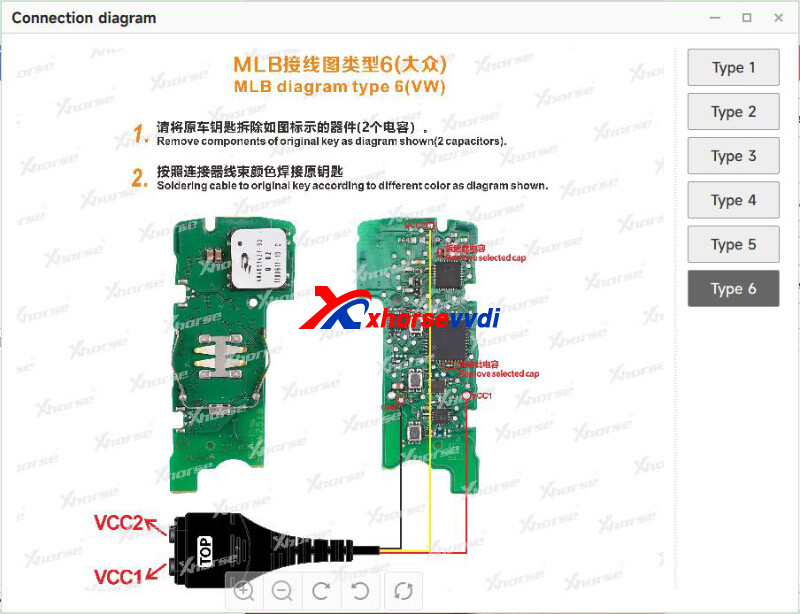
Stay tuned!
http://blog.xhorsevvdi.com/vvdi-mlb-tool-software-download-support-list-and-key-pinout/
Posted by: xhorsevvdi at
09:49 AM
| No Comments
| Add Comment
Post contains 143 words, total size 4 kb.
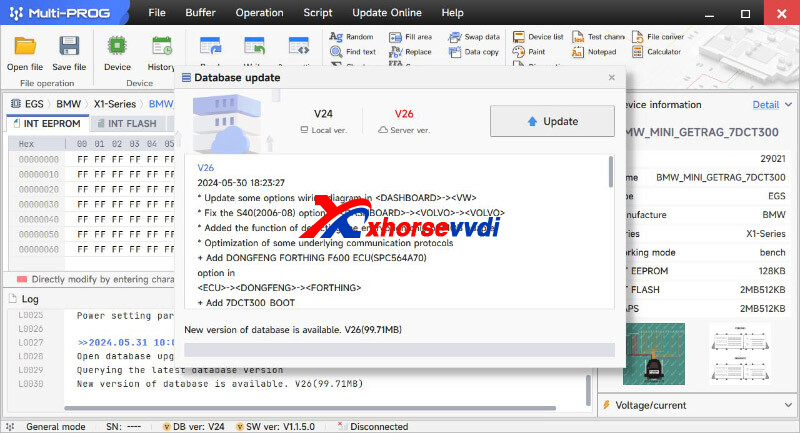
VVDI MULTI PROG released V26 database, adding Renesas D78FXXXX...
Free Download MULTI PROG Software
*Download software and update database online
V26 Database Update Info (2024-05-30)
* Update some options wiring diagram in <DASHBOARD>-><VW>
* Fix the S40(2006-0
option in <DASHBOARD>-><VOLVO>-><VOLVO>
* Added the function of detecting the encryption chip of MQB adapter
* Optimization of some underlying communication protocols
+ Add DONGFENG FORTHING F600 ECU(SPC564A70) option in <ECU>-><DONGFENG>-><FORTHING>
+ Add 7DCT300_BOOT option in <EGS>-><BMW>-><X1-Series>
+ Add JAC Junling DASHBOARD(MB96F693A/R) option in <DASHBOARD>-><JAC>-><JAC>
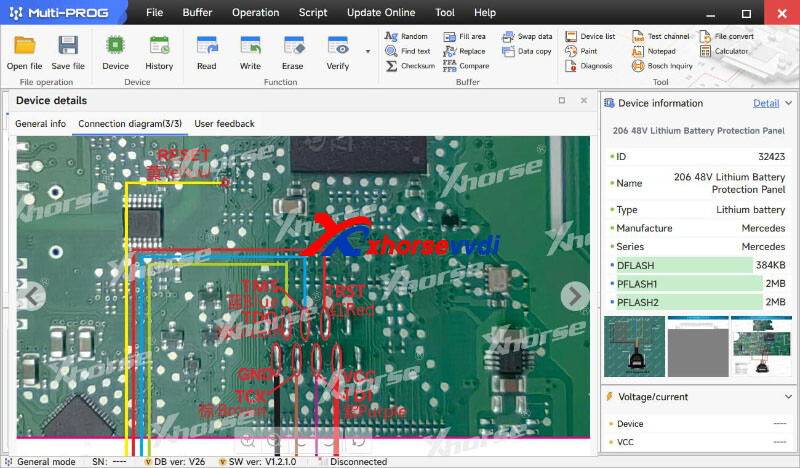
+ Add 206 48V Lithium Battery Protection Panel option in <Lithium battery>-><Mercedes>-><Mercedes>
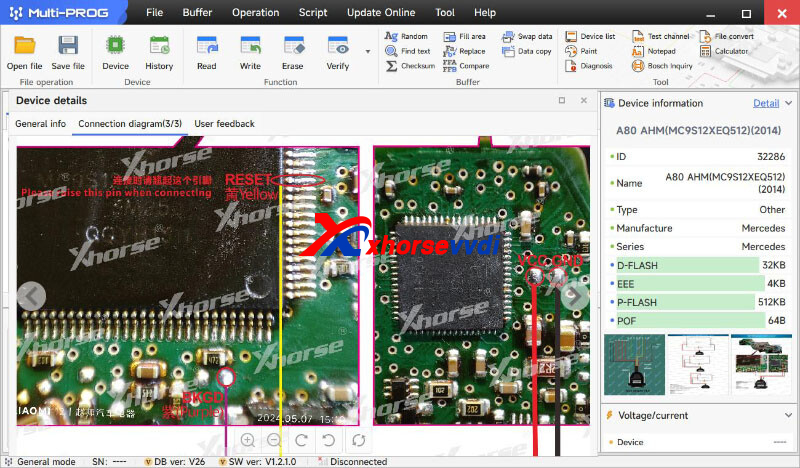
+ Add A80 AHM(MC9S12XEQ512)(2014) option in <OTHER>-><Mercedes>-><Mercedes>
+ Add YOGOMO BCM-1(STM8AF6269) option in <OTHER>-><YOGOMO>-><YOGOMO>
+ Add D78F0500, D78F0502, D78F0503, D78F0511, D78F0513, D78F0514, D78F0515, D78F0521, D78F0522, D78F0523, D78F0524, D78F0525, D78F0526, D78F0527, D78F0531, D78F0532, D78F0533, D78F0534, D78F0535, D78F0536, D78F0537, D78F0544, D78F0545, D78F0546, D78F0547, D78F0820, D78F0821, D78F0822, D78F1000, D78F1001, D78F1002, D78F1003, D78F1004, D78F1005, D78F1006, D78F1007, D78F1008, D78F1009, D78F1010, D78F1011, D78F1012, D78F1013, D78F1014, D78F1015, D78F1016, D78F1017, D78F1018, D78F1027, D78F1028, D78F1029, D78F1030, D78F1142, D78F1143, D78F1144, D78F1145, D78F1146, D78F1162, D78F1163, D78F1164, D78F1165, D78F1166, D78F1167, D78F1168, D78F1804, D78F1805, D78F1806, D78F1807, D78F1808, D78F1809, D78F1810, D78F1811, D78F1812, D78F1813, D78F1814, D78F1815, D78F1816, D78F1817, D78F1818, D78F1819, D78F1820, D78F1821, D78F1822, D78F1823, D78F1824, D78F1825, D78F1826, D78F1827, D78F1828, D78F1829, D78F1830, D78F1831, D78F1832, D78F1833, D78F1834, D78F1835, D78F1836, D78F1837, D78F1838, D78F1839, D78F1840, D78F1841, D78F1842, D78F1843, D78F1844, D78F1845, D78F1846, D78F1847, D78F1848, D78F1849, D78F9200, D78F9201, D78F9202, D78F9210, D78F9211, D78F9212, D78F9221, D78F9222, D78F9224, D78F9232, D78F9234, D78F9500, D78F9501, D78F9502, D78F9510, D78F9511, D78F9512 options in <MCU>-><Renesas>-><78K>
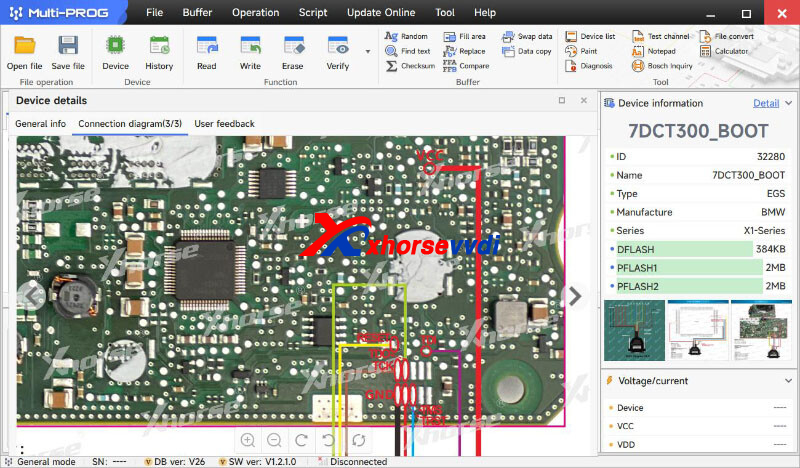
Stay tuned!
http://blog.xhorsevvdi.com/vvdi-multi-prog-v26-database-add-renesas-d78fxxxx/
Posted by: xhorsevvdi at
09:49 AM
| No Comments
| Add Comment
Post contains 253 words, total size 4 kb.
32 queries taking 0.119 seconds, 131 records returned.
Powered by Minx 1.1.6c-pink.

