



July 01, 2025
VVDI BIMTOOL PRO Enhanced Edition for BMW Update Version of VVDIBMW Tool, newly add ethernet port for coding and programming, support 10/100M programming via Ethernet. And we received feedback for BMW FEM F020, not assure which option to choose.
I’m trying to restore a FEM module coding
Not sure which option to select

Here is the xhorse engineer suggestion:
Please tick on CAFD,and choose the 40 option

http://blog.xhorsevvdi.com/xhorse-vvdi-bimtool-pro-restore-bmw-fem-f020-module-coding-tips/
Posted by: xhorsevvdi at
08:52 AM
| No Comments
| Add Comment
Post contains 79 words, total size 1 kb.
Question:
Xhorse Multi Prog reads ME17.9.64, it is stuck on this screen for quite a long time and gives connection errors, how to solve the problem?


Here is the Solution:
This error will be fixed later.
Now select 'test channel 2' and it works.

Done! Hope this helps!
http://blog.xhorsevvdi.com/xhorse-multi-prog-read-me17-9-64-connection-failed-solution/
Posted by: xhorsevvdi at
08:52 AM
| No Comments
| Add Comment
Post contains 57 words, total size 2 kb.
One customer gave feedback that Xhorse Multi Prog won't read VAG Continental SDI10.4. The tool showed 'Server calculation error', so is the server down?


Here is the Solution:
This error will be fixed later.
Users can select 'test channel 18' to read SDI10.4 now.

Done! Hope this helps!
http://blog.xhorsevvdi.com/multi-prog-read-vag-sdi10-4-server-calculation-error-solution/
Posted by: xhorsevvdi at
08:51 AM
| No Comments
| Add Comment
Post contains 58 words, total size 1 kb.
Question:
VVDI BIMTOOL PRO, I can't to do 6hp e-series reset by obd? May be it work only when connect wire directly to gearbox?
Here is the Answer:
Reset 6hp on Bench.
Connect VVDI BIM Tool to gearbox by pinout below.

Done! Hope this helps!
http://blog.xhorsevvdi.com/vvdi-bim-tool-reset-bmw-6hp-gearbox-obd-or-bench/
Posted by: xhorsevvdi at
08:50 AM
| No Comments
| Add Comment
Post contains 56 words, total size 1 kb.
One customer gave feedback that there was an error when he tried to program the new key, Xhorse XSBTKOGL Bluetooth Digital Smart Key.
The Solution is to switch CN version into GL version.

Here is how:
1.Reset device (Press and hold 20s)

2.Connect to device by iPhone
After all operations, make sure device shown GL version


3.Reset device again, connect device by Android phone
Done! Hope this helps!
http://blog.xhorsevvdi.com/how-to-switch-xhorse-digital-smart-key-to-global-version/
Posted by: xhorsevvdi at
08:48 AM
| No Comments
| Add Comment
Post contains 79 words, total size 3 kb.
May 13, 2025
Question:
XhorseBluetoothDigitalSmartKey told "this device is not allowed to be used in the current region", is there a solution, when buying no one warns that it doesn't work in...


Here is the Answer:
There are Global and Chinese Version of Xhorse Digital Smart Key, and CN version won't work outside China.
Simply ask your seller to change version for you.
Done! Hope this helps!
http://blog.xhorsevvdi.com/xhorse-bluetooth-digital-key-not-allowed-in-current-region-solution/
Posted by: xhorsevvdi at
09:07 AM
| No Comments
| Add Comment
Post contains 75 words, total size 1 kb.
One customer wonders if Xhorse Multi Prog read the cluster with MQB48 Adapter, VW T-ROC 2019 year with cluster 17A920790A CPU R7F701401.
Here is the Answer:
Multi Prog will only read/ write one cluster with CPU R7F701401.
Users need to solder cables using RH850 Cable.
Check out if pinout looks identical to PCB.


Done! Hope this helps!
http://blog.xhorsevvdi.com/multi-prog-mqb48-adapter-possible-to-read-vw-cluster-r7f701401/
Posted by: xhorsevvdi at
09:07 AM
| No Comments
| Add Comment
Post contains 68 words, total size 1 kb.
Question:
Xhorse XSBTK0EN Bluetooth Key,
IfIopenthedoorofcarwithoutkey,isthisobddevicestartinitiationon?
WhatistheprotectionagainstcartheftifIleavetheOBDdeviceinthecar?

Here is the Answer:
After key learning using XSBTK0EN Key, Switch to Daily Mode. (Path: Settings>>Advanced Setting>>Switching modes)
Then other phones won't identify this key via Bluetooth and this key cannot start cars without the linked phone.

Done! Hope this helps!
http://blog.xhorsevvdi.com/how-xhorse-xsbtk0en-bluetooth-key-start-initiation/
Posted by: xhorsevvdi at
09:06 AM
| No Comments
| Add Comment
Post contains 56 words, total size 1 kb.
Question:
Xhorse Multi Prog, I see dflash immo and ONLY read NO WRITE and no dflash clone how can I write this bcm, JEEP Renegade BCM R7F701034?

Answer:
Download Database again and it will give a way to clone D-flash.
Then users can clone this BCM unit.

Done! Hope this helps!
http://blog.xhorsevvdi.com/xhorse-multi-prog-possible-to-read-write-jeep-bcm-r7f701034/
Posted by: xhorsevvdi at
09:06 AM
| No Comments
| Add Comment
Post contains 62 words, total size 1 kb.
One customer said there was a problem on Xhorse Key Reader. Tried to decode one key using key reader but every time it read the key it would show different results. Tried 3 times and got three bittings.


Here is the Solution:
If part of bitting is not correct, users can change bitting by arrows below.
Put orange bits on the green line.

Then the correct bitting is 5434421232.
Done! Hope this helps!
http://blog.xhorsevvdi.com/xhorse-key-reader-read-different-bittings-on-identical-key-solution/
Posted by: xhorsevvdi at
09:06 AM
| No Comments
| Add Comment
Post contains 84 words, total size 2 kb.
Question:
Generated remote controls using 11 Xhorse Super Keys, but id48 96 function on Xhorse Key Tool Max Pro still not working, what is going on, how can I fix it?


Here is the Solution:
In this step, users need to put Key Tool Max Pro near ignition lock cylinder for collecting data
Done! Hope this helps!
http://blog.xhorsevvdi.com/key-tool-max-pro-id48-96-function-not-working-solution/
Posted by: xhorsevvdi at
09:05 AM
| No Comments
| Add Comment
Post contains 68 words, total size 2 kb.
Here is a review of Xhorse Multi Prog:
AUTEL IM508S fail to read ECU - Xhorse Multi PROG Did Read with ease & IMMO OFF - PASSAT 2017
Let's take a look at how it is done.
EDC17C74 unit.

2 possible PINOUTs.

Multi Prog Tool on the job.

Read and save EEPROM and FLASH data.


Select
Tool>>Turn off the immo

Load file.

Write immo off file.
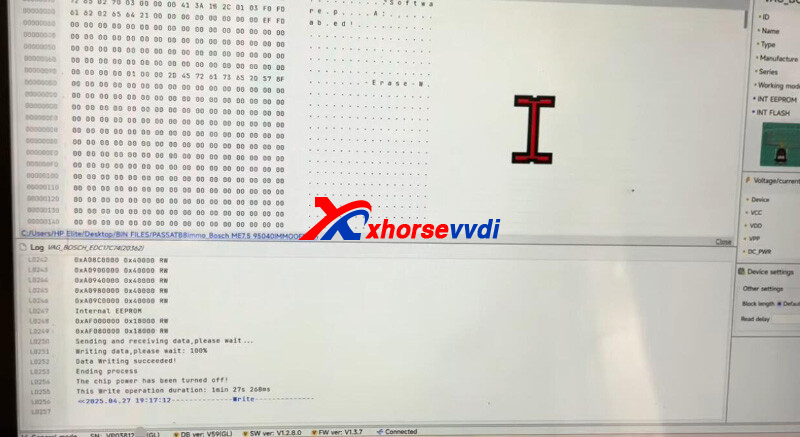
Done! That's how VVDI Multi Prog IMMO OFF Passat 2017.
http://blog.xhorsevvdi.com/xhorse-multi-prog-passat-2017-read-write-immo-off-with-ease/
Posted by: xhorsevvdi at
09:05 AM
| No Comments
| Add Comment
Post contains 89 words, total size 3 kb.
Question:
Xhorse MVCIPROJ2534workwithG-IDSSsoftwareaspassthru?


Here is the Answer:
If G-IDSS requires a J2534 passthru tool for connection, MVCI PRO should work.
G-IDSS is not tested yet, users try at their own risk.
If G-IDSS won't work, try HONDA HDS.
Done! Hope this helps!
http://blog.xhorsevvdi.com/mvci-pro-j2534-possible-to-work-with-isuzu-g-idss/
Posted by: xhorsevvdi at
09:04 AM
| No Comments
| Add Comment
Post contains 52 words, total size 1 kb.
VVDI Multi Prog V60 Database is available! MQB D70F3532 D70F3535 and more are added!

Free Download MULTI PROG Software
*Download software and update database online
V60 Database Update Info (04-28-2025)
* Fix the connection failure issue of 3658110XKU47A, 3658110XKV86A, 3658110XKY00A, 3658110XKY28B, 3658110XKY3BA, 3658110XKZ1DA, 3658110XNZ01A, 3658120XNZ01A options in [AIRBAG]->[GreatWall]->[GreatWall]
+ Add MQB_LOCK(D70F3532)-READ-V2(WELD), MQB_LOCK(D70F3535_36_37)-READ(WELD) options in [DASHBOARD]->[VW]->[MQB]
+ Add CDC3297 option in [MCU]->[TDK-MICRONAS]->[CDC32XX]
+ Add KF32A100GQP(ICSP), KF32A100GQP(DPI), KF32A100GQS(ICSP), KF32A100GQS(DPI), KF32A100GQT(ICSP), KF32A100GQT(DPI), KF32A100IQS(ICSP), KF32A100IQS(DPI), KF32A100IQT(ICSP), KF32A100IQT(DPI), KF32A100KQS(ICSP), KF32A100KQS(DPI), KF32A100KQT(ICSP), KF32A100KQT(DPI), KF32A116INP(ICSP), KF32A116INP(DPI), KF32A116KQS(ICSP), KF32A116KQS(DPI), KF32A120GQP(ICSP), KF32A120GQP(DPI), KF32A120GQS(ICSP), KF32A120GQS(DPI), KF32A120GQT(ICSP), KF32A120GQT(DPI), KF32A120IQS(ICSP), KF32A120IQS(DPI), KF32A120IQT(ICSP), KF32A120IQT(DPI), KF32A120KQS(ICSP), KF32A120KQS(DPI), KF32A120KQT(ICSP), KF32A120KQT(DPI), KF32A126IQS(ICSP), KF32A126IQS(DPI), KF32A126KNP(ICSP), KF32A126KNP(DPI), KF32A126KQS(ICSP), KF32A126KQS(DPI), KF32A136GNP(ICSP), KF32A136GNP(DPI), KF32A136GQS(ICSP), KF32A136GQS(DPI), KF32A136INP(ICSP), KF32A136INP(DPI), KF32A136IQS(ICSP), KF32A136IQS(DPI), KF32A136IQT(ICSP), KF32A136IQT(DPI), KF32A136KNP(ICSP), KF32A136KNP(DPI), KF32A136KQS(ICSP), KF32A136KQS(DPI), KF32A136KQT(ICSP), KF32A136KQT(DPI), KF32A140GQP(ICSP), KF32A140GQP(DPI), KF32A140INP(ICSP), KF32A140INP(DPI), KF32A140IQS(ICSP), KF32A140IQS(DPI), KF32A140IQT(ICSP), KF32A140IQT(DPI), KF32A140KQS(ICSP), KF32A140KQS(DPI), KF32A140KQT(ICSP), KF32A140KQT(DPI), KF32A141GQP(ICSP), KF32A141GQP(DPI), KF32A141GQS(ICSP), KF32A141GQS(DPI), KF32A141INP(ICSP), KF32A141INP(DPI), KF32A141IQS(ICSP), KF32A141IQS(DPI), KF32A141IQT(ICSP), KF32A141IQT(DPI), KF32A146INP(ICSP), KF32A146INP(DPI), KF32A146IQS(ICSP), KF32A146IQS(DPI), KF32A146IQT(ICSP), KF32A146IQT(DPI), KF32A146KQS(ICSP), KF32A146KQS(DPI), KF32A146KQT(ICSP), KF32A146KQT(DPI), KF32A150IQT(ICSP), KF32A150IQT(DPI), KF32A150KQS(ICSP), KF32A150KQS(DPI), KF32A150KQT(ICSP), KF32A150KQT(DPI), KF32A150KQV(ICSP), KF32A150KQV(DPI), KF32A150MNT(ICSP), KF32A150MNT(DPI), KF32A150MQS(ICSP), KF32A150MQS(DPI), KF32A150MQT(ICSP), KF32A150MQT(DPI), KF32A150MQV(ICSP), KF32A150MQV(DPI), KF32A151IQT(ICSP), KF32A151IQT(DPI), KF32A151KQS(ICSP), KF32A151KQS(DPI), KF32A151KQT(ICSP), KF32A151KQT(DPI), KF32A151KQV(ICSP), KF32A151KQV(DPI), KF32A151MQS(ICSP), KF32A151MQS(DPI), KF32A151MQT(ICSP), KF32A151MQT(DPI), KF32A151MQV(ICSP), KF32A151MQV(DPI), KF32A152MQT(ICSP), KF32A152MQT(DPI), KF32A152MQV(ICSP), KF32A152MQV(DPI), KF32A153MQV(ICSP), KF32A153MQV(DPI), KF32A155KQT(ICSP), KF32A155KQT(DPI), KF32A155MQT(ICSP), KF32A155MQT(DPI), KF32A156INP(ICSP), KF32A156INP(DPI), KF32A156IQS(ICSP), KF32A156IQS(DPI), KF32A156KQS(ICSP), KF32A156KQS(DPI), KF32A156KQT(ICSP), KF32A156KQT(DPI), KF32A156KQV(ICSP), KF32A156KQV(DPI), KF32A156MBV(ICSP), KF32A156MBV(DPI), KF32A156MQS(ICSP), KF32A156MQS(DPI), KF32A156MQT(ICSP), KF32A156MQT(DPI), KF32A156MQV(ICSP), KF32A156MQV(DPI), KF32A156MQW(ICSP), KF32A156MQW(DPI), KF32A166KQV(ICSP), KF32A166KQV(DPI), KF32A166KQW(ICSP), KF32A166KQW(DPI), KF32A166MQV(ICSP), KF32A166MQV(DPI), KF32A166MQW(ICSP), KF32A166MQW(DPI), KF32A250GQS(ICSP), KF32A250GQS(DPI), KF32A250KQT(ICSP), KF32A250KQT(DPI), KF32A250MQT(ICSP), KF32A250MQT(DPI), KF32A250MQV(ICSP), KF32A250MQV(DPI), KF32A251IQT(ICSP), KF32A251IQT(DPI), KF32A251KQT(ICSP), KF32A251KQT(DPI), KF32A251KQV(ICSP), KF32A251KQV(DPI), KF32A251MQT(ICSP), KF32A251MQT(DPI), KF32A251MQV(ICSP), KF32A251MQV(DPI) options in [MCU]->[ChipON]->[KF32AXXX]
+ Add KF32F110INP(ICSP), KF32F110INP(DPI), KF32F110IQP(ICSP), KF32F110IQP(DPI), KF32F110IQS(ICSP), KF32F110IQS(DPI), KF32F110IQT(ICSP), KF32F110IQT(DPI), KF32F130GNP(ICSP), KF32F130GNP(DPI), KF32F130GQS(ICSP), KF32F130GQS(DPI), KF32F130GQT(ICSP), KF32F130GQT(DPI), KF32F130INP(ICSP), KF32F130INP(DPI), KF32F130IQS(ICSP), KF32F130IQS(DPI), KF32F130IQT(ICSP), KF32F130IQT(DPI), KF32F130KQT(ICSP), KF32F130KQT(DPI), KF32F130MQT(ICSP), KF32F130MQT(DPI), KF32F142FNP(ICSP), KF32F142FNP(DPI), KF32F142FQS(ICSP), KF32F142FQS(DPI), KF32F142GNP(ICSP), KF32F142GNP(DPI), KF32F142GQS(ICSP), KF32F142GQS(DPI), KF32F142INP(ICSP), KF32F142INP(DPI), KF32F142IQS(ICSP), KF32F142IQS(DPI), KF32F160MQT(ICSP), KF32F160MQT(DPI), KF32F160MQV(ICSP), KF32F160MQV(DPI), KF32F160MQW(ICSP), KF32F160MQW(DPI), KF32F161GNP(ICSP), KF32F161GNP(DPI), KF32F161GNS(ICSP), KF32F161GNS(DPI), KF32F161GQP(ICSP), KF32F161GQP(DPI), KF32F161GQS(ICSP), KF32F161GQS(DPI), KF32F161GQT(ICSP), KF32F161GQT(DPI), KF32F161INP(ICSP), KF32F161INP(DPI), KF32F161INS(ICSP), KF32F161INS(DPI), KF32F161IQP(ICSP), KF32F161IQP(DPI), KF32F161IQS(ICSP), KF32F161IQS(DPI), KF32F161IQT(ICSP), KF32F161IQT(DPI), KF32F161KQT(ICSP), KF32F161KQT(DPI), KF32F161KQV(ICSP), KF32F161KQV(DPI), KF32F161KQW(ICSP), KF32F161KQW(DPI), KF32F161MQV(ICSP), KF32F161MQV(DPI), KF32F161MQW(ICSP), KF32F161MQW(DPI), KF32F330GQS(ICSP), KF32F330GQS(DPI), KF32F330IQS(ICSP), KF32F330IQS(DPI), KF32F330IQT(ICSP), KF32F330IQT(DPI), KF32F330IQV(ICSP), KF32F330IQV(DPI), KF32F330KQT(ICSP), KF32F330KQT(DPI), KF32F330KQV(ICSP), KF32F330KQV(DPI), KF32F330MQT(ICSP), KF32F330MQT(DPI), KF32F330MQV(ICSP), KF32F330MQV(DPI), KF32F341GQP(ICSP), KF32F341GQP(DPI), KF32F341GQS(ICSP), KF32F341GQS(DPI), KF32F341IQS(ICSP), KF32F341IQS(DPI), KF32F341IQT(ICSP), KF32F341IQT(DPI), KF32F350KQS(ICSP), KF32F350KQS(DPI), KF32F350KQT(ICSP), KF32F350KQT(DPI), KF32F350KQV(ICSP), KF32F350KQV(DPI), KF32F350MQS(ICSP), KF32F350MQS(DPI), KF32F350MQT(ICSP), KF32F350MQT(DPI), KF32F350MQV(ICSP), KF32F350MQV(DPI), KF32F351KQT(ICSP), KF32F351KQT(DPI), KF32F351KQV(ICSP), KF32F351KQV(DPI), KF32F351MQT(ICSP), KF32F351MQT(DPI), KF32F351MQV(ICSP), KF32F351MQV(DPI) options in [MCU]->[ChipON]->[KF32FXXX]
+ Add KF32L530KNS(ICSP), KF32L530KNS(DPI), KF32L530KQT(ICSP), KF32L530KQT(DPI), KF32L530KQV(ICSP), KF32L530KQV(DPI), KF32L530MNS(ICSP), KF32L530MNS(DPI), KF32L530MQT(ICSP), KF32L530MQT(DPI), KF32L530MQV(ICSP), KF32L530MQV(DPI) options in [MCU]->[ChipON]->[KF32LXXX]
+ Add KF32LS100GNS(ICSP), KF32LS100GNS(DPI), KF32LS100GQS(ICSP), KF32LS100GQS(DPI), KF32LS100GQT(ICSP), KF32LS100GQT(DPI), KF32LS100INP(ICSP), KF32LS100INP(DPI), KF32LS100INS(ICSP), KF32LS100INS(DPI), KF32LS100IQS(ICSP), KF32LS100IQS(DPI), KF32LS100IQT(ICSP), KF32LS100IQT(DPI), KF32LS100IQV(ICSP), KF32LS100IQV(DPI), KF32LS100KNP(ICSP), KF32LS100KNP(DPI), KF32LS100KNS(ICSP), KF32LS100KNS(DPI), KF32LS100KQS(ICSP), KF32LS100KQS(DPI), KF32LS100KQT(ICSP), KF32LS100KQT(DPI), KF32LS100KQV(ICSP), KF32LS100KQV(DPI), KF32LS100MNS(ICSP), KF32LS100MNS(DPI), KF32LS100MQS(ICSP), KF32LS100MQS(DPI), KF32LS100MQT(ICSP), KF32LS100MQT(DPI), KF32LS100MQV(ICSP), KF32LS100MQV(DPI), KF32LS102GNP(ICSP), KF32LS102GNP(DPI), KF32LS102GNS(ICSP), KF32LS102GNS(DPI), KF32LS102GQS(ICSP), KF32LS102GQS(DPI), KF32LS102GQT(ICSP), KF32LS102GQT(DPI), KF32LS102INP(ICSP), KF32LS102INP(DPI), KF32LS102INS(ICSP), KF32LS102INS(DPI), KF32LS102IQS(ICSP), KF32LS102IQS(DPI), KF32LS102IQT(ICSP), KF32LS102IQT(DPI), KF32LS102KNP(ICSP), KF32LS102KNP(DPI), KF32LS102KNS(ICSP), KF32LS102KNS(DPI), KF32LS102KQS(ICSP), KF32LS102KQS(DPI), KF32LS102KQT(ICSP), KF32LS102KQT(DPI), KF32LS102MNS(ICSP), KF32LS102MNS(DPI), KF32LS102MQS(ICSP), KF32LS102MQS(DPI), KF32LS102MQT(ICSP), KF32LS102MQT(DPI), KF32LS105GNP(ICSP), KF32LS105GNP(DPI), KF32LS105GNS(ICSP), KF32LS105GNS(DPI), KF32LS105GQS(ICSP), KF32LS105GQS(DPI), KF32LS105GQT(ICSP), KF32LS105GQT(DPI), KF32LS105INP(ICSP), KF32LS105INP(DPI), KF32LS105INS(ICSP), KF32LS105INS(DPI), KF32LS105IQS(ICSP), KF32LS105IQS(DPI), KF32LS105IQT(ICSP), KF32LS105IQT(DPI), KF32LS105IQV(ICSP), KF32LS105IQV(DPI), KF32LS105KNP(ICSP), KF32LS105KNP(DPI), KF32LS105KNS(ICSP), KF32LS105KNS(DPI), KF32LS105KQS(ICSP), KF32LS105KQS(DPI), KF32LS105KQT(ICSP), KF32LS105KQT(DPI), KF32LS105KQV(ICSP), KF32LS105KQV(DPI), KF32LS105MNS(ICSP), KF32LS105MNS(DPI), KF32LS105MQS(ICSP), KF32LS105MQS(DPI), KF32LS105MQT(ICSP), KF32LS105MQT(DPI), KF32LS105MQV(ICSP), KF32LS105MQV(DPI), KF32LS200FNP(ICSP), KF32LS200FNP(DPI), KF32LS200FNS(ICSP), KF32LS200FNS(DPI), KF32LS200FQS(ICSP), KF32LS200FQS(DPI), KF32LS200GNP(ICSP), KF32LS200GNP(DPI), KF32LS200GNS(ICSP), KF32LS200GNS(DPI), KF32LS200GQS(ICSP), KF32LS200GQS(DPI), KF32LS200GQT(ICSP), KF32LS200GQT(DPI), KF32LS200INP(ICSP), KF32LS200INP(DPI), KF32LS200INS(ICSP), KF32LS200INS(DPI), KF32LS200IQS(ICSP), KF32LS200IQS(DPI), KF32LS200IQT(ICSP), KF32LS200IQT(DPI), KF32LS200KNP(ICSP), KF32LS200KNP(DPI), KF32LS200KNS(ICSP), KF32LS200KNS(DPI), KF32LS200KQS(ICSP), KF32LS200KQS(DPI), KF32LS200KQT(ICSP), KF32LS200KQT(DPI), KF32LS200KQV(ICSP), KF32LS200KQV(DPI), KF32LS200MNS(ICSP), KF32LS200MNS(DPI), KF32LS200MQS(ICSP), KF32LS200MQS(DPI), KF32LS200MQT(ICSP), KF32LS200MQT(DPI), KF32LS200MQV(ICSP), KF32LS200MQV(DPI), KF32LS201GNP(ICSP), KF32LS201GNP(DPI), KF32LS201GNS(ICSP), KF32LS201GNS(DPI), KF32LS201GQS(ICSP), KF32LS201GQS(DPI), KF32LS201GQT(ICSP), KF32LS201GQT(DPI), KF32LS201INP(ICSP), KF32LS201INP(DPI), KF32LS201INS(ICSP), KF32LS201INS(DPI), KF32LS201IQS(ICSP), KF32LS201IQS(DPI), KF32LS201IQT(ICSP), KF32LS201IQT(DPI), KF32LS201IQV(ICSP), KF32LS201IQV(DPI), KF32LS201KNP(ICSP), KF32LS201KNP(DPI), KF32LS201KNS(ICSP), KF32LS201KNS(DPI), KF32LS201KQS(ICSP), KF32LS201KQS(DPI), KF32LS201KQT(ICSP), KF32LS201KQT(DPI), KF32LS201KQV(ICSP), KF32LS201KQV(DPI), KF32LS201MNS(ICSP), KF32LS201MNS(DPI), KF32LS201MQS(ICSP), KF32LS201MQS(DPI), KF32LS201MQT(ICSP), KF32LS201MQT(DPI), KF32LS201MQV(ICSP), KF32LS201MQV(DPI), KF32LS500GNP(ICSP), KF32LS500GNP(DPI), KF32LS500GNS(ICSP), KF32LS500GNS(DPI), KF32LS500GQS(ICSP), KF32LS500GQS(DPI), KF32LS500GQT(ICSP), KF32LS500GQT(DPI), KF32LS500INP(ICSP), KF32LS500INP(DPI), KF32LS500INS(ICSP), KF32LS500INS(DPI), KF32LS500IQS(ICSP), KF32LS500IQS(DPI), KF32LS500IQT(ICSP), KF32LS500IQT(DPI), KF32LS500KNP(ICSP), KF32LS500KNP(DPI), KF32LS500KNS(ICSP), KF32LS500KNS(DPI), KF32LS500KQS(ICSP), KF32LS500KQS(DPI), KF32LS500KQT(ICSP), KF32LS500KQT(DPI), KF32LS500KQV(ICSP), KF32LS500KQV(DPI), KF32LS500MNS(ICSP), KF32LS500MNS(DPI), KF32LS500MQS(ICSP), KF32LS500MQS(DPI), KF32LS500MQT(ICSP), KF32LS500MQT(DPI), KF32LS500MQV(ICSP), KF32LS500MQV(DPI), KF32LS520GNP(ICSP), KF32LS520GNP(DPI), KF32LS520GNS(ICSP), KF32LS520GNS(DPI), KF32LS520GQS(ICSP), KF32LS520GQS(DPI), KF32LS520GQT(ICSP), KF32LS520GQT(DPI), KF32LS520INP(ICSP), KF32LS520INP(DPI), KF32LS520INS(ICSP), KF32LS520INS(DPI), KF32LS520IQS(ICSP), KF32LS520IQS(DPI), KF32LS520IQT(ICSP), KF32LS520IQT(DPI), KF32LS520KNP(ICSP), KF32LS520KNP(DPI), KF32LS520KNS(ICSP), KF32LS520KNS(DPI), KF32LS520KQS(ICSP), KF32LS520KQS(DPI), KF32LS520KQT(ICSP), KF32LS520KQT(DPI), KF32LS520KQV(ICSP), KF32LS520KQV(DPI), KF32LS520MNS(ICSP), KF32LS520MNS(DPI), KF32LS520MQS(ICSP), KF32LS520MQS(DPI), KF32LS520MQT(ICSP), KF32LS520MQT(DPI), KF32LS520MQV(ICSP), KF32LS520MQV(DPI) options in [MCU]->[ChipON]->[KF32LSXXX]

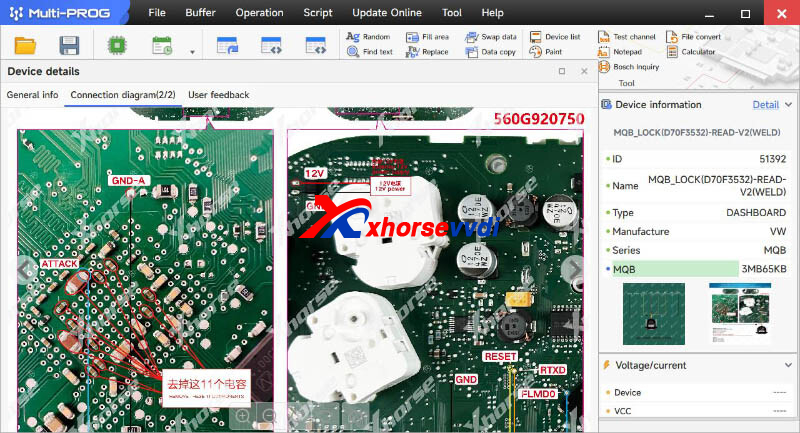

Stay tuned!
http://blog.xhorsevvdi.com/multi-prog-v60-database-update-mqb-d70f3532-d70f3535/
Posted by: xhorsevvdi at
09:04 AM
| No Comments
| Add Comment
Post contains 639 words, total size 13 kb.
Question:
XhorseBluetoothDigitalSmartKeyXSBTK0EN,
Canweuseitforallkeylostvehiclestooandisitreusable?
Willthisworkwith2023NissanPatrolY62Til?

Here is the Answer:
This key has an Xhorse XM38 Toyota Remote PCB inside, so it supports all remote controls marked by 'XM38-TOYOTA'.
And it is reusable and can be used for AKL vehicles.
*If original keys in vehicle cannot lock car doors, such car models are not supported

Done! Hope this helps!
http://blog.xhorsevvdi.com/what-car-models-will-xhorse-bluetooth-digital-smart-key-support/
Posted by: xhorsevvdi at
09:03 AM
| No Comments
| Add Comment
Post contains 68 words, total size 2 kb.
Question:
VVDI Multi Prog, done many BMW MSV80 before but this time it won't work, tried bench, boot, and obd mode many times, is server done?

Here is the Solution:
On the low right,
Select
Device settings>>Block length
Try 0x500,0x1000,0x2000 and so on.

Done!
http://blog.xhorsevvdi.com/fixed-vvdi-multi-prog-read-bmw-msv80-data-loading-fail/
Posted by: xhorsevvdi at
09:03 AM
| No Comments
| Add Comment
Post contains 55 words, total size 1 kb.
Xhorse Bluetooth Digital Smart Key will enable your phone to unlock your car.
Here we will show you how.

Step-by-step Guidance:
Step 1. Key Programming
Press the hole and take the key apart.


Every key has a smart key pcb inside.

Install a CR2032 coin battery.

Put key into coil on Key Tool Plus Tablet.
Select
Remote Program>>BYD>>Han>>Han ID46/ 4A 433.92

Check chip type and frequency.
If tool won't recognize key, insert it into OBD port, pair it with phone via Bluetooth, and unlock key using phone app.

Select
IMMO Programming>>BYD>>Select by year>>2021-(New)>>Smart keys programming>>key programming
Put new key in sensing area.


Step 2.Link Key and Phone App
Download smart key app.
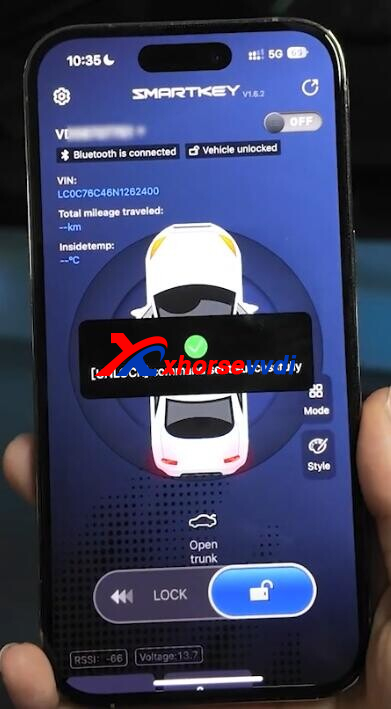
Remove battery and install key pcb back.
Insert smart key into OBD port.
Select
Settings>>Connect
Pair smart key with your phone.

Step 3.Write OBD Diagnostic Program
Select
Settings>>OBD Diagnosis>>BYD>>Han>>2020-2024

*If your car is not on the support list, only Real-time vehicle access and fault information are not available

Done! That's how to use Xhorse Digital Smart Key.
http://blog.xhorsevvdi.com/how-to-use-xhorse-bluetooth-digital-smart-key/
Posted by: xhorsevvdi at
09:02 AM
| No Comments
| Add Comment
Post contains 178 words, total size 5 kb.
Xhorse VVDI Multi-Prog Programmer is 2nd generation of VVDI Prog Programmer. Support ECU & TCU Read/Write/Clone. And we received customer feedback that:
I’m trying to read engine computer for Ford transit 2017 with diesel engine
I need to know how to decode label on the engine computer
How to decode labels from ECU and find the right menu in the Multi-prog ?


Xhorse Engineer replied it is OK in multi prog software, it has option, check SID209
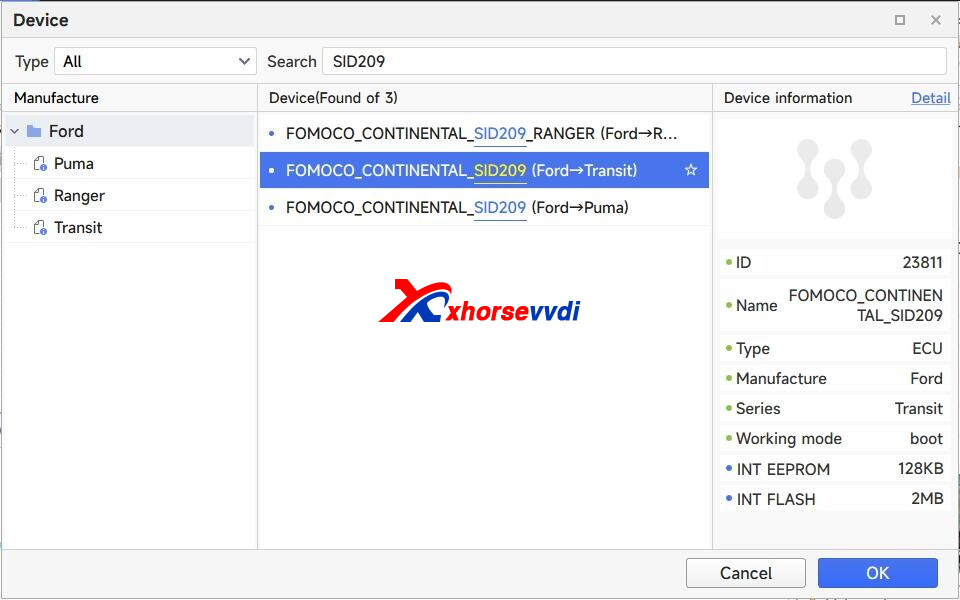
And the connection diagram


Posted by: xhorsevvdi at
09:01 AM
| No Comments
| Add Comment
Post contains 92 words, total size 3 kb.
Question:
For the VVDI PROG EEPROM Read Clip which colour wire is for pin number 1 so I know correct location on the eeprom (chip) when I use VVDI Programmer.

Also what are the 2 free hanging wires used for as you can see them in the photo.

Here is the Answer:
PIN1>>Black wire, also a white dot is marked on PIN1.
2 free hanging GND wires are connected to the probe for some chips
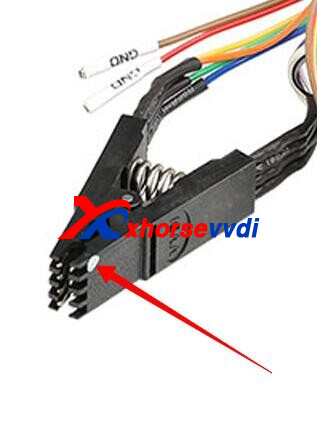

Done! Hope this helps!
http://blog.xhorsevvdi.com/xhorse-vvdi-prog-eeprom-clip-using-tips/
Posted by: xhorsevvdi at
09:01 AM
| No Comments
| Add Comment
Post contains 87 words, total size 2 kb.
Question:
Can't write dump file into XT27A Super Chip since Xhorse Key Tool Max Pro won't recognize it. Already updated to the latest versions, how to solve it?


Here is the Answer:
Try the latest Firmware V2.0.5.
Generate super chip first and put it into the small chip coil on Key Tool Max Pro.
Done! Hope this helps!
http://blog.xhorsevvdi.com/solved-key-tool-max-pro-wont-recognize-super-chip/
Posted by: xhorsevvdi at
09:00 AM
| No Comments
| Add Comment
Post contains 68 words, total size 1 kb.
20 queries taking 0.1349 seconds, 67 records returned.
Powered by Minx 1.1.6c-pink.

