



November 01, 2021
Xhorse Key Programmers (VVDI2/VVDI Key Tool Plus) can add key for VW cars with NEC/Johnson cluster via certain adapters or software.
For
VW with NEC cluster, you may need to switch the cluster into service
mode by NEC Cluster Set, and then you can add key by VVDI2/Key Tool
Plus.
For VW with Johnson cluster, you may need to contact VAG dealer to get Immo data, and then load it into like VVDI2 to add key.
Here will show you two examples:
1.VW JETTA 2013(NEC Cluster)
What we need:
Xhorse VVDI2
NEC Cluster Set
Procedure:
Connect NEC cluster cable to NEC cluster.
Turn on the switch.
Put probe side on the point until the cluster shows "BRAKEâ€, which means the cluster is in service mode.


Note: better back up ABS coding before putting cluster into service mode.
On VVDI2,
Click on "Read EEPROM/FLASHâ€.
When it succeeds, it’ll tell you the whole procedure.
So we read and save EEPROM&Immo data.
Use aVVDI super chipto generate an ID48 transponder key byKey Tool Max.
Put it in VVDI2 key coil to "prepare normal dealer keyâ€.
Last, click on "Reset Instrument†and the cluster goes back on.


Also, above operation can be done withVVDI Key Tool Plus Pad.


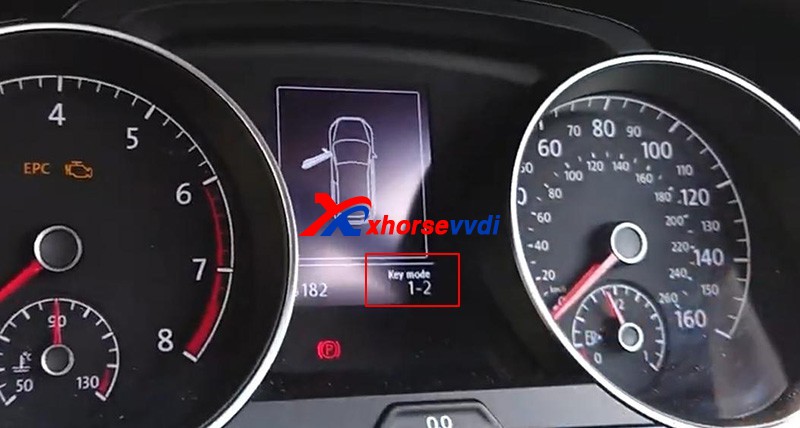
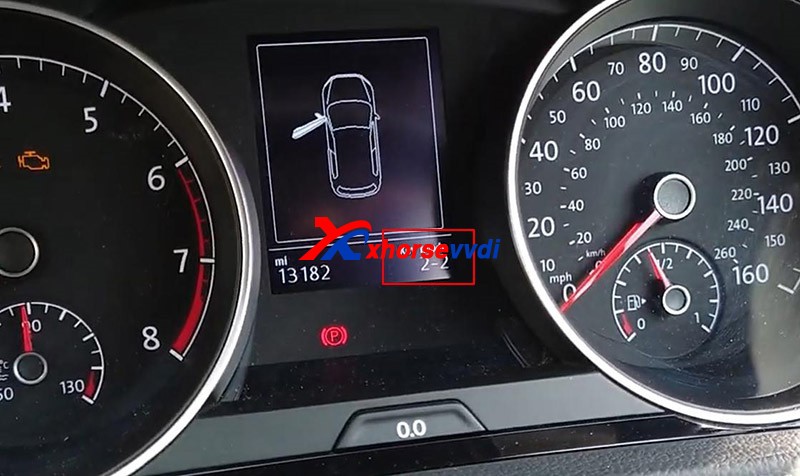
2.VW Golf 2019(Johnson Cluster)
What we need:
Xhorse VVDI2
VAG dealer(to get Immo data)
Procedure:
If you select cluster type and click on "Diagâ€, it’ll prompt the cluster is not supported.
So we need to contact a VAG dealer to pay for immo data.
After we got immo data file, if we just load it to prepare key, it’ll still prompt this file is not supported.
So we need to exit and select other instrument types so that it don’t know we have a Johnson cluster.
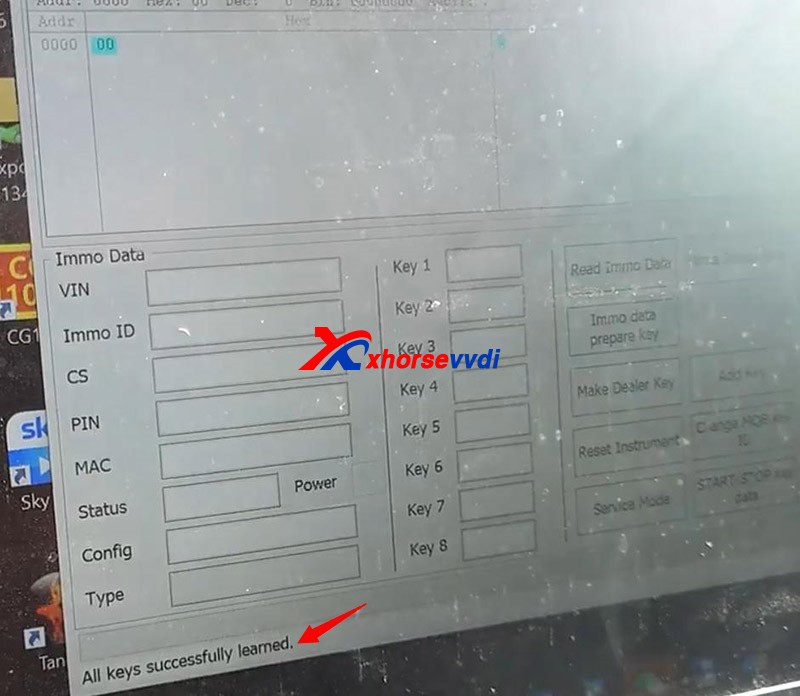
Then load immo data file on "Immo data prepare key†and add key.


Alright, we can see that VW key programming capability of Xhorse programmer can be advanced a lot by other tools’ help.
http://blog.xhorse.co.uk/can-xhorse-programmer-add-key-for-vw-with-nec-johnson-cluster/
Posted by: xhorsevvdi at
03:11 AM
| No Comments
| Add Comment
Post contains 336 words, total size 10 kb.
October 29, 2021
 diagram
V5.0.8VVDI Progsoftware is released, here is the newest V5.0.8VVDI Prog softwaredownload link.

1.Free Download V5.0.8 VVDI Prog Software
Password:123456
2.V5.0.8VVDI Prog UpdateInformation:
V5.0.8 VVDI Prog Update (2021-10-27)
* This version DON’t need update firmware
* Fix LACROSSE-BCM(200
diagram in <4-IMMOBILIZER>-><BUICK>
+ Add MB91F109, MB91F127, MB91F128, MB91F133, MB91F155, MB91F158, MB91F223, MB91F248, MB91F267, MB91F273, MB91F313, MB91F314, MB91F318R, MB91F345,
MB91F353A, MB91F355A, MB91F356B, MB91F463C, MB91F465C, MB91F467C, MB91F464H, MB91F467M, MB91F467T, MB91F475, MB91F478, MB91F479, MB91F482, MB91F486, MB91F487, MB91F492, MB91F575/S, MB91F577/S, MB91F610:FONT, MB91F610 ROG, MB91F627, MB91F662, MB91F668/F669 options in <2-MCU>-><FUJITSU-MB9XF>
+ Add SAIC-GM-BCM option in <4-IMMOBILIZER>-> <SAICMOTOR>
+ Add CS75(MB91F534B)(2017) option in <5-DASHBOARD>-><CHANGAN>
+ Add Viaggio(D70F3525)(2014) option in <5-DASHBOARD>-><FIAT>
+ Add HIACE-DASHBOARD(2016) option in <5-DASHBOARD>-><JINBEI>
+ Add SOUTHEAST-V3-LINGYUE option in <5-DASHBOARD>-> <SOUTHEAST-MOTOR>
+ Add A4L-LEW-MODULE(2017-), A4L-SKYLIGHT-MOTOR-MODULE, options in <8-OHTER>-><AUDI>
+ Add VIANO-ELECTRIC-DOOR-MODULE option in <8-OTHER>-><BENZ>
+ Add 525-REAR-VIEW-CAMERA-MODULE, X5-E70-ESP(ST10F269), X6-E71-TAILGATE-MODULE options in <8-OHTER>-><BMW>
+ Add CS75-AIRCONDITION-MODULE(2014) option in <8-OHTER>-><CHANGAN>
+ Add ECOBOOST-AFS-MODULE option in <8-OHTER>-><Ford>
+ Add MG-6-TELEMATICS-MODULE(2014) option in <8-OHTER>-><SAICMOTOR>
+ Add PHIDEON-TPM(201
option in <8-OHTER>-><VOLKSWAGEN>
+ Add S80L-ICM(2011) option in <8-OHTER>-><VOLVO>

Posted by: xhorsevvdi at
03:34 AM
| No Comments
| Add Comment
Post contains 172 words, total size 4 kb.
October 28, 2021
After Xhorse released the key reader, we receivedtons of questions on this very new tool , To start, we have to answer one questionthat we are frequently asked
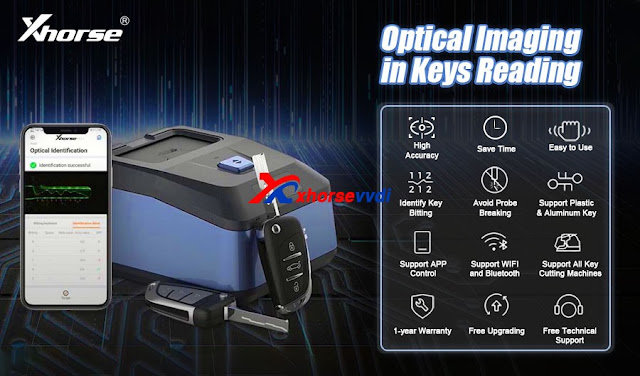
Q: Why Xhorsedeveloped this product?
A: well, Key reader has three significantfeatures:
1. Itis able to identify aluminum, keys plastic keys as well as metal keys. aluminum and plastic keys are notsupported in key cuttingmachines.and it's abit troublesome to get the baiting codes,so the tool greatly compensates for that

2.Probe braking can be avoided using a Xhorse key reader skimmer.
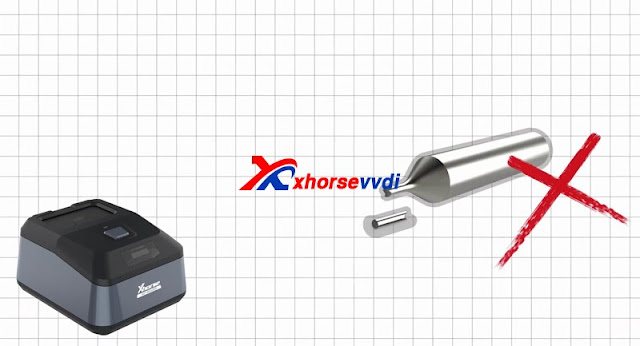
3.It's much more accurate and faster than takingphotos to identify key data.
A: Will key readerwork on the App?
Q:Sure! you can either use your smartphoneand key cutting machines like dolphin xp005 or use the Keycutting machine with a screen such as condor xc mini plus tocopy a key.

- With a smartphone, KEY READER gives a new level of working experience, allowing locksmiths to get the key bitting code even without a key cutting machine. KEY READER provides an integrated solution for a wide range of users.
- But using keycuttingmachines with screens, you can directly cut the key withsimpleclicks on the machine
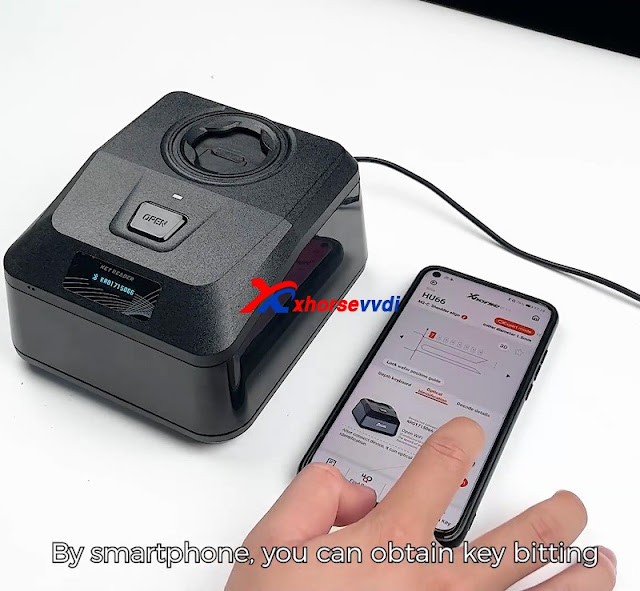
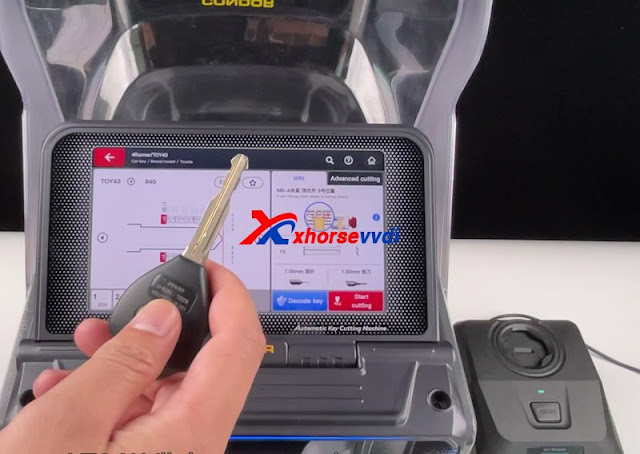
Xhorse Key Reader and Dolphin XP005 Cut Mazda Key
How to Use Xhorse Key Reader with Condor XC-Mini Plus II to cut HU66
Q: Does it support edgecut keys?
A: Yes we'lldemonstrate the process in the video below.Just insert thekey and click identification on thescreen.
Q: Does it identifyhu162t?
A: Yes hu162t decoder is mainly forVolkswagen Audi says golden cars.
Though especially with 3size, It’s metal keys,So for sure creator is ableto identify it.
Q: Does it identify honda keys?
A: Definitely! it's acknowledged that honda keys tendto wear off easily.yet you can stillacquire accurate key bittingresults withkey reader

Q: Does it support plastic or aluminum keys?
A: sure!that's the biggest advantage of thetool.
Q: How much is it and when will it beavailable?
A: Xhorse Key Reader price is US$350.00, you can buy it from here, will arrive and deliver in December.
Xhorse KEY READER Functions Overview:

http://blog.xhorsevvdi.com/faq-of-xhorse-key-reader/
Posted by: xhorsevvdi at
07:43 AM
| No Comments
| Add Comment
Post contains 344 words, total size 9 kb.
October 25, 2021
Let’s start it, easy and simple.
1. Remove 12 screws on the back. (8 surrounded, 4 on the center)

2. Make the front side up and remove the front cover. (note: watch the cable connected to the screen)
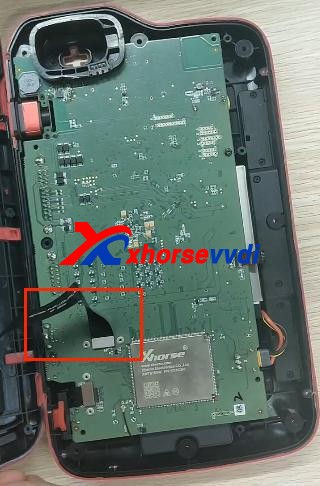
3. Disconnect 3 ribbon cables.

4. Remove the thin cable as shown.
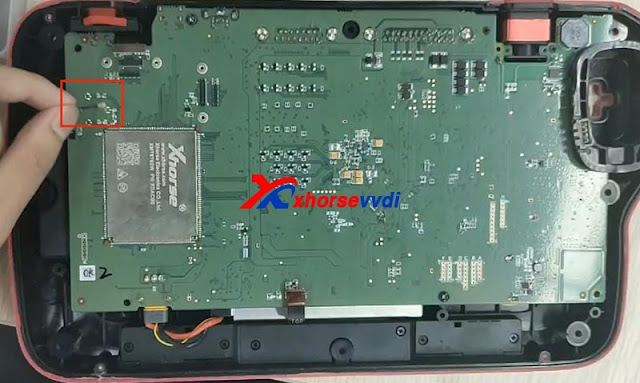
5. Unscrew 4 screws on the PCB board.
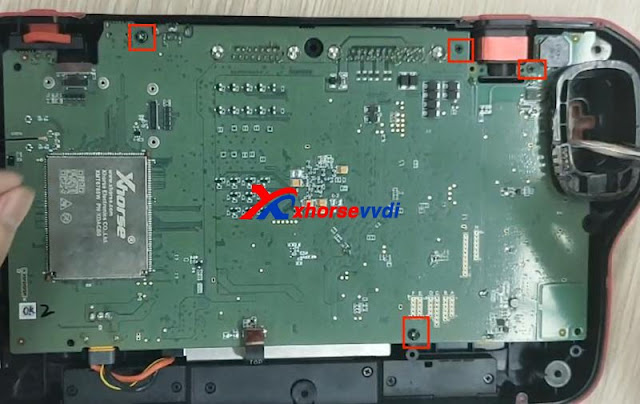
6. Take out PCB board and disconnect battery cable.

Finished, that’s the process of taking out PCB board from Key Tool Plus Pad.
Video demo:
For more info, you can check
Source:http://blog.xhorsevvdi.com/how-to-take-out-xhorse-vvdi-key-tool-plus-pcb-board/
Posted by: xhorsevvdi at
10:20 AM
| No Comments
| Add Comment
Post contains 119 words, total size 5 kb.
October 22, 2021
2021 new Xhorse Dolphin XP-005L Key Cutting Machineis taking pre-orders now atxhorsevvdi.com.
Let’s see the difference among them:
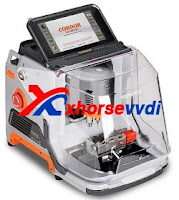
| Item | Dolphin XP-005 | Dolphin XP-005L | Condor XC-MINI Plus |
| Image | 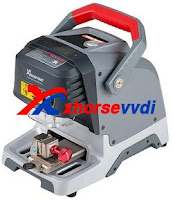 |
 |
 |
| Price(USD) | 1950$ | 2250$ | 2700$ |
| Weight(Net) | 15kg | 13kg | 18kg |
| Weight(Gross) | 18kg | 18.5kg | 22.9kg |
| Size | 315x218x270mm | 390*220*270mm | 265*362*301mm |
| Screen | × | Angle adjustable 5-inch LCD touch screen | Angle adjustable 7-inch LCD touch screen |
| Smart status indicator | × | Yes (in blue, yellow, red color) | × |
| Protection cover | Yes,not enough | Yes, good | Yes, good |
| Update | Database update in APP, firmware update via Xhorse update kit | Online Update |
Online Update, support offline file update. |
| Clamp | M1,M2, M3(optional) M4(optional) |
M1, M2,M5(=M1+M2) M3(optional) M4(optional) |
M1, M2, M3(optional) M4(optional) |
| Manipulation | Phone APP/Key Tool Max | Phone APP/Standalone | Standalone |
| Offline operation | × | × | √ |
| All keys lost | √ | √ | √ |
What is Clamp M5?
The new clamp M5 is equal to clamp M1 plus M2, supporting Dolphin II XP-005L and Condor XC-MINI II(coming soon).
Clamp M5 has side A and B, so users can turn it over as cutting needs instead of replacing different clamps. Detailed method is:
Loosen the key lock knob, turn over the clamp and tighten the key lock knob.


What new features on Dolphin XP-005L?
Dolphin XP-005L ≈Dolphin XP-005 software(function) + Condor XC-MINI Plus hardware.
Compared to Dolphin XP-005:
300$, we’ll get
An HD screen(you don’t have to operate on your phone or buy aKey Tool Max),
A larger protection cover(Some customers gave a feedback that they wanted to buy a separate shell for Dolphin XP-005),
Online update(Firmware update via Upgrade Kit is a big trouble to some customers)
Lower weight(Easier to carry out)
M5 clamp(Make operation easier).
Compared to Condor XC-MINI Plus:
450$, we’ll lose
A larger screen, offline operation. However, XC-Mini Plus doesn’t have a built-in battery so hard to take it out.
Personal review
Basically for me, 300 bucks to get a screen, don’t worth it. Just pay more 50 bucks and I can getKey tool max plus XP-005. And lower weight and the combination M5(M1, M2) also don’t interest me, but I’d like to pay for online update, because when the device needs a firmware update, you have to request a link to the update software application through the support section of their phone app. I couldn’t get it to communicate with my Dolphin xp005over USB, and eventually I do the update using a friends computer.
As for Condor Mini Plus, you can see the biggest difference is that it allows you to cut keys without network support. It’s very useful, but the price is too high. See if you really need that function.
Who Views This Also Viewed:
- 2021 New Xhorse Dolphin II XP-005L Key Cutting Machine Coming Soon! (27)
- What is the difference of Xhorse Dolphin XP-005 and Dolphin XP005L? (26.3)
- V2.2.1 Xhorse APP Update, Support Dolphin II Key Cutting Machine (17.9)
- Xhorse Dolphin XP-005/Condor XC-Mini Plus Cutter & Probe Breaks Test Method (17.6)
- Xhorse Dolphin XP005 VA2/VA6/VA2EH Bug will fix in new Xhorse APP (16.5)
Posted by: xhorsevvdi at
08:28 AM
| No Comments
| Add Comment
Post contains 502 words, total size 11 kb.
October 21, 2021
2021 newestXhorse Dolphin II XP005Lkey cutting machine will be launched. It’s an upgrade version of Dolphin XP005, XP005L with Adjustable Screen and Protective Cover, total weight is only 14kg,asy and portable to work without pressure.
Xhorse XP-005L Features:
- Buit-in database
- Support APP Control
- Intelligent operating system
- Smart LED indicator
- Angle adjustable LCD touch screen
- Support WiFi and Bluetooth
- All-aluminum body structure
- High precision ball screw
- High rigidity cross rail
- Cutter and probe work in parallel
- Support Multiple Clamps
- Support Sided/Track/Tibbe Key
- Update online: Machine firmware and database upgrade via WiFl directly
Xhorse XP005L Structure:
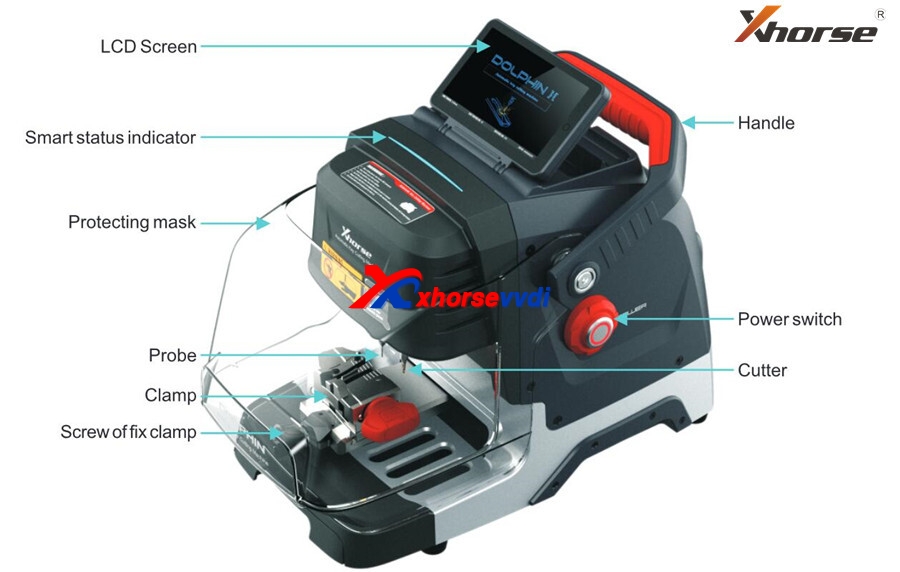
Xhorse Dolphin XP-005L M5 Clamp
M5
clamp with two sides of A and B. Users can turn the clamp surface to
cut according to cutting needs, it’s no need to repeated install and
uninstall to replace clamps. Here are the method of using the M5 clamp.
1) Loosen the "key lock knob†counter clockwise to make the right slider of the clamp the right limit
2)
Turn the movable module clockwise, and turn the clamp from side a to
side B. Tighten the key lock knob†clockwise to lock the clamp.
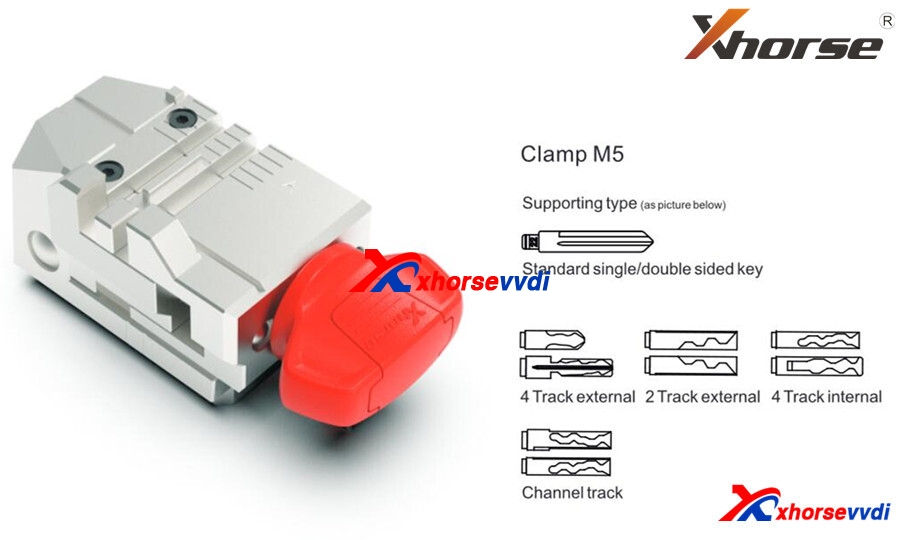
Dolphin XP-005L Specification:
Input voltage: 24V DC
Power: 160W
Principal axis rotation speed: 12500rpm
Motor Torque: 0.15Nm
LCD resolution: 1280*720
Working temperature: 10-50°C
Humidity: 10-90%
Machine size: 390mm:220mm*270mm
Package size: 495mm*400mm*360mm
Net weight: 13kg
Gross weight: 18.5kg
Look here,What are the new features in Dolphin II XP005L :
- HD Touch Screen
Users can directly complete operation on the screen. High definition screen minimizes eye fatigue.
The
machine adopts an angle-adjustable 5-inch capacitive touch screen. You
can set the angle of the screen based on actual needs.
- Innovative Colorful Indicator Lights
The indicator light changes color with the change of real-time working status.
- Massive Vehicle Database
Built-in powerful database covers over 100 car brands, 2,000 car models and 20,000 key data. Accurate key data, detailed parameters, and clear key graphics. We provide a lifelong database upgrade service for free!
- Portable Solution
Thanks to its compact design, lightweight, much easier to take it outside and provide users outdoor and roadside services.
Built-in well-known lithium battery, stable and reliable, support cutting works without power supply access.
- Transparent Protective Shield
The transparent shield enables users to check the real-time working status while preventing metal debris from spattering.
- Manufacture Craftsmanship
All-aluminum
body structure; Manufactured by German-made DMG CNC machine to
guarantee high precision cutting results. The finished keys passed the
rigorous testing of the Optical Instrument.
A wider workbench, strong and steady, make your works more productive.
Maintain excellent performance even under extreme weather.
- Multi-purpose Clamps (M5 Clamp)
A wide duplication availability guaranteed by a variety of functional clamps (Standard equipped M5 clamp (M1andM22 in 1), optional M1/M2 Clamp, M3 Clamp, M4 Clamp.), support multiple key types, standard single sided, standard double sided, 2 track external, 4 track external, dimple, channel track, 4 track internal, F021 & Citroen SX9 keys, residential keys, etc.
- Support Bluetooth and WiFi
Support directly upgrade online via WiFi connection.
Control the machine by the Xhorse APP on your smartphone or other intelligent terminals via Bluetooth.
Dolphin XP005LHighlights
- Support to cut key anywhere without a smart phone.
- Database covers 100 car brands, 2000 car models, 20000 keys.
- Built-in lithium battery, compact and lightweight design for ease carry.
- All aluminum body structure, strong & accurate.
- New UI interface, easy & smart to control.
Download:Xhorse Dolphin II XP-005L user manual

Pre-order in xhorsevvdi.com,Dolphin II XP-005L price is 2250 usd.
Source:https://www.xhorsevvdi.com/wholesale/dolphin-ii-xp005l-key-cutting-tool.html
Posted by: xhorsevvdi at
06:53 AM
| No Comments
| Add Comment
Post contains 582 words, total size 7 kb.
October 14, 2021
This article is about to bring you a method to read 2nd/3rd/4th BMW EWS module respectively. All No soldering cables or removing MCU.
Contact us to check if your EWS is supported!
Part 1. EWS2
Tools: Ak90+ Key Programmer (Read 1D47J, 2D47J, 0D46J, 2L86D without removing MCU)
Model:BMW 3er E36 1996
MCU:2D47J
Procedure:
Connect MCU to AK90 unit by 10-pin cable.
Connect AK90 unit to PC by USB cable.


On AK90 app,
Press "Connectâ€and select chip type.
Watch the prompt and click on "Read EWSâ€.


Part 2. EWS3
Tools: Xhorse XDNP50 EWS3 Adapter
Procedure:
Use EEPROM clip to clip PIN1.

Connect EWS3 module to XDNP50 EWS3 Adapter.

Combine EWS3 module and EWS3 adapter.


Device path:
Programmer>>IMMO>>BMW>>BMW>>EWS3(Adapter)>>Read>>EEPROM
Part 3. EWS4
Tools:EWS4 Adapter
Model:BMW X3 2007
MCU: 2L86D
Procedure:
Put EWS4 module in the adapter and lock it.

Select "4-IMMOBILIZERâ€"BMWâ€"EWS4 X(ADAPTER)â€.
Press "Readâ€and "Saveâ€to get data file.
Done! That’s how we read BMW EWS2/EWS3/EWS4 no soldering.
Read also:
Xhorse XDNP50 EWS3 Adapter Step-by-Step Tutorial(No Soldering)?
How to use VVDI Prog and VVDI2Program BMW X3 EWS4.42007?
Posted by: xhorsevvdi at
03:52 AM
| No Comments
| Add Comment
Post contains 187 words, total size 9 kb.
October 13, 2021
Issue 1.
Read DATA1 success withBCM2 adapter, but during DATA2 readingVVDI Key Tool Plusprompts "Error Code: 13040031â€and"Read Data failâ€.
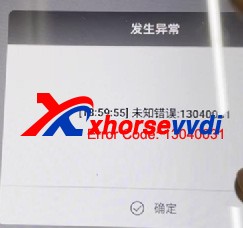

Solution 1 :
Do Not try as you like when it shows "Error Code: 13040031â€, the correct way is to check cables & adapters connection and external power supply, try to read again and it should be fine (Do Not read DATA1 again, unlock BCM or try to install BCM back and read via OBD). Read data as instructions and restore BCM back, and there will be no other problems.
Issue 2.
Read DATA1 and DATA2 success, save Immo data and service data success, but write service data fail and it prompts "Fail to eraseâ€when repeating service data writing. Try again and DATA1 reading also fails.
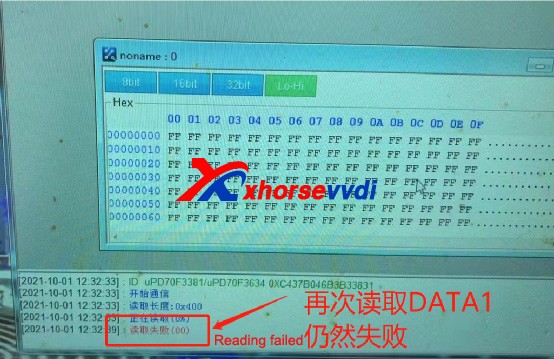
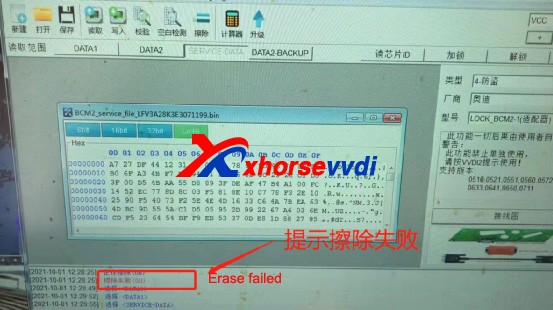
Solution 2 :
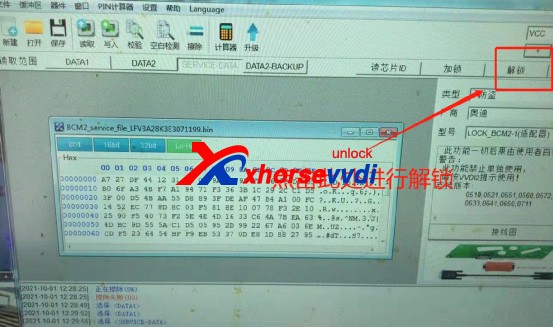
WhenVVDI PROG reads DATA1 & DATA2 successfully and saves service data, we can select "Unlockâ€to unlock BCM’s CPU.
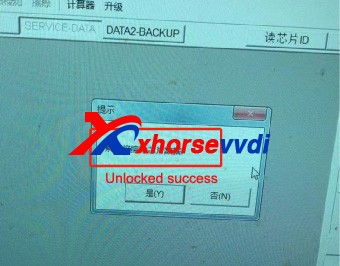
Until the system prompts that the unlock is successful
" src="https://www.xhorsevvdi.com/upload/service/21101316341075394310.jpg" />
Then select "SERVICE DATAâ€and write it back.
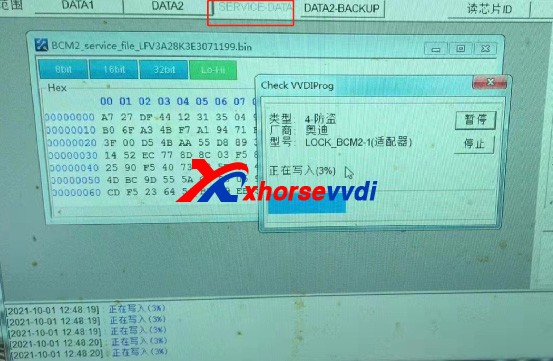
After writing successfully, restore BCM back to vehicle, and vehicle can start without additional operation.
Above problems are collected from customers feedback. Hope this could help. More questions, contact us.
Posted by: xhorsevvdi at
07:00 AM
| No Comments
| Add Comment
Post contains 246 words, total size 3 kb.
Issue 1.
Read DATA1 success withBCM2 adapter, but during DATA2 readingVVDI Key Tool Plusprompts "Error Code: 13040031â€and"Read Data failâ€.
Solution 1 :
Do Not try as you like when it shows "Error Code: 13040031â€, the correct way is to check cables & adapters connection and external power supply, try to read again and it should be fine (Do Not read DATA1 again, unlock BCM or try to install BCM back and read via OBD). Read data as instructions and restore BCM back, and there will be no other problems.
Issue 2.
Read DATA1 and DATA2 success, save Immo data and service data success, but write service data fail and it prompts "Fail to eraseâ€when repeating service data writing. Try again and DATA1 reading also fails.
Solution 2 :
WhenVVDI PROG reads DATA1 & DATA2 successfully and saves service data, we can select "Unlockâ€to unlock BCM’s CPU.
Until the system prompts that the unlock is successful
" src="https://www.xhorsevvdi.com/upload/service/21101316341075394310.jpg" />
Then select "SERVICE DATAâ€and write it back.
After writing successfully, restore BCM back to vehicle, and vehicle can start without additional operation.
Above problems are collected from customers feedback. Hope this could help. More questions, contact us.
Posted by: xhorsevvdi at
07:00 AM
| No Comments
| Add Comment
Post contains 246 words, total size 3 kb.
September 24, 2021
-
2013-2019 A4L /A5/Q5 add key and all key lost
-
2013-2019 A6L /A7/A8 get BCM2 immo data while all key lost (Synchronize data can get from 3rd service provider)(Add key can get BCM2 immo data directly via OBDII)
What we want to do today:
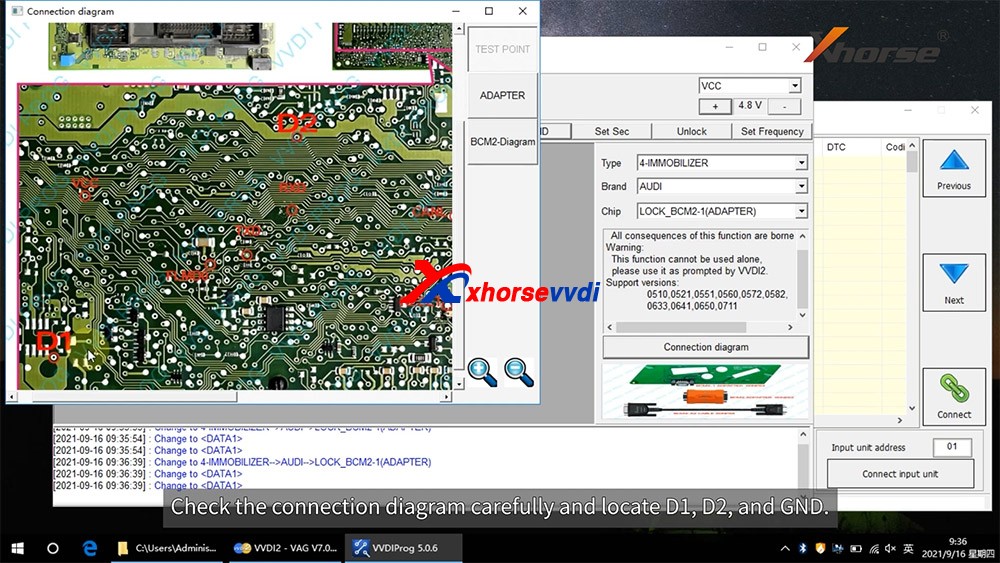
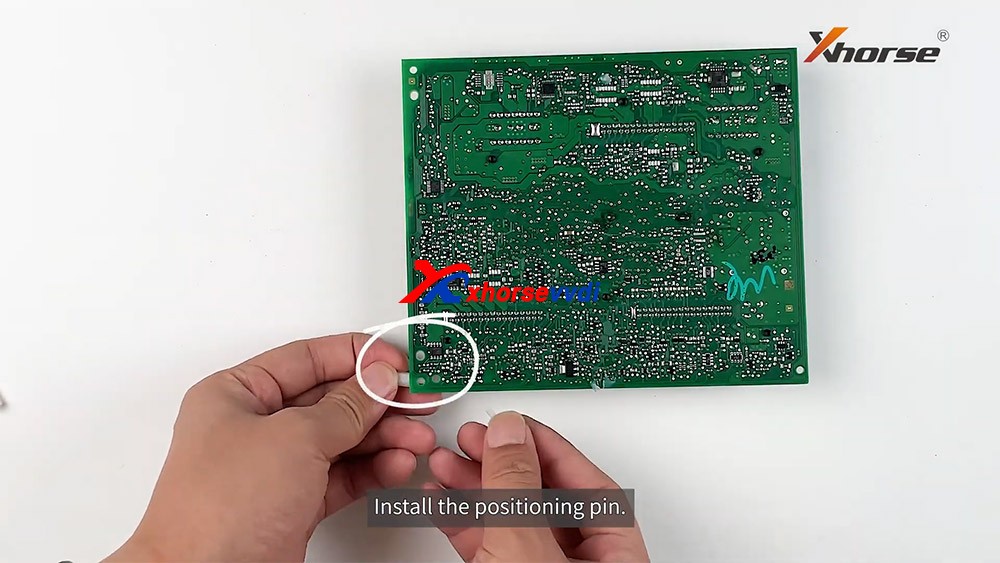
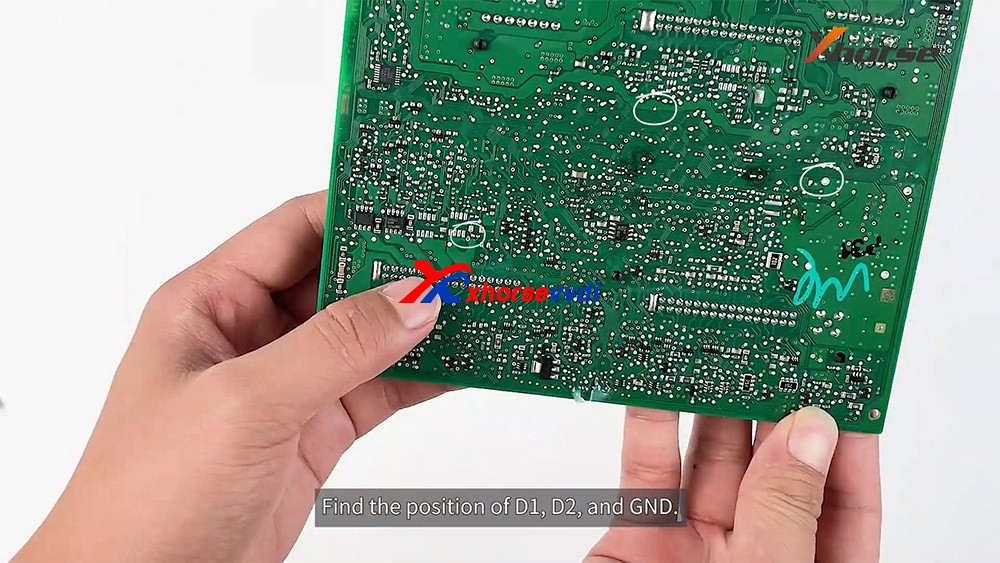
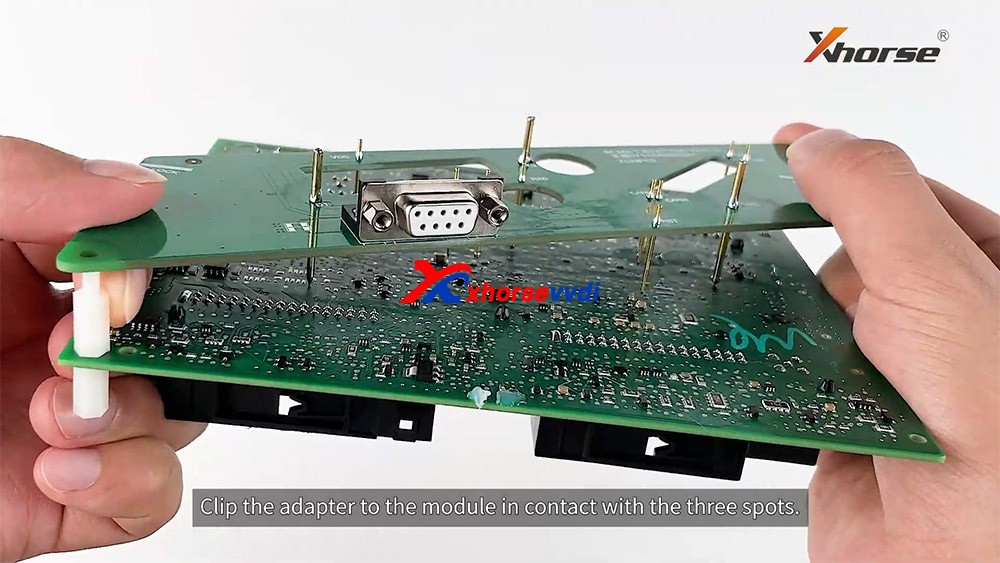
Read and write Audi 5th Immobilizer System- Locked BCM2
Good to know:
- Warning 1 :This function is high risk, all the consequences caused are undertaken by yourself
- Warning 2: In VVDI-PROG function, Don’t touch power supply, cable, BCM2 module!!!
VVDI-PROG data instructions:
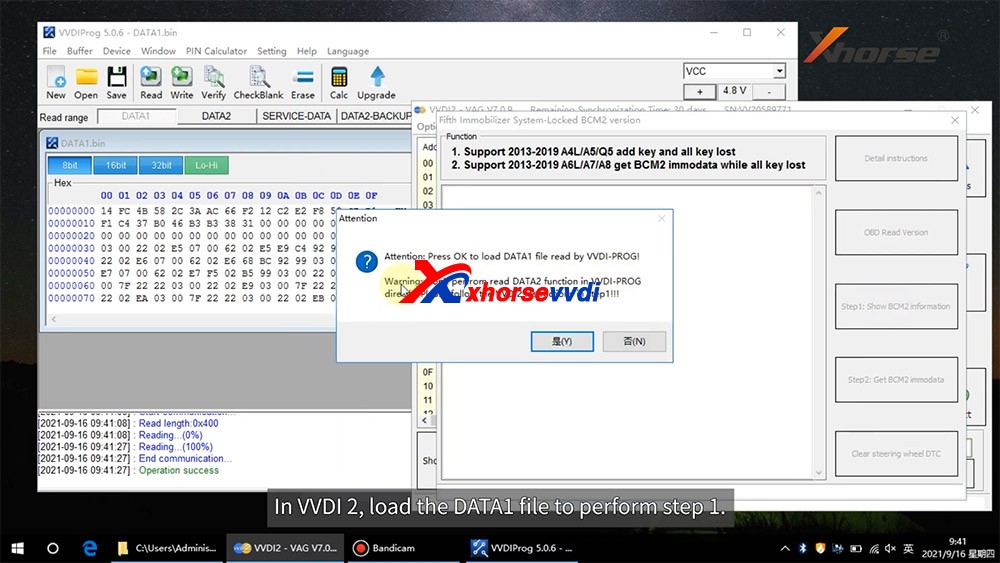
- DATA1: VVDI2 stepl require data, you can read DATA1 after connect in VVDI-PROG
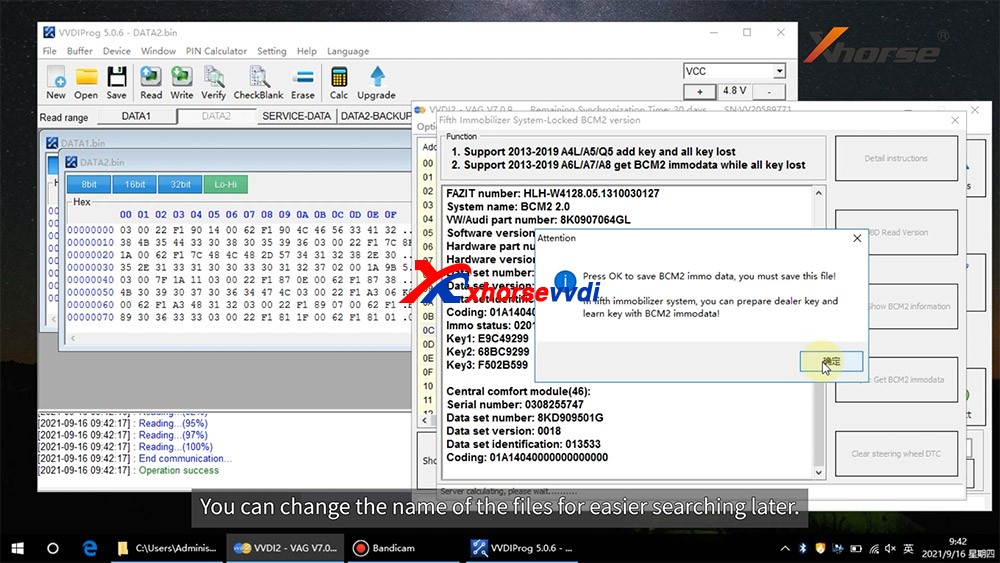
- DATA2: VVDI2 step2 require data, you can read DATA2 after you get instructions in VVDI2(load DATA1 in stepl)
- SERVICE-DATA: you can get this data in step2. Write this data to BCM2 activate module
- DATA2-BACKUP: If read DATA2 failed(cause by power or cable), you can use this function to get DATA2 data
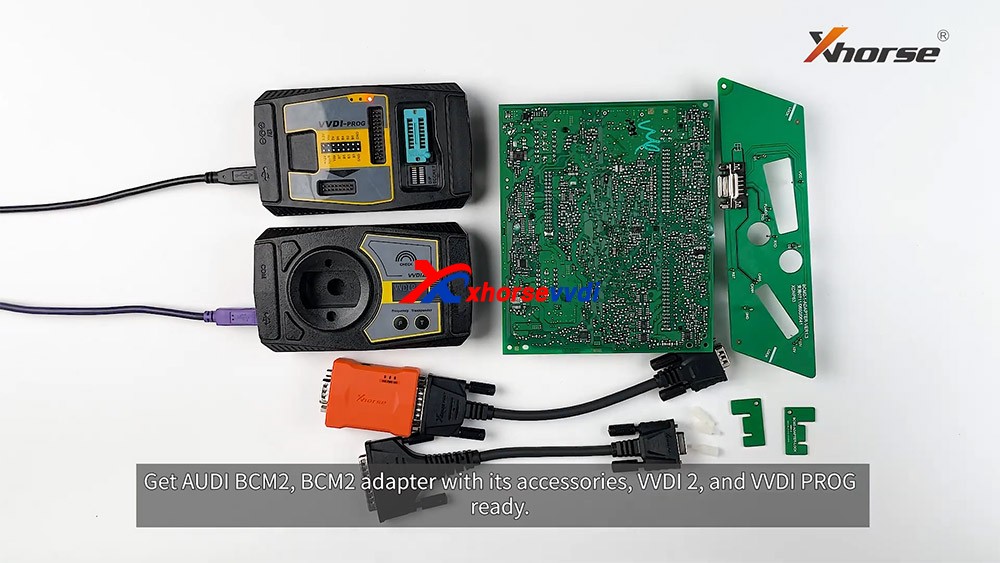
Instructions of using AUDI BCM2 Adapter with VVDI 2 & VVDI PROG:
- First use OBD Read Version function, OBD read BCM2 version and check support status
- Open trunk: Find the BCM2 in right-rear area, remove the two big plug, then small one(DON'T close trunk)
- Connect VVDI-PROG and BCM2 module, VVDI BCM2 adapter require support +12V
- Enter VVDI-PROG->immobilizer->Audi->LOCK_BCM2-1 orLOCK_BCM2-2 read DATA1 data and save it(Depends on the SW version)
- Enter WDI2 stepl, load DATA1 data(require internet), continue with VVDI2 instructions (maybe not need DATA2)
- If VVDI2 ask you provide DATA2, enter VVDI-PROG read DATA2 and save(After read DATA2, BCM2 will enter service mode)
- Enter VVDI2 step2, load DATA2 data(require internet), it will save 2 files: BCM2 immodata and BCM2 service data
- BCM2 immodata can use learn key, BCM2 service data can write to BCM2(make BCM2 work again) with VVDI PRO.
- After write BCM2 service data, restore BCM2 to car.
- Enter 5th immobizer system learn key.
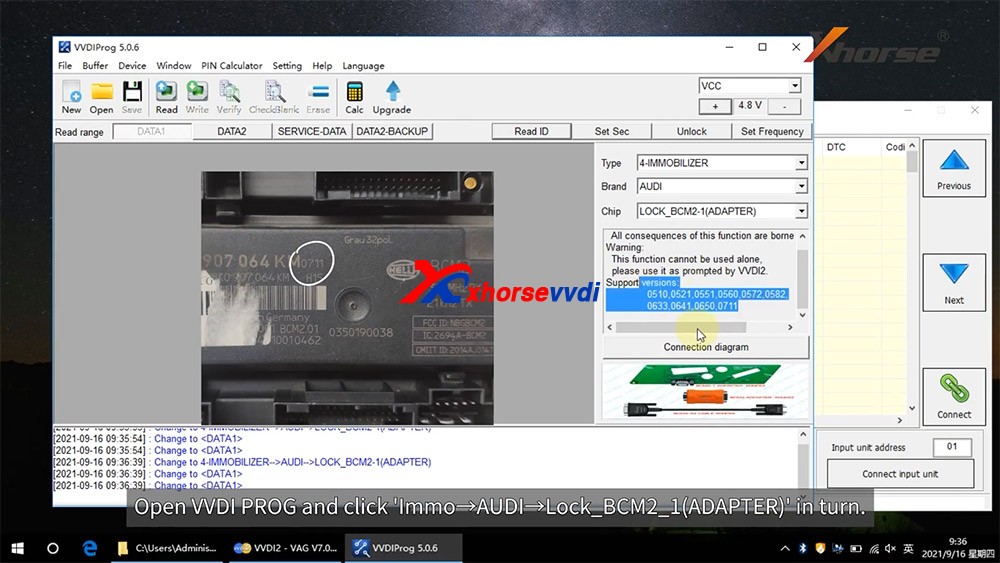
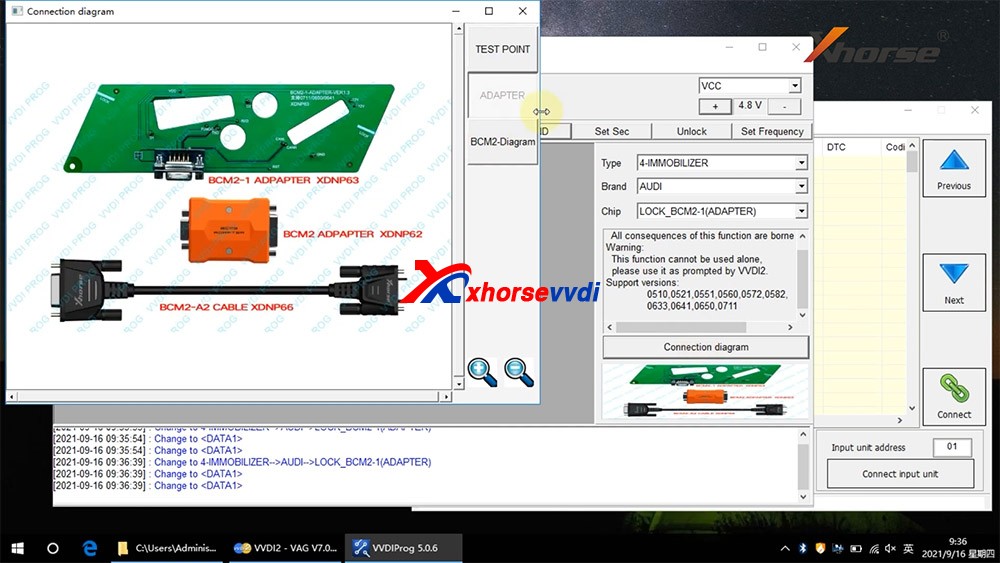
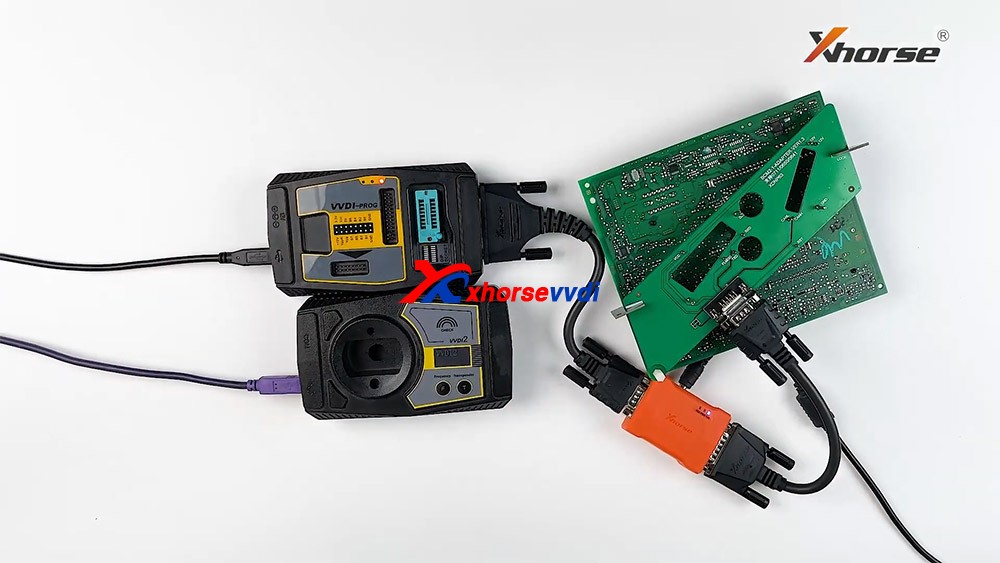
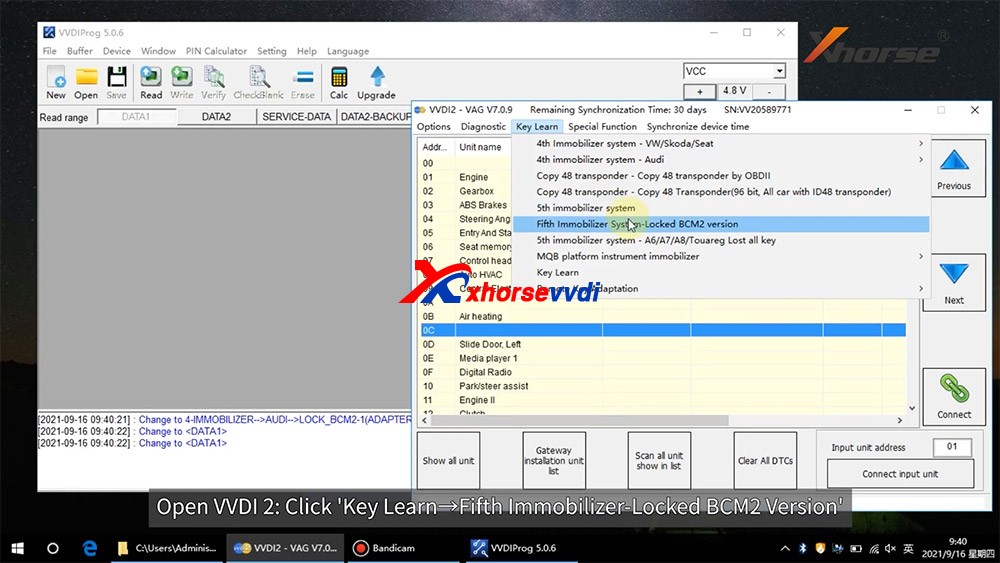
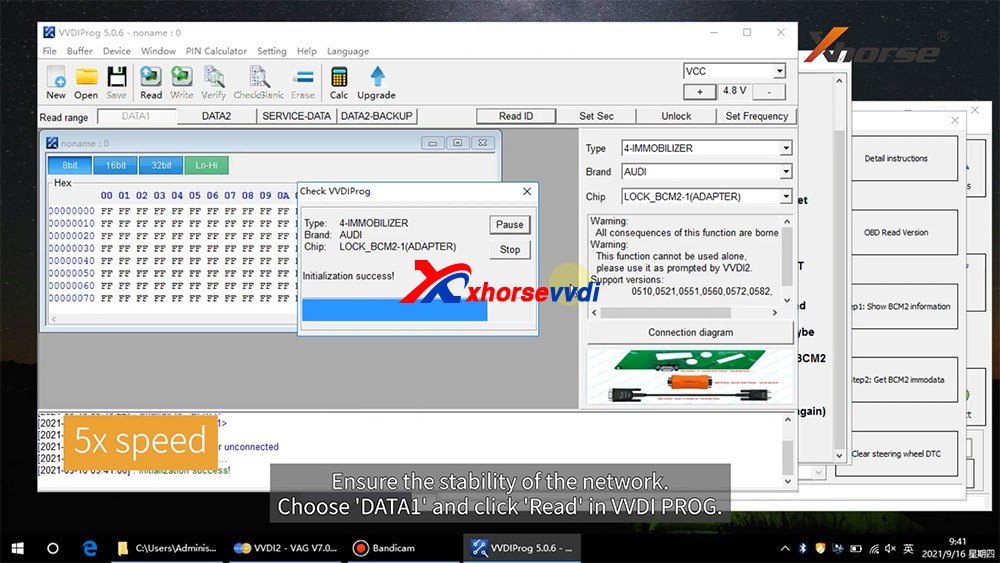
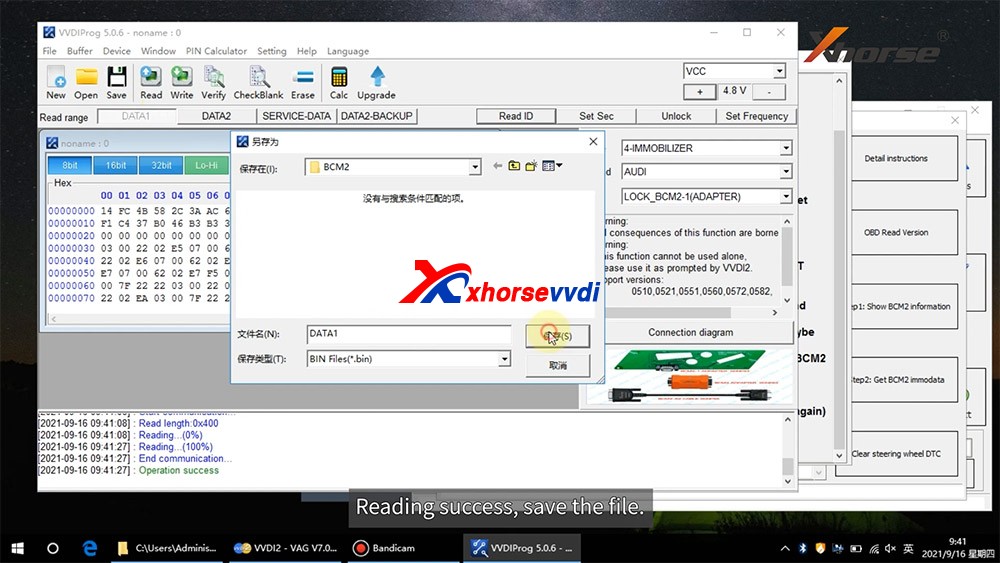

Posted by: xhorsevvdi at
09:34 AM
| No Comments
| Add Comment
Post contains 337 words, total size 5 kb.
September 17, 2021
Xhorse Multi-function Adapter is developed especially for connecting old adapters such as BOSH ECU adapter, BENZ EZS adapters, etc. to KEY TOOL PLUS and MINI PROG.This is could help avoid purchasing those new accessories coming with KEY TOOL PLUS again and make full use of your old ones.

There're 5 ports in this adapter in total.
1. Connect to KEY TOOL PLUS and MINI PROG
2. Connect to renew adapters

3. Connect to BMW EWS4 adapter

4.Connect to BENZ EZS adapter

5.Connect to BOSH ECU adapter

These adapters all work with different tools from Xhorse, but now together with this Multi-function Adapter, they're all compatible with KEY TOOL PLUS or MINI PROG.With this adapter, there's no need to purchase new adapters specially designed for KEY TOOL PLUS or MINI PROG.
Source:http://blog.xhorsevvdi.com/how-to-use-xhorse-xdkp30-multi-function-adapter/
Posted by: xhorsevvdi at
02:47 AM
| No Comments
| Add Comment
Post contains 137 words, total size 4 kb.
September 16, 2021
â€
â€.
Posted by: xhorsevvdi at
06:29 AM
| No Comments
| Add Comment
Post contains 183 words, total size 3 kb.
September 14, 2021
Working on a Toyota Tacoma 2016 smart key board 2110 using VVDI Key Tool Max, Only one option makes the remote work but none has the proximity/smart feature working, Toyota Rav4 2018 the same issue.
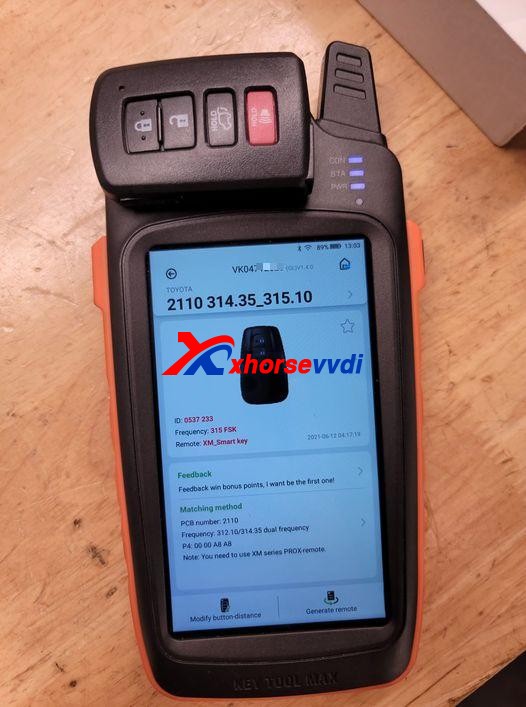
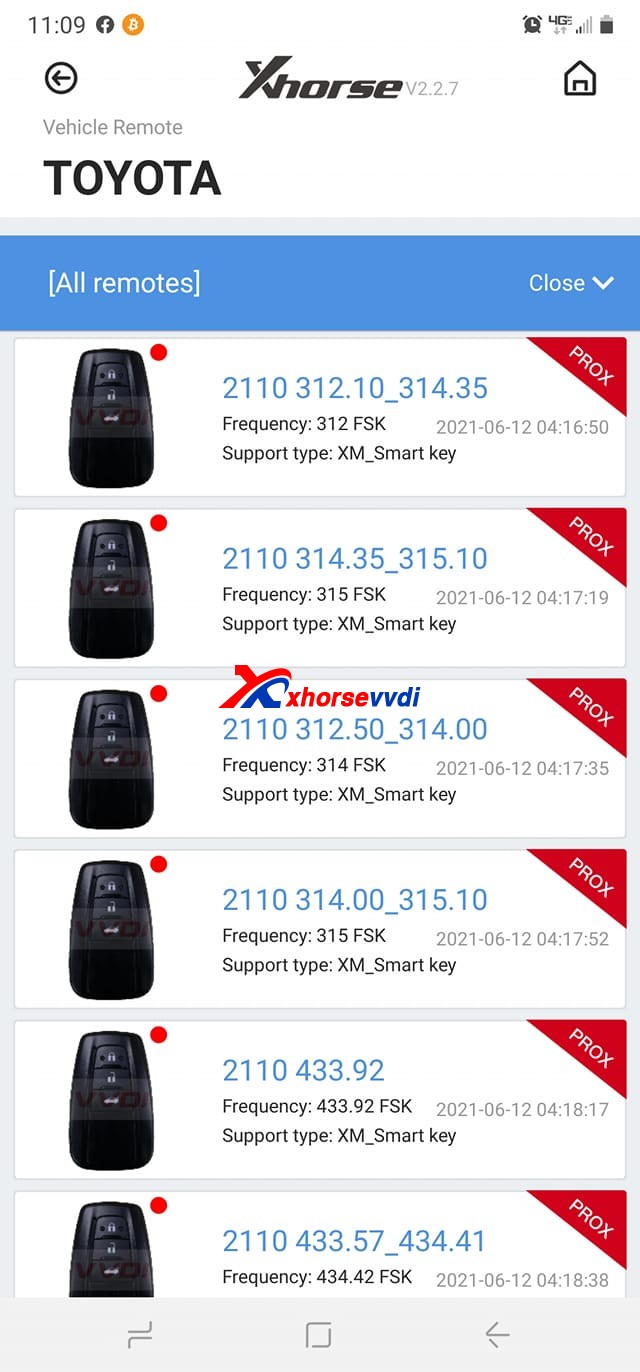
Here Xhorsevvdi engineers answer:
Sometimes a smart key generated successfully may not fully function the vehicle: remote doesn’t work, doesn’t have smart feature or even one button fails etc., which needs us to modify smart key’s values manually.
Possible reason:
Xhorse XM smart keys are universal keys, not particular for one model like Toyota Tacoma 2016, so we need to customize XM smart key to find correct values for each car.
Solution:
XM smart key customization by VVDI Key Tool Plus or Key Tool Max.
Path: Special Function>>XM smart key customization
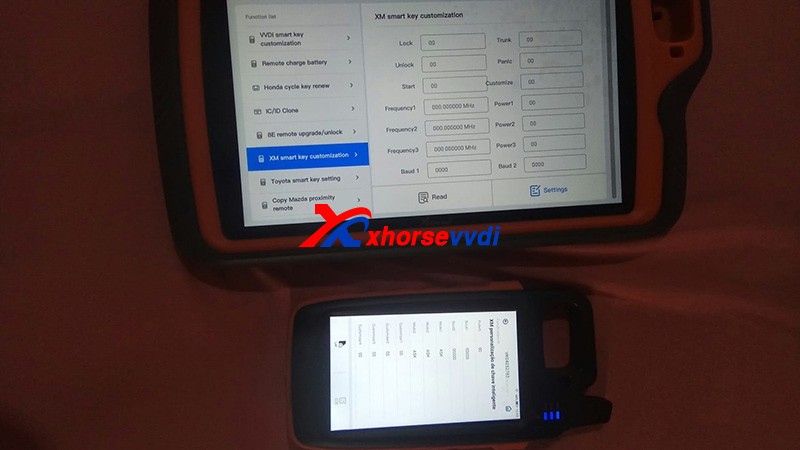
1)Modify Frequency
Sometimes the frequency options given to us is slightly different from that of the smart key to be programmed.
So read out the frequency "A†that your vehicle wants by Xhorse devices, then read original XM smart key frequency "B†and set "B†to "Aâ€.
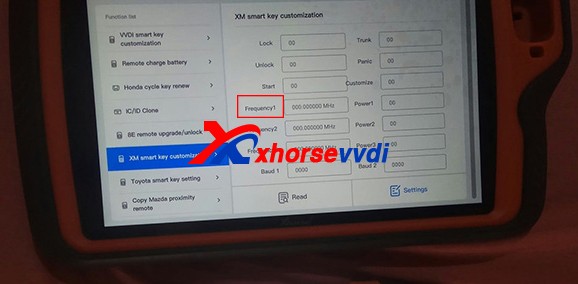
2)Modify Baud
Read key’s Baud, increase it by 400, and test if it works perfectly.
If not, add Baud again by 400 until it works well. (The last two numbers may vary automatically, which is normal.)

Customer feedback:
I had exactly the same problem with a Corolla 2018, and I just made the changes on the ID and frequency as well and everything works...
Thank Tyler and Raphael for sharing!
Hope this could help!
More info, please check
http://blog.xhorsevvdi.com/fixedkey-tool-max-program-xm-smart-key-prox-feature-doesnt-work/
Posted by: xhorsevvdi at
03:49 AM
| No Comments
| Add Comment
Post contains 266 words, total size 6 kb.
September 09, 2021
Problème :Xhorse VVDI2Volvo V70 1998- avec 93С66 et pcf7935.Lors du chargement des données eeprom, les positions libres 4, 5 et 6 ne sont pas disponibles pour l'écriture.Comment résoudre ce problème ?

L'ingénieur principal de Xhorse a répondu:
Générez simplement la clé Ã partir de la position 1, 2 ou 3.Pas besoin de réécrire les données sur immobox si vous utilisez avec letranspondeurSuper Chip XT27A01 XT27A66;si vous utilisez avec la clé d'origine, vous devez réécrire les données dans immobox.
D'accord, support technique Xhorse VVDI2:http://blog.xhorse.co.uk/
Posted by: xhorsevvdi at
09:34 AM
| No Comments
| Add Comment
Post contains 95 words, total size 2 kb.
August 30, 2021
Hi there, today Xhorsevvdi is going to show you a simple way to read Benz EIS data. We’ll use Xhorse VVDI Prog and EZS adapter to read Benz W211 EIS. Of course, VVDI Prog is not the only choice, EZS adapter can also work with the VVDI Key tool plus (Xhorse multi-function XDKP30 adapter is needed) or MINI Prog (DB9 cable is needed).
Procedure:
Step 1
First we remove EIS cover.
Then put it in W209/211(HC12) EZS adapter and fasten it.


Connect the set to VVDI Prog by the cable supplied.


Supply power to VVDI Prog and connect it to PC.
Step 2
Open up VVDI Prog software.
Select
Type>>"4-IMMOBILLIZERâ€
Brand>>"BENZâ€
Chip>>"EIZ-W211-HC12(ADAPTER)â€.
Select "EEPROM†and press "Read†to get EEPROM data.


Click on "Save†to save EEPROM data.
Select "FLASH†and press "Read†to get FLASH data.


Also click on "Save†to save FLASH data.

Done!
It’s really easy for VVDI PROG to read Benz EIS data with EZS adapters.
Without the adapter, you have to solder cables to EIS circuit board. That would be a tough job.

More things to simplify your job, please check
http://blog.xhorsevvdi.com/xhorse-vvdi-prog-ezs-adapter-read-benz-w211-eis/
Posted by: xhorsevvdi at
09:52 AM
| No Comments
| Add Comment
Post contains 201 words, total size 9 kb.
August 25, 2021
How to view the tokens for Mercedes Benzand VW MQBwith Xhorse VVDI Key Tool Plusin step by step.
Part 1. How to ViewMQB Online Tokens with VVDI Key Tool Plus
Immo programming -> VW -> Get immo data online -> Start programming -> Balance inquiry


Part 2. How to ViewMMercedes Benz Tokens with VVDI Key Tool Plus
Immo programming ->Benz -> Select from system -> Password calculation -> Start programming ->Query the Benz points -> here you will see how many times for free calculation, how many times for paid calculation, how many bonus.


PS: You can get Key Tool Plus for Mercedes Benz Password Calculation Token at here:
https://www.xhorse.co.uk/wholesale/1-token-for-vvdi-key-tool-plus-password-calculation-for-sn-vk08.html
Posted by: xhorsevvdi at
01:51 AM
| No Comments
| Add Comment
Post contains 122 words, total size 6 kb.
August 23, 2021
Xhorsevvdi.com is going to share with you how to useXhorse Key Tool MaxandVVDI Mini Prog& BMW CAS3+ adapterto add a new key for BMW M3 2011 with a CAS3+ module.
Step 1
First remove the CAS3+ module.
Now on bench, clean points on the module.
Remove MINI Prog head.
Then UseXDNP11 BMW CAS3+ adapterto connect VVDI Mini Prog and the circuit board.

Step 2
Turn onMINI Prog.
Open up Xhorse appon your phone.
Switch to the MINI Prog page.
Click on "Select†to connect your phone to mini prog.

Step 3
Select
- Immo>>BMW>>BMW>>CAS3+(0L15Y)(ADAPTER)
Check if it’s connected well by diagrams.
Then select
- Read>>EEPROM>>Start operation
Data reading success and save the file.

Step 4
Now back to Key Tool Maxpage.
Select
- Special Function(Network connection needed)>>Immo Data Tool>>Europe>>BMW>>CAS3+ (0L15Y, 0M23S)>>CAS3+
Load the file we just saved.

Follow the prompt to add a new key.
Done!
That’s the procedure of BMW CAS3+ key programming using VVDI Key Tool Maxand Mini Progwith Xhorse BMW solder-free adapter.
http://blog.xhorsevvdi.com/xhorse-vvdi-mini-prog-key-tool-max-add-key-for-bmw-m3/
Posted by: xhorsevvdi at
09:59 AM
| No Comments
| Add Comment
Post contains 177 words, total size 4 kb.
August 18, 2021
Posted by: xhorsevvdi at
08:30 AM
| No Comments
| Add Comment
Post contains 418 words, total size 7 kb.
August 13, 2021
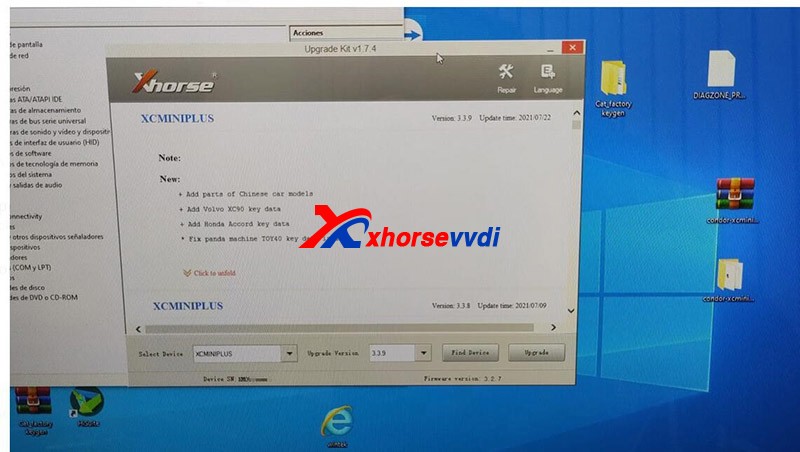
The other day we’ve talked about the update error ofCondor XC-Mini Plusthat it cannot boot or be identified by the Upgrade Kit, also including how to check the power board. If you meet the similar problem, go check:
http://blog.xhorsevvdi.com/fix-xhorse-mini-condor-update-error/
Recently we receive his feedback that he still cannot update the device after replacing the power board, and the problem is the device and the Upgrade Kit got stuck when updating.
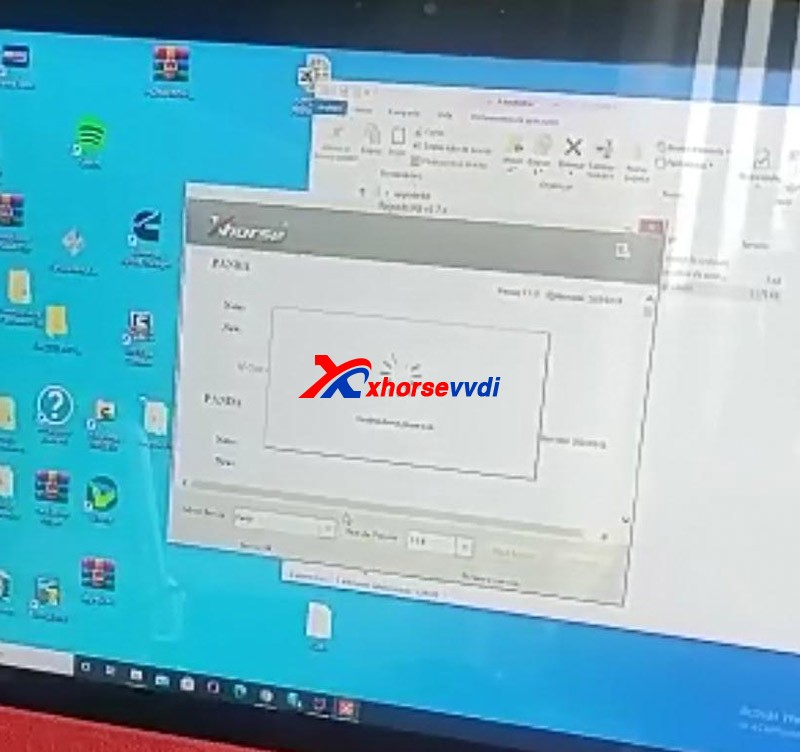

Xhorsevvditechnical support asks for his serial number (SN) andCONDOR MINI’s homepage picture for analysis and gave the
Solutions:
1.Close all anti-virus software and system firewall.
Enter "Windows Securityâ€interface.
Press "Virus & threat protectionâ€and "Manage settingsâ€.
Turn off all options.
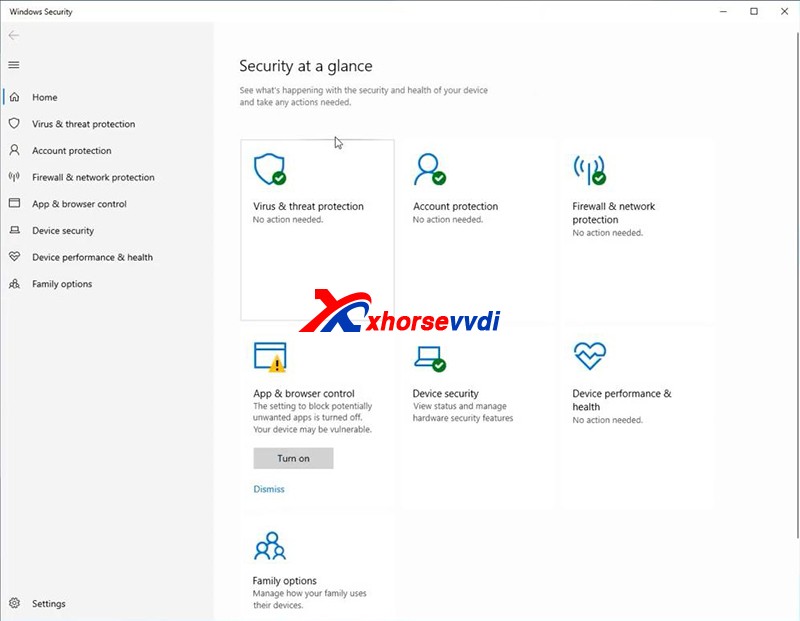
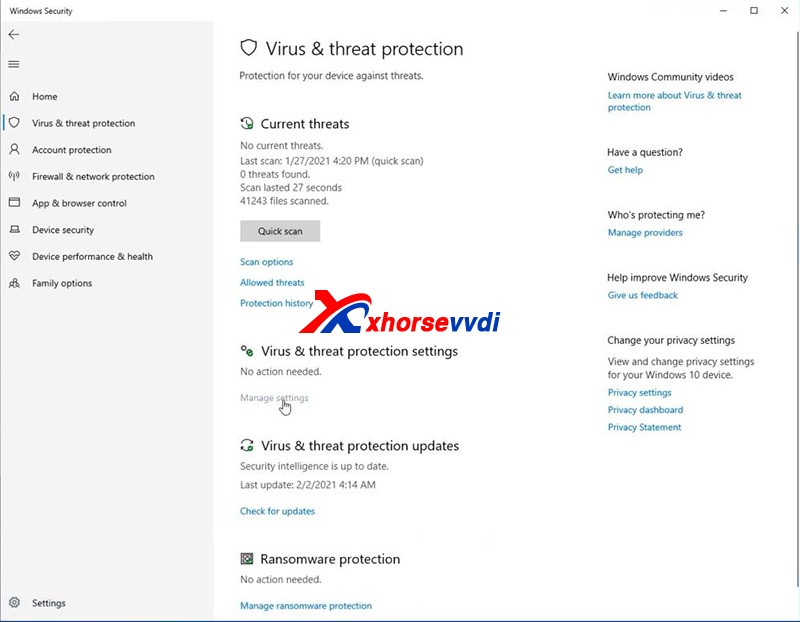
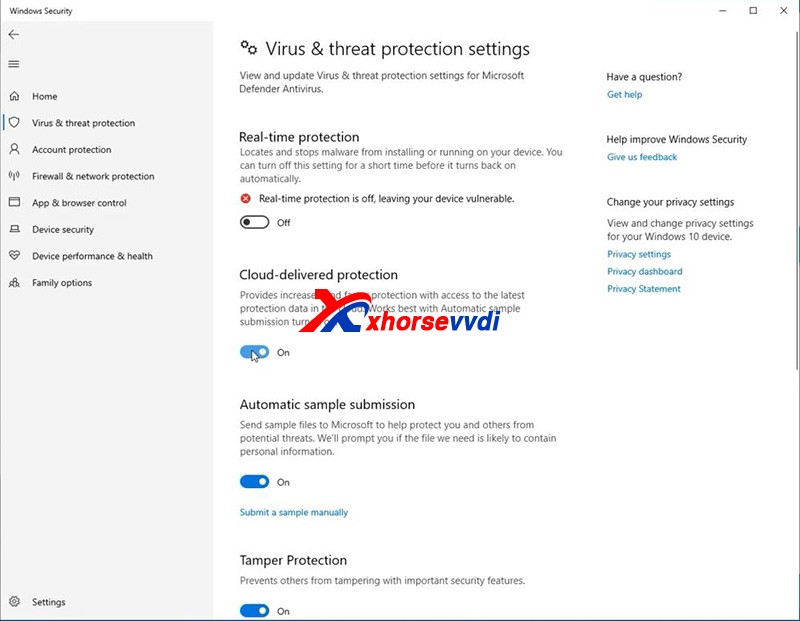
Note: Always remember that turn off all anti-virus programs when it comes to the update and installation of Xhorse software.
2.Re-install drivers and reboot the computer or try another computer.
Last we also receive the message that the customer’s device can be identified and update successfully.
http://blog.xhorsevvdi.com/fixed-xhorse-condor-mini-update-got-stuck/
Posted by: xhorsevvdi at
10:17 AM
| No Comments
| Add Comment
Post contains 165 words, total size 3 kb.
July 29, 2021
Question onXhorse VVDI Key tool maxorvvdi mini key tool:how to renew the bmw f series after market key, soldering points please.


How-to guide:
Xhorse VVDI Key tool max or vvdi mini key tool can’t renew the After Market Key, because it may be unstable, if it is anXhorse smart remote, it can burn the data without renewing.
Also, someone reports:
Desolder the pcf and insert in the adapter. Already done.
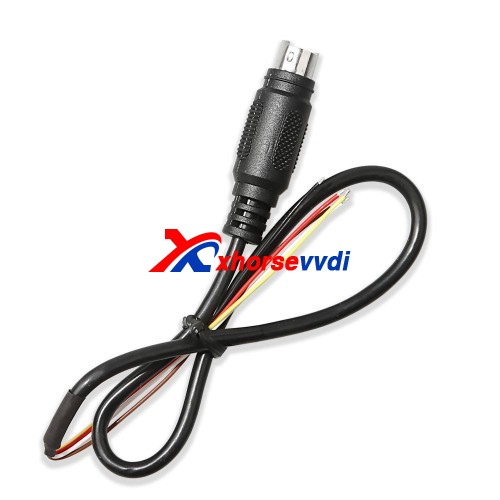
As for Huf-F Series 868MHz, it is not available yet, please use therenew cableto desolder instead.
http://blog.xhorsevvdi.com/renew-the-bmw-f-series-after-market-key-with-key-tool-max/
Posted by: xhorsevvdi at
03:45 AM
| No Comments
| Add Comment
Post contains 100 words, total size 3 kb.
32 queries taking 0.0895 seconds, 131 records returned.
Powered by Minx 1.1.6c-pink.

